
Successful email marketing is no longer about sending occasional or uncoordinated promotional emails and calling it a day. Stores that consistently generate revenue from email rely on a balance of email marketing automations (based on customer journeys) and promotional campaigns.
As customer acquisition becomes more expensive and first-party data becomes more valuable, email has evolved from a promotional channel into a lifecycle marketing one.
Once you create a welcome series, abandoned cart recovery, post-purchase journeys, and other automations based on strong segments, you will cover major customer touchpoints and keep shoppers engaged.
This Shopify email marketing guide walks through everything you need, such as choosing the right platform, picking essential automations, growing your subscriber list, segmenting customers, improving deliverability, measuring performance, and coordinating email with other marketing channels.
- Does email marketing still work for Shopify stores?
- Shopify Email vs. a dedicated platform: Which should you choose?
- Which are the essential email automations every Shopify store needs?
- How to build your Shopify email list
- Email marketing segmentation and personalization: Best practices
- Email deliverability basics
- Email Design Basics
- Shopify email marketing metrics
- Advanced tactics: AI, omnichannel marketing, and seasonal campaigns
- How Brevo helps with email marketing for Shopify stores
- Execute your Shopify email marketing strategy with Brevo
Does email marketing still work for Shopify stores?
Yes, email marketing continues to be an effective revenue channel for Shopify stores, particularly when it combines promotional campaigns with automated customer journeys. These two types of emails serve different purposes:
- Automated emails are triggered by customer behavior
- Promotional emails are independent of customer behavior and are decided through a content calendar
| PARAMETER | PROMOTIONAL EMAILS | AUTOMATION EMAILS |
|---|---|---|
| What triggers them? | Scheduled based on a marketing calendar | Triggered automatically by customer behavior or lifecycle events |
| Purpose | Announce promotions, product launches, seasonal sales, brand updates | Guide customers through the buying journey and encourage specific actions |
| Audience | A selected customer segment or your entire subscriber list | Individual customers who meet predefined conditions |
| Examples | New collection launch, holiday sale, newsletter, flash sale | Welcome series, abandoned cart recovery, post-purchase follow-up, win-back campaigns |
| Frequency | Decided manually | Runs continuously in the background whenever trigger conditions are met |
| Role in your email marketing strategy | Creates awareness and demand | Converts intent and nurtures long-term customer relationships |
This distinction matters because campaigns and automations solve different problems.
Shopify makes this approach particularly effective. Every order, product view, checkout event, customer tag, and purchase history can be synchronized with your email marketing platform (depending on the platform), making it much easier to build behavior-based automations.
As a result, email marketing on Shopify allows you to use first-party customer data to send timely, personalized messages rather than generic newsletters or promos. Campaigns remain essential for driving awareness, but automations keep revenue flowing between promotional campaigns by running in the background.
Not surprisingly, email automations bring in 30x more revenue per recipient (RPR) than promotional campaigns.
Shopify Email vs. a dedicated platform: Which should you choose?
Shopify Email covers the essentials well. If you are sending newsletters or announcing new products, its built-in features are enough to get started.
There is no additional integration to manage; the drag-and-drop editor is easy to use, and because it is built into Shopify, you can immediately use your store’s customer and order data to personalize emails.
For many new and growing stores, that is exactly the right level of functionality.
As your marketing matures, the limitations become more noticeable. You may want to:
- Create highly specific customer segments based on purchase history and other behavioral cues.
- Build automations with different branches depending on whether a customer opens an email, ignores the message, clicks a link in the message, or places an order.
- Coordinate email with SMS and web push notifications so customers receive your marketing content across channels.
These are the kinds of use cases where a dedicated marketing platform offers more flexibility.
Many Shopify integrations synchronize customer data, orders, products, and other store events in real time, so your automations and segments stay up-to-date as shoppers interact with your store.
Shopify remains the operational foundation for growing stores. A dedicated marketing platform builds on the foundation by making better use of the data you already have.
Which are the essential email automations every Shopify store needs?
You do not need dozens of automated workflows to see results from email marketing. Most Shopify stores can cover the entire customer lifecycle with a handful of well-designed automations.
Start with these core workflows, then expand your automation strategy as your customer segments and marketing channels become more sophisticated.
Welcome email
A welcome series is the first automated workflow new subscribers receive after joining your email list.
It is an opportunity to introduce your brand and set expectations. You can deliver any promised sign-up incentive and encourage a first purchase while interest is highest.
Example: Drunk Elephant, a skincare brand
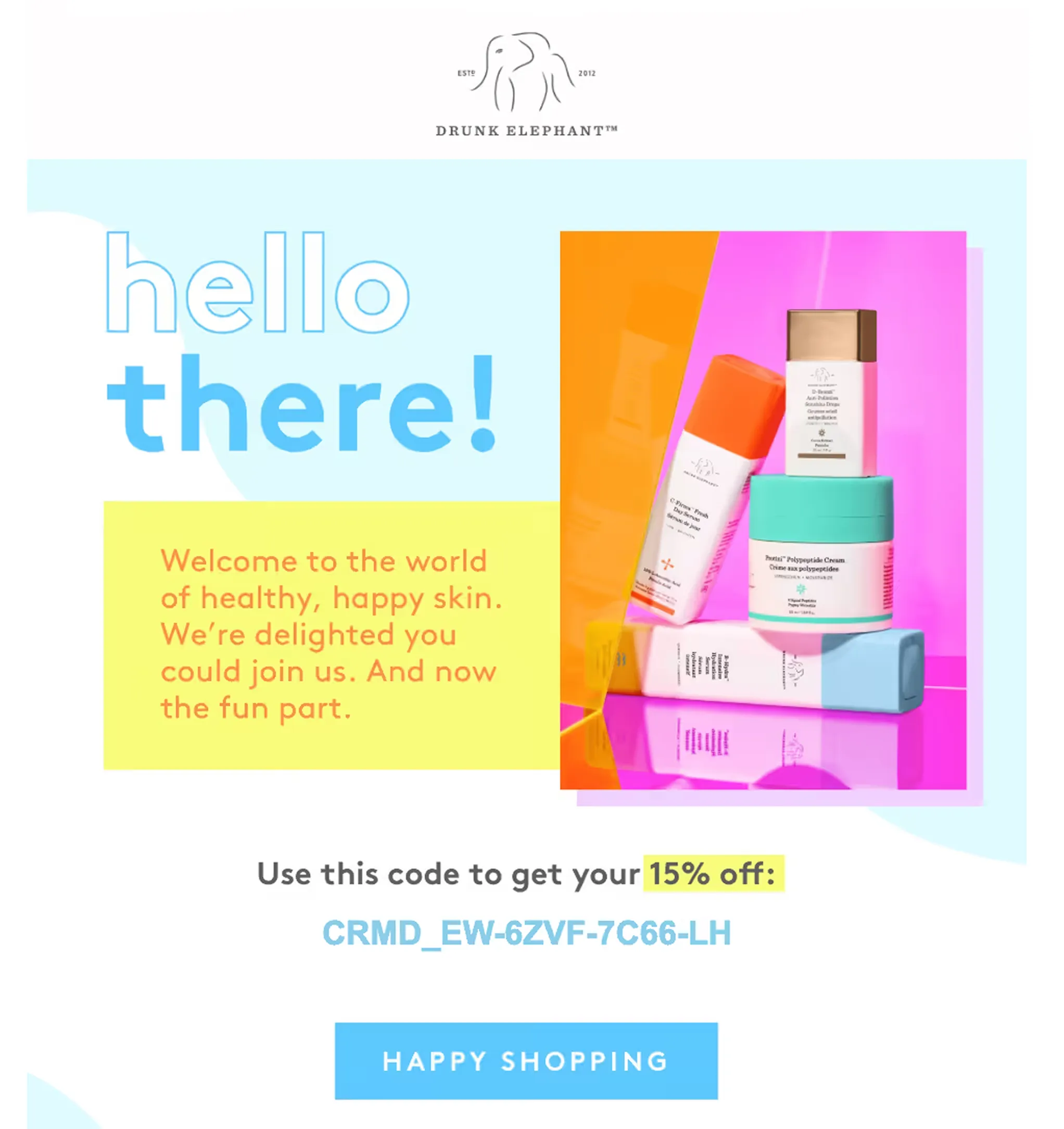
Why it works: The playful color palette and email copy set the tone for the customer relationship, and the discount code, though not always necessary, is a great starting incentive.
You can introduce your brand over more than one email. For example, the first email can dive into the vision and founder story, while the next email can highlight bestsellers.
Abandoned cart email
Cart abandonment emails remind shoppers to complete a purchase after they have added products to their cart but left before checking out.
Because these customers have already shown strong purchase intent, abandoned cart recovery is often one of the highest-performing automations.
Example: Brew Tea Co., a tea leaf brand
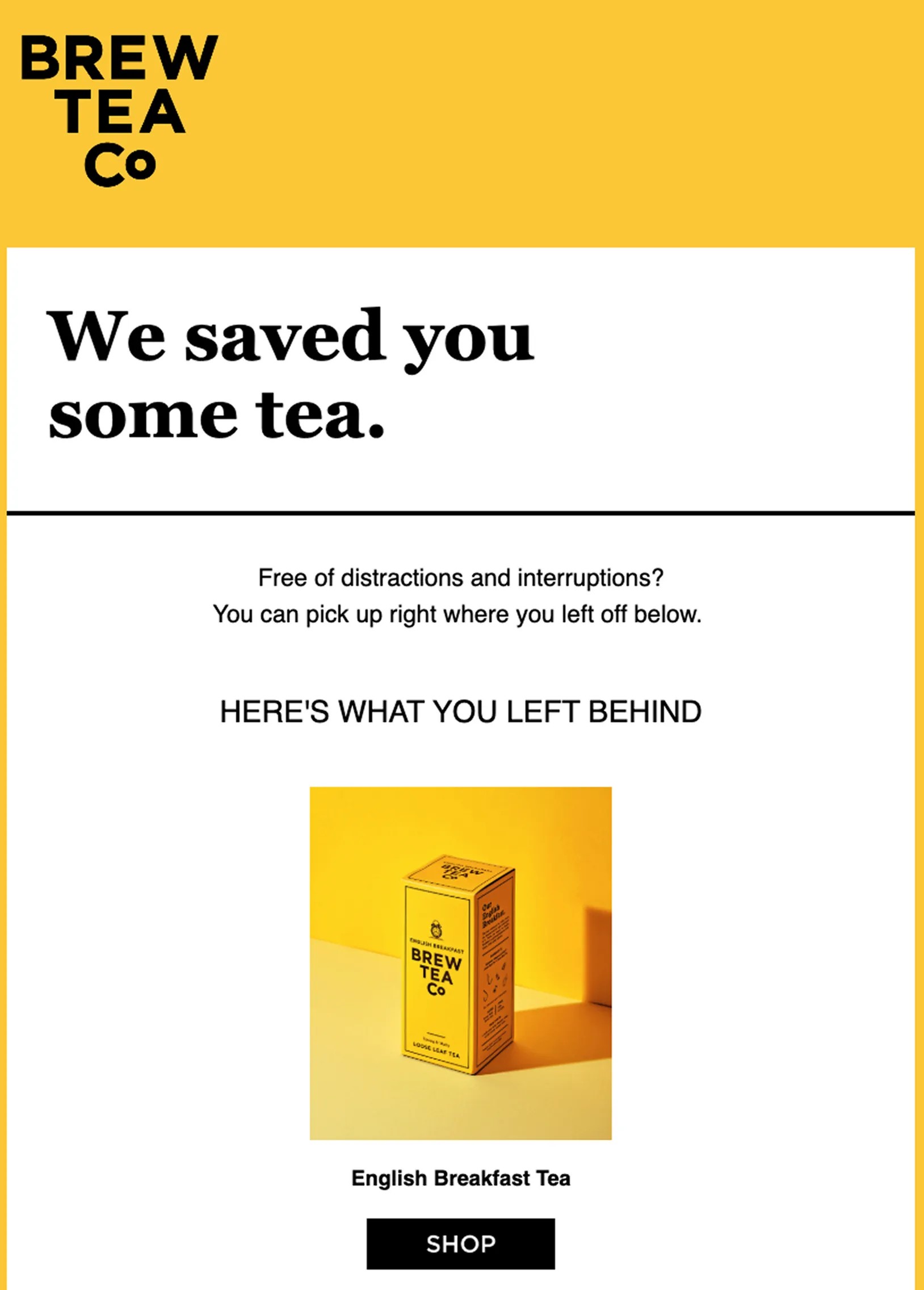
Why it works: It does not assume that the customer needs a discount code to finish the purchase (that can come later in the flow) and acknowledges that sometimes shoppers get distracted. The minimal copy, product name with a clear product image, and distinct CTA button make the email simple but persuasive.
Since you will be sending multiple emails as part of the flow, remember to suppress customers who complete their purchase so they do not receive unnecessary reminder emails.
Browse abandonment email
Browse abandonment emails help re-engage shoppers who viewed products or collections but left before adding any product to the cart.
Example: Claire’s, an accessories brand
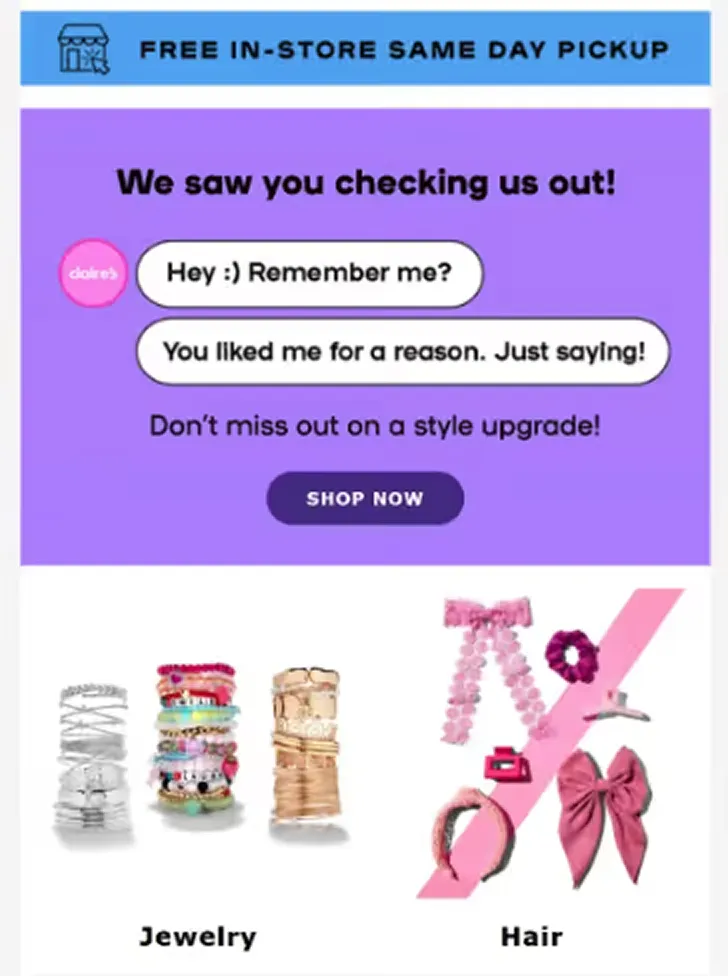
Why it works: The email highlights the product categories the shopper browsed. The brand colors are apparent, and the minimal email copy does not try to “sell” them.
Since this automation comes right before the ACR workflow will get triggered, remember to exclude customers who have already entered a cart recovery workflow.
H3: Post-purchase emails
The customer journey does not end after checkout, or even after delivery.
Post-purchase emails help customers get value from their purchase while creating opportunities for repeat business.
You can create these opportunities through product education in the form of checklists, advice, tutorials, or UGC content. You can also send care and maintenance advice.
After some time has passed, you can send a review request, and if the product requires restocking after some time of use (beauty products, food and beverages, etc.), you can send a reorder reminder.
“The goal is to make customers feel recognized, not sold to. The checkout and post-purchase experience are just as important as how your website behaves to get the customers to purchase in the first place.”
- Kriszta Grenyo, the COO at Suff Digital
A customer’s experience after the purchase will determine whether they buy from you again.
Win-back campaigns
Win-back campaigns re-engage customers who have not purchased within their typical buying cycle. The goal is to encourage another purchase before the customer becomes completely dormant.
Example: Plum Goodness, a skincare brand
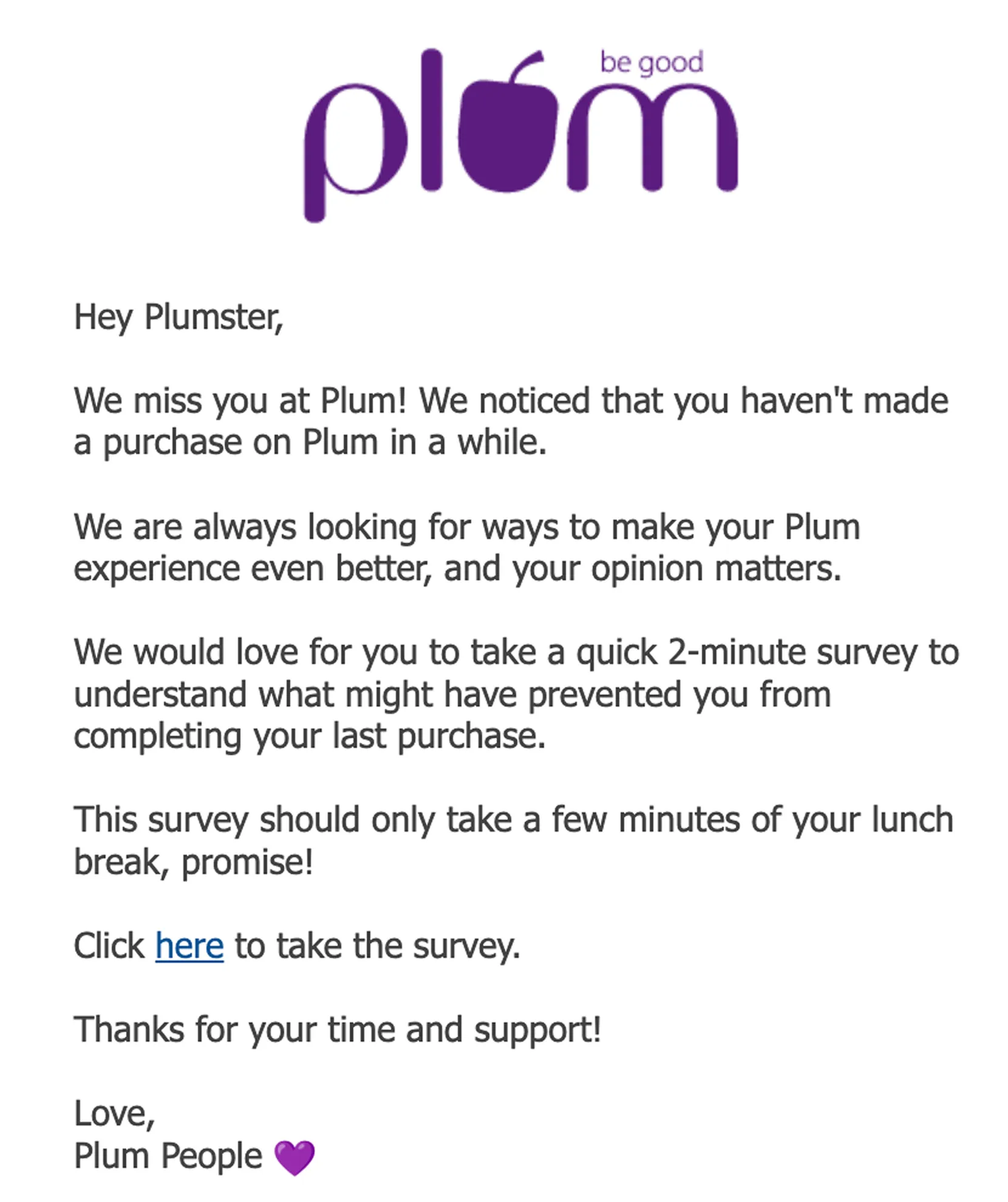
Why it works: Instead of trying to push the customer to make a purchase, it invites feedback through a survey. The “survey should only take a few minutes of your lunch break, promise!” is conversational, and the overall tone of the email is warm and friendly.
A customer’s purchase history is a vital predictor of how to target them in a win-back campaign. You can recommend related products based on what they have bought, and AOV will help you test incentives.
Define inactivity based on your product and industry (usually 60-90 days, but can be more for furniture brands, art decor stores, etc.).
After the win-back campaign, if no purchase has been made, you can remove the unengaged contact from your email list; it’s the best hack for maintaining list hygiene.
Back-in-stock alerts
Back-in-stock emails notify interested shoppers when an unavailable product becomes available again, helping recover sales through timely targeted reminders.
Example: Cocokind, a skincare brand
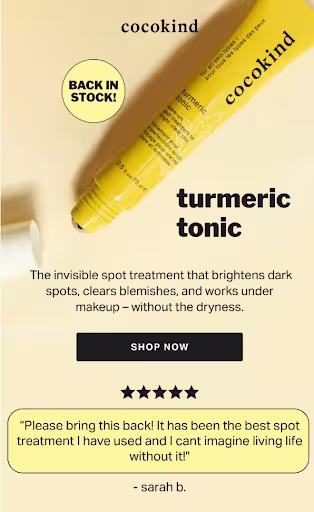

Why it works: High-quality product images, testimonials, ingredient lists, and product benefits communicate everything a subscriber needs to click the CTA button to learn more.
These emails are especially effective for high-demand or seasonal products. For fashion brands, back-in-stock alerts should be for the specific size or variant that the customer has requested.
Once these core automations are in place, consider expanding your Shopify email strategy with workflows such as customer anniversary or birthday emails and VIP milestone emails. These will further deepen your relationship with your customers.
How to build your Shopify email list
Would you rather have 10,000 inactive subscribers who never open your emails (or worse, mark them as spam) or 1,000 engaged customers who regularly open your emails and are genuinely interested in your products?
For Shopify stores, sustainable growth comes from attracting subscribers who are genuinely interested in your products and want to hear from you and engage with your content.
A healthy email list starts with how you collect subscribers. Some techniques are:
- Embedded signup forms: Include signup forms in places where shoppers naturally spend time, such as your homepage (the banner and footer are excellent non-intrusive places), blog footer, or social media pages. They are less disruptive than popups since they do not interrupt the browsing experience.
- Landing pages: Dedicated signup pages work well for seasonal campaigns, giveaways, product launches, or referral programs. Because these pages focus on a single offer, your request for a subscriber’s email address should be centered around the value of that offer.
- Popups: Include a compelling reason to subscribe, whether that's a first-order discount or a lead magnet.
In relation to popups, instead of showing one as soon as a visitor lands on your store’s website, trigger it based on behavior, such as time spent on a page, scroll depth, or exit intent.
Why?
It will interrupt the shopper before they have even started browsing your store’s website.
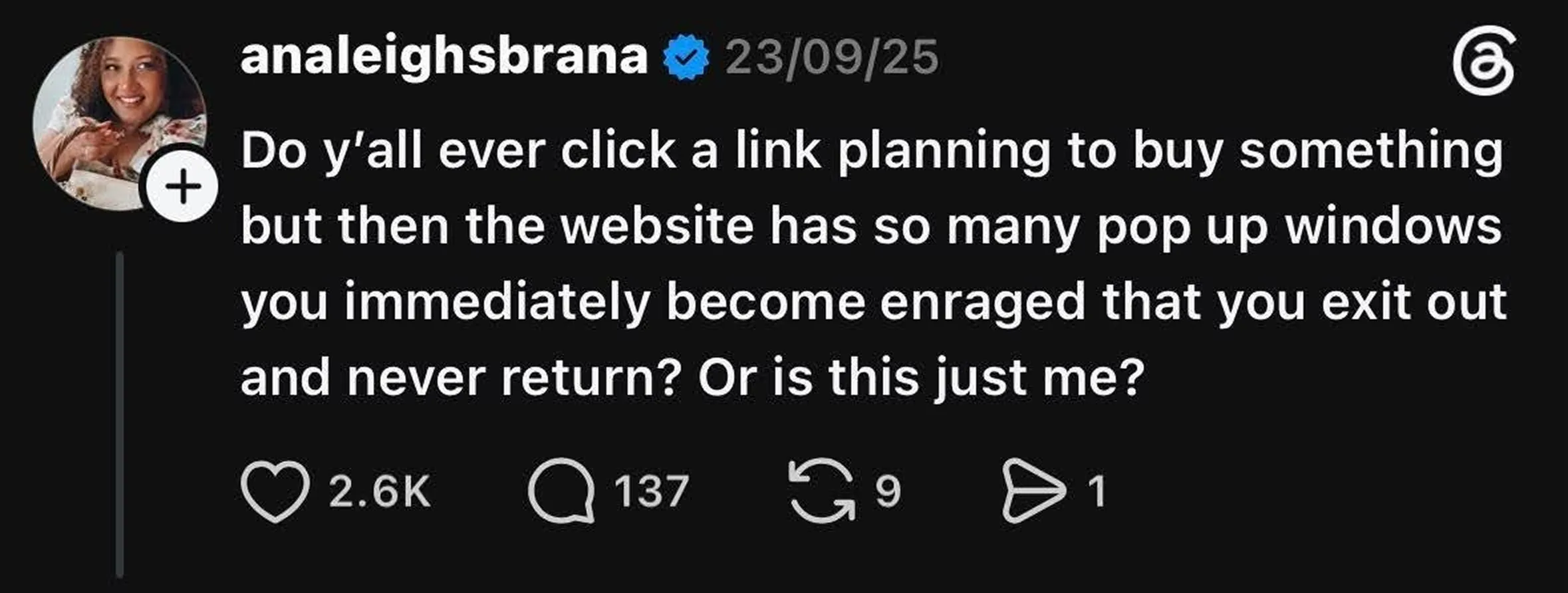
Your website popups should feel like an addition rather than an interruption.
As you grow your list, collect subscriber consent responsibly.
Be clear about what customers are signing up for so that if they choose to subscribe, it is informed consent. Provide a clear and easy mechanism to unsubscribe in all your marketing emails.
Using double opt-in to verify new subscribers will help maintain a high-quality email list.
Depending on the regions your customers reside in, regulations such as GDPR and CAN-SPAM apply, so make sure to stay updated on the relevant provisions (and penalties) around consent, data storage, and marketing communication.
Email marketing segmentation and personalization: Best practices
Cosmetic personalization such as adding the customer’s first name in the subject line no longer works. The emails that perform best reflect where a customer is in their buying journey and what they are most likely to do next, and not just their name.
Customer segmentation makes personalization possible.
No segmentation would mean sending every campaign to every subscriber, and since every subscriber is at a different stage, you cannot personalize.
When you group customers based on shared characteristics, you tailor your message with nuance. For Shopify stores, some valuable customer segments include:
- Purchase history: Differentiate first-time buyers, repeat customers, seasonal customers, and customers who have not ordered in a while.
- Average order value (AOV) or customer lifetime value (LTV): Reward high-value customers and long-term buyers with exclusive offers or early access through loyalty programs. For discount hunters and new subscribers, you can send weekly offers.
- Recency and purchase frequency: Adjust your messaging based on how recently and how often a customer has purchased.
- Product category affinity: Recommend complementary products or announce launches that match a customer’s previous purchases.
- Anonymous vs. identified visitors: Once a visitor identifies themselves by creating an account or subscribing, you can move beyond generic campaigns (which you would send to anonymous visitors) and tailor based on their browsing and purchase history.
These segments make your campaigns and automations more relevant because they reflect customer behavior rather than broad assumptions or static demographic factors like gender, age, or geographic parameters.
As Grenyo puts it, “A first-time purchaser should always be put into a different email sequence than a repeat customer, and the same goes for someone who abandons their cart, who receives a message relating to their items in the cart versus a generic promotional message.”
Once the customer segments are in place, they can dictate not just the email copy but also timing.
This is also where many Shopify stores outgrow a native email tool.
While built-in solutions are well suited to basic campaigns and straightforward automations, a dedicated marketing platform makes it easier to create granular segments, update them automatically as customer data changes, and use those segments consistently.
This flexibility becomes increasingly important for delivering more personalized customer experiences at scale.
Email deliverability basics
Customers cannot engage with an email they never receive. Even if your email copy is compelling and the email is well timed, they won’t act on it if it is difficult to read.
The first situation is related to email deliverability.
Before sending marketing emails, authenticate your sending domain using SPF, DKIM, and DMARC. These deliverability protocols verify that emails sent from your domain are legitimate, helping mailbox providers distinguish your messages from spam or spoofed emails.
Major mailbox providers, including Gmail, Yahoo, and Microsoft, expect configured SPF, DKIM, and DMARC for your sending domain. Gmail and Yahoo also recommend keeping spam complaint rates below 0.3%.
Email authentication is a baseline requirement. Without proper authentication, even well-designed campaigns may struggle to reach the inbox.
Email Design Basics
When designing emails, optimize for clarity before creativity.
Use responsive, mobile-friendly templates.
Keep email copy concise and use relevant images for visual breaks.
Give each email a clear primary call to action.
Consistent branding helps customers recognize your business. Overly complex layouts rarely improve performance because they increase loading times and may not be device-compatible.
For most Shopify stores, email marketing tools with drag-and-drop templates provide enough flexibility to create polished, on-brand emails without increasing maintenance. Reserve custom HTML for cases where you need functionality or slightly complex layouts that templates cannot support.
Shopify email marketing metrics
Your email reports contain dozens of metrics, but not all of them tell you whether your email campaigns are driving business results.
Focus on the email metrics most closely tied to revenue, and use benchmark data as a starting point rather than a target. Performance varies by industry and audience.
| METRICS | WHAT IT TELLS YOU | WHY IT MATTERS |
|---|---|---|
| Open rate | % of recipients who opened your email | Useful for monitoring trends, but should be interpreted alongside other metrics because Apple Mail Privacy Protection (AMPP rules) can inflate open rates |
| Click-through rate (CTR) | How many recipients clicked a link in your email? | Indicates whether your content, offer, and call to action are relevant and persuasive enough to drive traffic to the product page/linked page |
| Placed order rate | How many recipients completed a purchase after receiving an email? | Connects email engagement to actual sales instead of just clicks |
| Revenue per recipient (RPR) | Average revenue generated per email recipient | One of the clearest measures of email’s business impact because it ties campaign performance to revenue |
| Conversion rate | % of recipients who completed the desired action | Helps identify whether your landing pages, products, and offers are converting traffic into customers |
| Unsubscribe rate | % of recipients who opted out | Signals whether your content, frequency, targeting, or list-building tactic needs adjustment |
Metrics are most valuable when viewed together rather than in isolation.
A high open rate does not translate into sales, while a lower open rate paired with a strong click-through and revenue per recipient indicates a more engaged bucket of campaigns.
When you focus on customer engagement and business outcomes, you can contextualize your metrics and inbox activity.
Advanced tactics: AI, omnichannel marketing, and seasonal campaigns
Once your core email automations and other building blocks like email deliverability and customer segments are in place, the next step is to refine how you create campaigns and communicate with customers, especially during high-demand sales periods.
These advanced tactics can help you scale your efforts without losing relevance or consistency.
Use AI to improve efficiency
AI in email marketing can help speed up repetitive tasks, from drafting email copy and generating subject line ideas to summarizing campaign performance and creating content variations for A/B tests.
AI can also generate product recommendations, create personalized content blocks for different customer segments, and speed up localization for international Shopify stores.
While AI tools can significantly reduce production time, remember that they are a supporting tool, not a replacement for your Shopify email marketing strategy. Every audience responds differently, so use AI-generated content and AI-assisted workflows to keep up as your store grows (without making it the foundation).
Not all AI use cases will go down well with your customers. Here is an example of how Amazon’s usage of AI in delivery updates has drawn flak from customers:
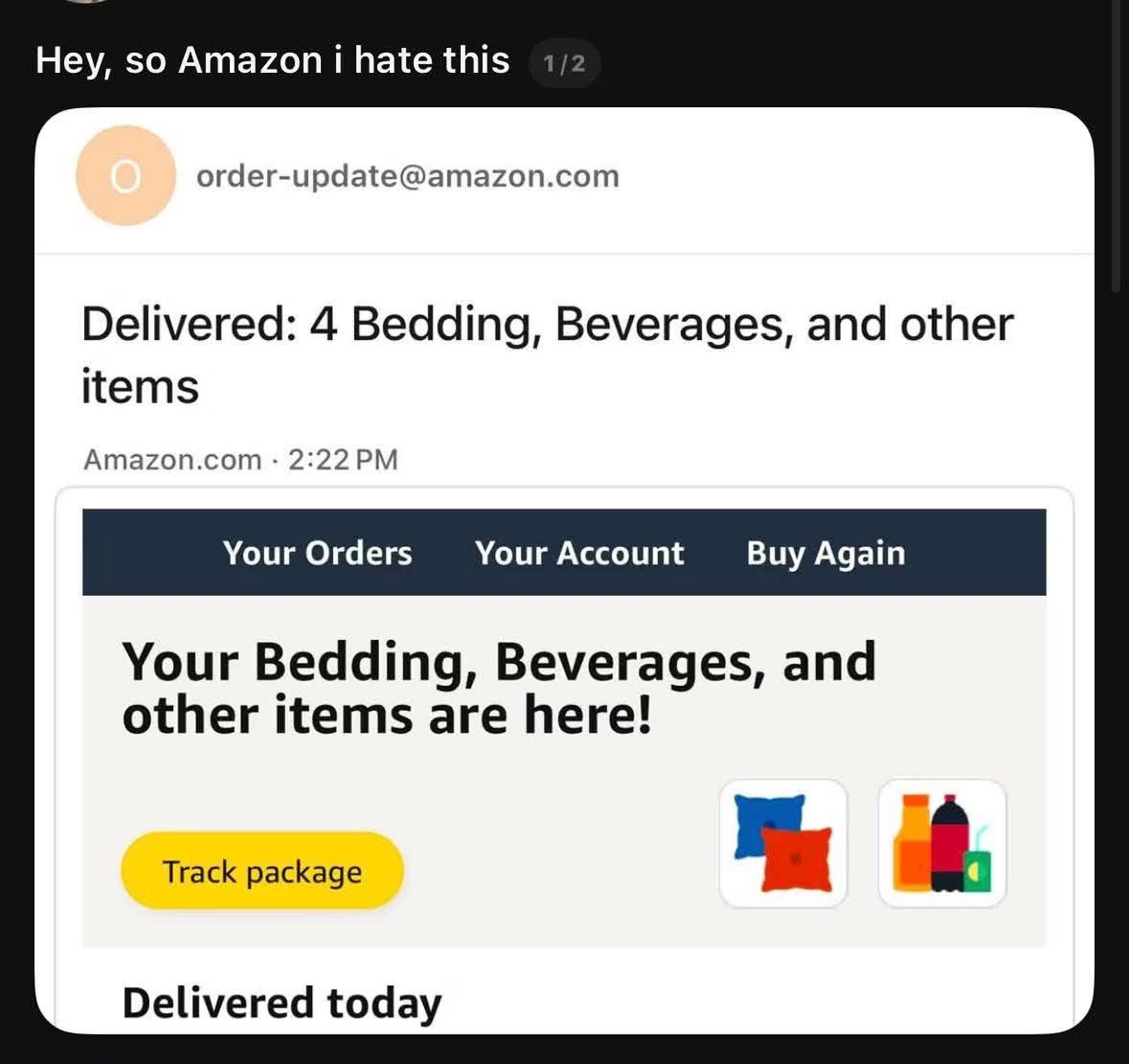
According to the post, the vagueness of the delivery update nudges the customer to revisit the app rather than presenting the information upfront.
AI should reduce friction rather than create it. Review AI-generated customer communications to ensure they are accurate and genuinely useful.
Coordinate customer journeys across channels
Customers do not think in channels; their brand recall is based on overall messaging. This presents two situations that you need to avoid:
- Replicating the message across each channel can backfire and be perceived as spam
- Sending completely disconnected messages across channels can lead to confusion and conflicting offers
How do you balance the two?
Assign each channel a clear role within the customer journey so that every touchpoint complements the others.
For example, an abandoned cart recovery workflow might begin with an email that reminds the customer about the products they left behind and answers common purchase questions. If they still have not converted, an SMS or WhatsApp message can provide a shorter, time-sensitive reminder.
Each touchpoint builds on the previous one instead of repeating it. The same principle applies to promotional campaigns.
A product launch email that introduces a new collection in detail can be supplemented with a WhatsApp message highlighting early access.
An SMS can serve as a final reminder before the offer ends.
The messaging remains consistent, but each channel contributes something different. Every interaction across different channels moves the customer closer to a purchase rather than adding to the noise.
Build seasonal/holiday content calendars
Major shopping events such as Black Friday + Cyber Monday, Christmas, Thanksgiving, and other holidays require seasonal planning and campaign scheduling beyond your usual promotions.
Creating a seasonal marketing calendar helps your team stay ahead of peak demand instead of building campaigns at the last minute, and it can run in parallel with your always-on automations.
Related reading: Download: Holiday Marketing Calendar 2026
Since these campaigns will have a different tone adapted to the specific holiday, they will shift your marketing creatives, timing, and offer structure. Holiday email marketing strategies help shake things up again when your promos feel stagnant.
How Brevo helps with email marketing for Shopify stores
Now you know that successful Shopify email marketing depends on a few key building blocks:
- Reliable customer data
- Meaningful email segmentation
- Lifecycle automations
- Promotional campaigns
- Omnichannel marketing
A dedicated marketing platform brings those capabilities together in one place.
Brevo connects directly with Shopify to synchronize customer profiles, orders, products, and collections in real time.
You do not need to import customer lists manually. You can group shoppers by purchase history, customer tags, or customer lifetime value (CLV). The customer segments update automatically as customer behavior changes.
Brevo has pre-built automation templates for common Shopify use cases, including welcome series, abandoned cart recovery, browse abandonment, and back-in-stock notifications.
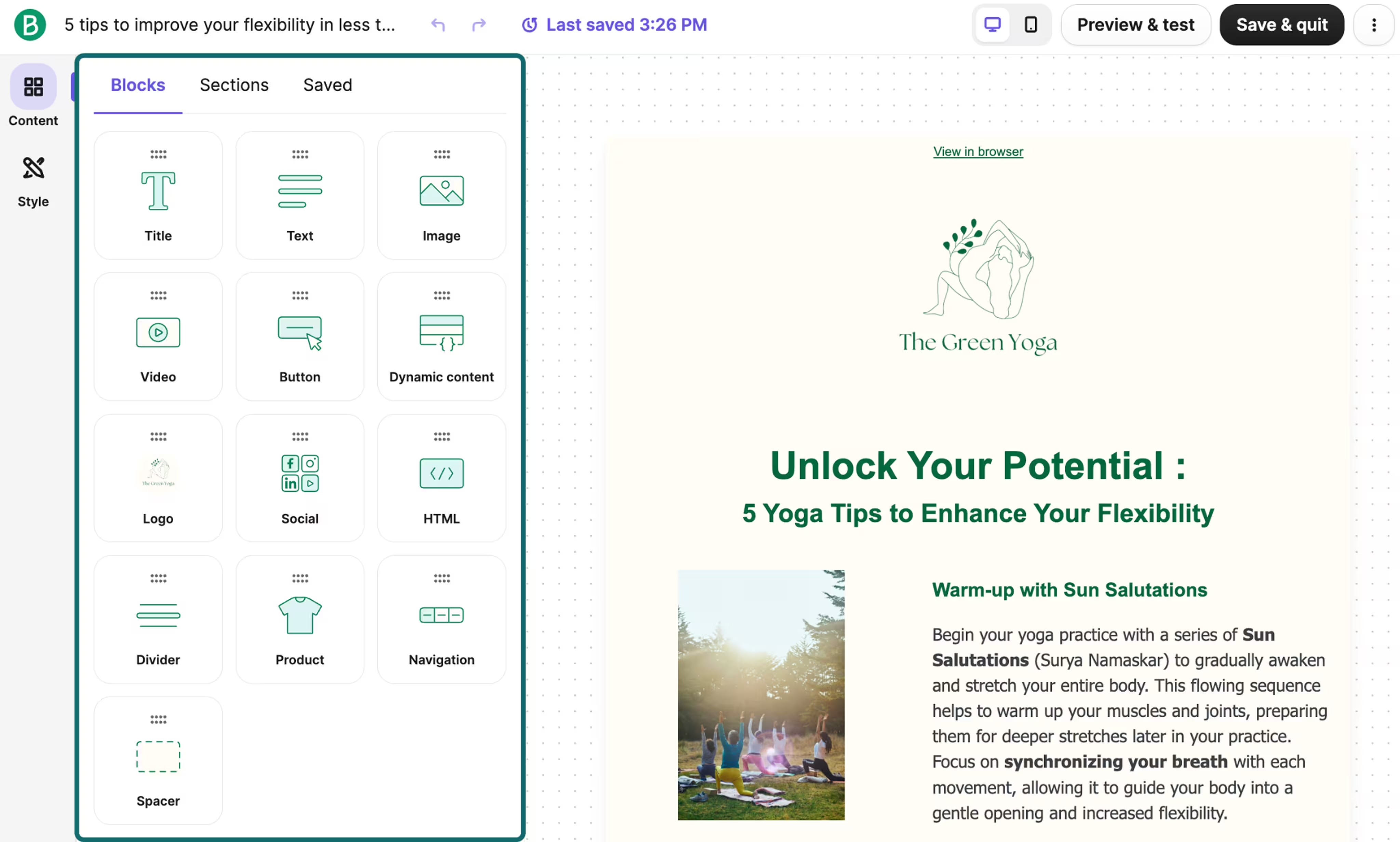
Brevo’s templates provide a starting point that you can customize to match your products, brand aesthetic, and marketing goals without building campaigns from scratch.
Brevo also supports omnichannel marketing from a single platform. Instead of managing email, SMS, WhatsApp, and push notifications separately, you can coordinate them within the same platform.
As your subscriber list grows, pricing is based on the emails you send rather than the number of contacts you store so that you do not have to continue paying simply to keep engaged subscribers in your database.
Execute your Shopify email marketing strategy with Brevo
Whether you are just getting started with a welcome series or building more advanced, cross-channel customer journeys, the right tools can help you spend less time managing campaigns and more time growing your business.
With Brevo, you can grow your subscriber list and coordinate email, SMS, WhatsApp, and push notifications from one platform.
Start scaling your email marketing strategy with Brevo.


