
Sending a single email manually is easy. Sending thousands of personalized order confirmations or email marketing campaigns from your app? That's where an email API comes in.
An email API connects your application to an email API provider, allowing you to send, receive, and track emails—no manual work required.
Whether you're a developer or a marketer, understanding email APIs is essential for reliable communication. In this guide, we'll break down what an email API is, how it works, and how your business can benefit from one.
At a glance
What is an email API?
An email API is a set of rules that connects your application to an an email service provider, allowing you to access all the features of a professional email platform directly from your own software’s code.
Why do you need an email API?
It automates your communication, scales as you grow, and provides reliable deliverability and real-time tracking that manual sending cannot match.
How to get started with an email API:
Choose an email API provider, verify your domain, generate a secure API key, and make your first API call using a standard HTTP request or an SDK.
Table of Contents
What is an email API?
An email API (short for Application Programming Interface) is a set of rules and protocols that enable your application or website to "talk" to an email service provider (ESP). It allows you to access all the features of a professional email platform—like high email deliverability, templates, and tracking—directly from your own software’s code.
Think of it as a digital bridge. On one side, you have your app (like an ecommerce store or a booking platform). On the other side, you have a powerful email engine (like Brevo, SendGrid, or Mailgun). Instead of logging into a dashboard and clicking "Send," your app sends a coded request across that bridge, telling the email engine exactly what to send, who to send it to, and when.
What is an API in email marketing?
While developers often use APIs for technical tasks (like password resets), marketers use them to create seamless, data-driven customer experiences.
In email marketing, an API acts as a bridge between your marketing tools. It allows you to:
- Sync contact lists: Automatically add a new lead from your CRM or a webinar signup page directly into your email marketing list.
- Personalize at scale: Pull real-time data—like a customer’s last purchased item or their loyalty points balance—into a marketing newsletter without manual exports.
- Trigger smart campaigns: Send a specific promotional offer the moment a user performs a certain action in your app, such as viewing a pricing page three times in one week.
Example: Instead of a generic blast, a travel brand uses an API to pull a user's saved destinations from their app and automatically inject those images into a weekly "Deals for You" email.
Find out more about email marketing APIs here.
How does an email API work?
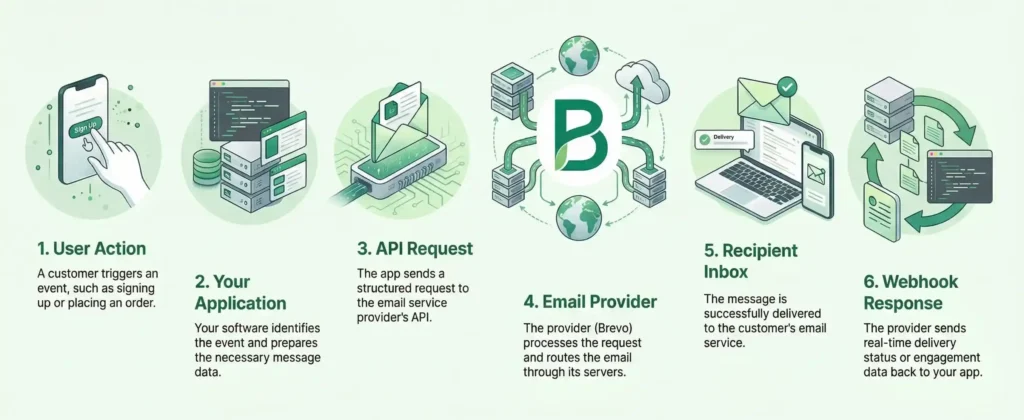
To understand how an email API functions, it helps to look at the request and response cycle. It’s much like ordering a coffee through a mobile app: you place the order (request), the shop makes the drink (processing), and you get a notification when it’s ready (response).
Here’s how an email API call works in detail:
- Trigger: An event occurs in your application. This could be a user clicking "Sign Up" or a scheduled marketing blast.
- Request (the JSON payload): Your application packages the email data into a structured format—usually JSON (JavaScript Object Notation). This package includes the recipient's address, the subject line, the sender identity, and any dynamic data (like the user’s name).
- Authentication: To ensure the request is legitimate, your app includes a secret API key or token. This acts like a digital passport, telling the email service provider that your app has permission to send on your behalf.
- API call: Your app sends this API request over the internet via an HTTP method (usually a POST request) to a specific URL called an API endpoint.
- Processing & Delivery: The email service provider receives the request, validates the data, and puts the email into its sending queue. It then uses its optimized infrastructure to route the email through the internet to the recipient's inbox.
- Response: The email service provider sends a message back to your application (a response code).
- A 2xx OK code (like 201 Created) means "Message received and queued."
- A 400 or 500 code means something went wrong (like a missing email address or a server error), allowing your app to retry or log the issue.
Pro tip: Use Webhooks alongside your API. While the API sends the data, Webhooks "push" data back to you in real-time when a user opens the email or clicks a link, so your app can react instantly.
The architecture of an email API
Most modern email APIs (including Brevo’s) use a RESTful architecture. In plain English, this means they follow the standard rules of the web that almost every developer already knows.
When your application communicates with an email API provider, it uses specific HTTP methods to tell the provider exactly what it wants to do:
- POST: This is the most common method. It’s used to "post" (send) a new email or create a new contact in your database.
- GET: This is used to "get" (retrieve) information. For example, your app might use a GET request to ask the API for the current open rate of a specific campaign.
- PUT/PATCH: These are used to "update" existing data, like changing a subscriber’s email address or updating a template's content.
- DELETE: As the name suggests, this is used to remove data, such as removing a contact from a database or deleting an old automated workflow.
Because email APIs use standard HTTP, they work with any programming language.
Why you should use an email API
If you’re building an application that needs to send more than a few dozen emails a day, an email API is a business necessity. Moving away from manual sending or basic SMTP to a dedicated API provider offers the following 8 benefits.
1. Automation & efficiency
The most immediate benefit is removing the human element from repetitive tasks. With an email API, your application becomes self-sufficient. Whether it’s a password reset at 3:00 AM or a complex multi-step onboarding series, the API triggers these messages instantly based on user behavior. This frees up your team to focus on strategy rather than execution.
Learn more about one of the most popular forms of automation—marketing automation—in our dedicated blog article.
2. Scalability
As your business grows, your email infrastructure needs to keep up. Building your own mail server is notoriously difficult to scale; it requires constant maintenance and hardware upgrades. An email API service handles the infrastructure for you, allowing you to scale your volume up or down instantly without hitting performance bottlenecks.
3. Advanced features & customization
Unlike standard email, APIs allow for deep personalization using dynamic data. You can use Handlebars or similar templating languages supported by your API to inject conditional logic. For example: “If user is a Premium subscriber, show the VIP discount code; otherwise, show the standard offer.” This level of one-to-one communication is only possible through programmatic sending.
4. Better deliverability
Sending emails is easy; getting them into the inbox is the hard part. Email API providers invest heavily in maintaining their sender reputation, warming up IP addresses, and building relationships with email clients like Gmail and Outlook. By using an API, you benefit from this enterprise-grade infrastructure, significantly reducing the risk of your business-critical emails landing in the spam folder.
5. Real-time analytics & tracking
How do you know if your users actually received their order confirmation? An email API provides granular data and key metrics for every message. Through Webhooks, the API provider can push data back to your app the moment an email is:
- Delivered
- Opened
- Clicked
- Bounced (and why)
- Marked as spam

6. Enhanced security
Standard email protocols can be vulnerable. Email APIs offer more secure authentication methods, such as scoped API Keys. This means you can create a key that only has permission to send transactional emails, but cannot delete your contact lists or change your billing settings. If a key is ever compromised, you can revoke it instantly without affecting your entire system.
7. Easy integration (SDKs)
You don't need to be an expert in email protocols to use an API. Most providers offer SDKs (Software Development Kits) for popular programming languages like Python, Node.js, PHP, and Ruby. These code libraries allow your developers to integrate email functionality in minutes using the tools they already know.
Find Brevo's SDKs and libraries here.
8. Cost-effective
Maintaining your own email servers involves hidden costs: hardware, electricity, and—most importantly—the engineering hours required to keep them running. Email API providers typically offer a pay-as-you-go model, meaning you only pay for what you send. Some, like Brevo, even offer generous free tiers.
Quick tip
Want to know how companies use Brevo to build strong customer relationships? We’ve put together a wide range of case studies for you that show how it’s done. In one of them, Figaro Classifieds reveals how they secure their critical transactional emails with Brevo's email API – and key takeaways to replicate when volumes skyrocket.
4 types of email APIs you should know about
Not all email APIs serve the same purpose. Depending on your business model, you may need one or all of the following types to create a complete communication loop.
1. Transactional email APIs
A transactional email is triggered by a specific action a user takes within your app.
- Use cases: Password resets, order confirmations, two-factor authentication (2FA) codes, and shipping updates.
- Key characteristic: These emails consistently outperform marketing emails in open and click rates, because recipients expect and actively look for them.
Read more: The best transactional email services.
2. Email marketing APIs
While transactional APIs handle one-to-one messages, marketing APIs are built for one-to-many communication. They allow you to manage your audience and send bulk campaigns programmatically.
- Use cases: Newsletters, promotional announcements, and segment-based product updates.
- Key characteristic: These focus heavily on list management, unsubscribes (compliance), and visual template builders.
3. Email verification APIs
Before you even send an email, you need to know if the address is real. A verification API checks an email address in real-time to see if it’s valid, active, or a disposable address.
- Use cases: Verifying a user's email during the signup process to prevent fake accounts.
- Key characteristic: Using this API keeps your bounce rate low and protects your sender reputation.
4. Inbound (receiving) APIs
Most people think of APIs for sending, but they can also receive. An inbound API (or Parse API) takes an incoming email sent to your domain and parses it into clean data (JSON) that your app can understand.
- Use cases: Allowing a user to reply to a support ticket via email, or letting a user post a comment on a forum by simply hitting "Reply" in their inbox.
- Key characteristic: They enable two-way communication by automatically pushing incoming email content to your server as soon as it arrives.
Email API vs. SMTP: Which should you use?
If you’ve researched how to send automated emails, you’ve likely come across SMTP (Simple Mail Transfer Protocol). SMTP is the universal language of email that has been around since the 1980s.
So, if SMTP is the standard, why do modern developers bother with an API? The best way to think about it is this: SMTP is like a standard postal service. It’s reliable and everyone uses it, but it requires you to do all the sorting, labeling, and tracking yourself. An Email API is like an end-to-end logistics partner. It uses the same "roads" as SMTP, but it automates the entire process and gives you real-time data on every delivery.
At a glance: Email API vs. SMTP
When to use SMTP
SMTP is still useful if you are using legacy systems or off-the-shelf software like a CRM, a printer, or a basic WordPress plugin that doesn't support custom code. It’s perfect for low-volume sending where you just need a plug-and-play solution.
Want to know what's the best free SMTP server? Check out our dedicated comparative!
When to use an email API
If you are building a modern web or mobile application, an email API is almost always the better choice. It is built for speed, scales easily as your user base grows, and provides the rich data you need to troubleshoot delivery issues or optimize your email performance.
In short: Use SMTP for simple, pre-built integrations. Use an Email API for custom applications that require speed, security, and deep data insights.
Email API use cases
To see the real-world value of an email API, let’s look at how different departments use it to solve specific business problems.
Ecommerce
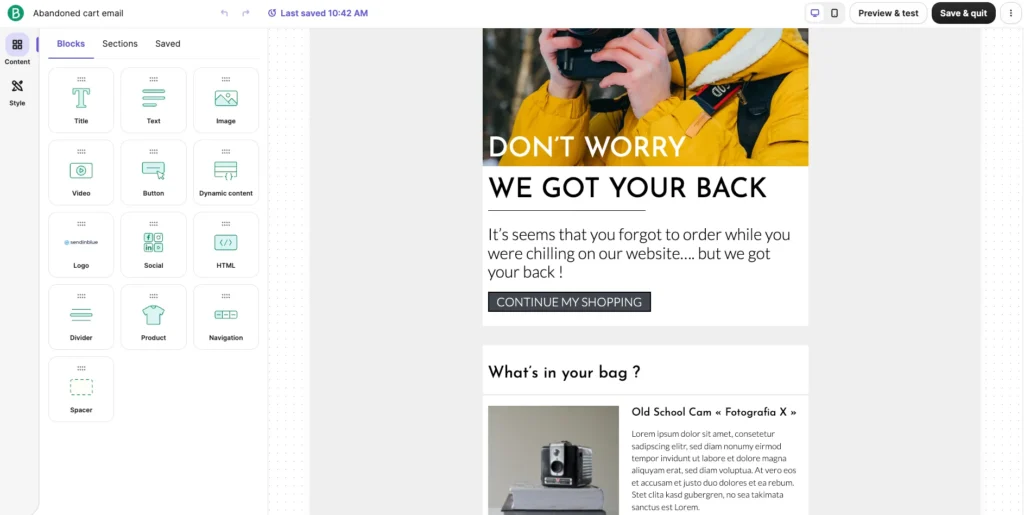
- Abandoned cart alerts: If a user leaves items in their cart for more than two hours, the API triggers a personalized "Don't forget these!" email with the exact products and a dynamic discount code.
- Order tracking: As soon as a warehouse scans a package, the API sends a shipping confirmation with a live tracking link.
SaaS applications
- 2FA & password resets: Security is time-sensitive. An API ensures that a two-factor authentication code reaches the user’s inbox in seconds.
- Usage reports: At the end of every month, the API pulls data from the app to send a customized "Your Month in Review" infographic to every user.
Marketing & campaigns
- Segmented newsletters: Instead of sending the same email to everyone, a marketing API allows you to send different versions of a newsletter based on a user's past behavior or interests.
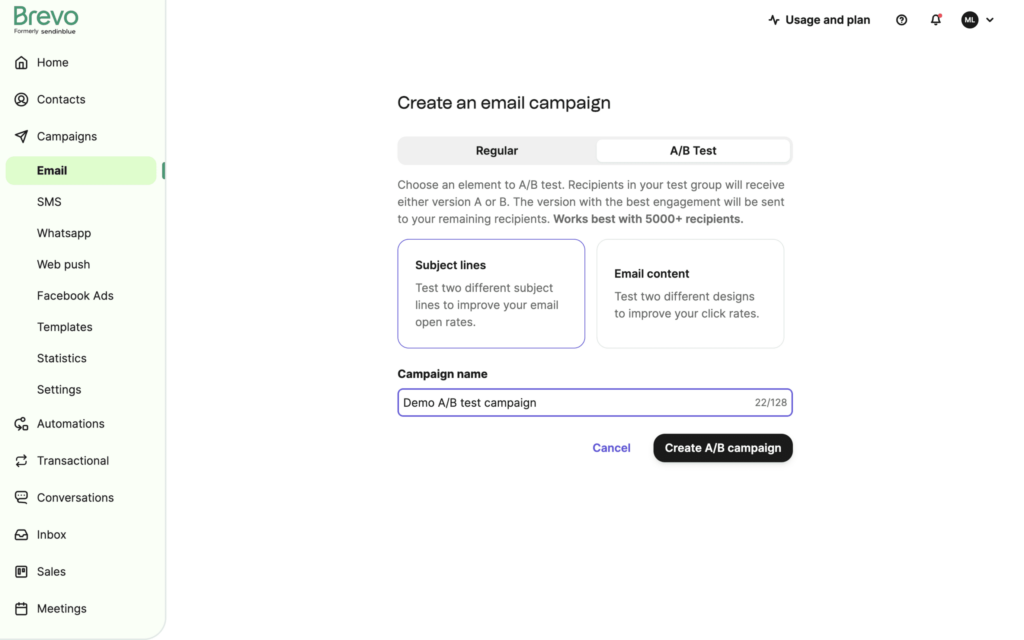
- A/B testing: You can programmatically send version A to 10% of your list and version B to another 10%, then automatically send the best-performing version to the remaining 80%.
Customer support
- Ticket updates: When a support agent replies to a ticket in your helpdesk, the API sends an instant update to the customer.
- NPS surveys: Two days after a ticket is marked as resolved, the API triggers a short satisfaction survey to gather feedback.
Internal business tools
- Automated KPI alerts: If your website traffic drops below a certain threshold or a server goes down, the API can instantly alert your engineering team.
- HR onboarding: When a new hire is added to your HR system, the API can trigger a series of welcome emails over their first week to help them get settled.
How to get started with an email API in 5 easy steps
If you are ready to move from manual sending to a fully automated system, the transition is straightforward. Most modern platforms are designed to get you up and running in less than an afternoon.
Step 1: Choose an email API provider
Your first step is selecting a platform that fits your volume and technical needs. While there are many options on the market, look for a provider that offers high deliverability, clear documentation, and a transparent pricing model.
Tip: You can compare the best email API providers in our dedicated comparative.
Choosing an email API provider: Key features to look out for
To ensure your application scales reliably, prioritize these essentials:
- High deliverability: Proven reputation with Gmail and Outlook to avoid the spam folder.
- Developer-friendly docs: Clear API documentation and SDKs for your preferred languages.
- Real-time tracking: Webhooks that push delivery and engagement data to your app.
- Robust security: Scoped API keys and compliance with GDPR/CCPA.
- Template management: A drag-and-drop editor so marketers can update designs without code.
- Transparent pricing: A model that scales with your volume, starting with a free tier.

Excellent first experience with their support — Free account review
"I've been using Brevo since its Sendinblue days, mainly for email marketing and SMTP relay with our office printer [...] The transition to Brevo brought noticeable improvements. What stands out is their customer support - even as a free account user, I received personalized, non-canned responses to my queries. This prompt and considerate support, especially for minor issues like the SMTP key length for our printer, is commendable."
Pat B.,
Sales and Marketing Director

SMTP & Transactional email provider
"We've been using Brevo (Sendinblue) as an SMTP for our transactional Woo emails since 2021 and intend to continue even longer. And here's why. Recently, our account was postponed and all our transactional emails stopped being sent. We couldn't understand the reason behind it and appealed for support. Hats off to the Brevo team, we've received it quickly. The support team found a spam bot activity and helped us resolve this issue by advising us on our steps. Again, we never experienced any issues with the service itself. But it's great to know that Brevo's quick assistance is there if something goes wrong."
Tatiana Lebedeva,
Brevo user
Several sales and marketing tools in one system
"We stumbled upon Brevo by accident as we were using a system just for sending marketing emails. We discovered quickly that Brevo offered multiple different digital sales and marketing tools to enhance both our manual branded client engagement tasks, but also offered automation tools to aid our day to day sales efforts. Brevo has allowed us to move away from three other, separate systems and we now use Brevo for all our outbound sales and marketing endeavours. This has saved us a lot of time and money and has increased our output. The system is easy to use and the support is excellent and prompt."
Stephen Day,
Brevo user
Step 2: Sign up and verify your domain
Once you have created an account, you must prove to the provider that you actually own the domain you want to send from. This is a critical security step that prevents others from impersonating your brand. You will need to configure SPF and DKIM records on your domain. Setting up DMARC is also strongly recommended, as it adds an extra layer of protection against spoofing.
Step 3: Generate your API keys
After your domain is verified, you can create your API keys in your provider’s dashboard. These keys are unique strings of code that act as a password for your application.
Best practice: Never hard-code your API keys directly into your software where they might be exposed. Instead, store them as environment variables to keep your account secure.
Step 4: Make your first API call
Now it is time for the code. Most providers offer SDKs in multiple languages, but you can also use a simple cURL command to test your connection.
Get your API key and follow our Getting Started guide to send your first email with Brevo today.
Step 5: Test and monitor
Before you go live to your entire customer base, use a sandbox or test mode to ensure everything is formatted correctly. Once you start sending real traffic, keep a close eye on your dashboard for bounce rates and delivery errors. This allows you to catch and fix any issues before they impact your sender reputation.
Email API best practices
Follow these industry standards to get the most out of your integration and ensure your emails always reach the inbox:
- Implement error handling: Not every API call will be successful. Build your application to recognize error codes and automatically retry failed requests after a short delay. (Only retry on 5xx server errors or timeouts. A 4xx error indicates a problem with your request itself and will not resolve on retry.)
- Monitor your rate limits: Providers often limit how many emails you can send per second or per month. Make sure your app stays within these bounds to avoid service interruptions.
- Keep your email templates separate: Instead of cluttering your code with HTML, store your email designs in your API provider’s template builder. Your code simply calls the Template ID and injects the dynamic data.
- Use webhooks for feedback: Don't just send and forget. Set up webhooks to feed data back into your CRM when a user unsubscribes or an email bounces.
Start sending with an email marketing API
If your business needs to send more than a few dozen emails a day, manual processes and basic servers will eventually hit a wall. An email API provides the reliable infrastructure, speed, and real-time tracking that modern applications require to stay connected with their users.
Key takeaways:
- Own your customer data, not the server: Use an API to push delivery, open, and click data directly back into your own database or CRM. This way, you won’t need to build or maintain expensive mail servers.
- Scale without friction: Whether you are sending one password reset or one million newsletters, an API handles the volume instantly without you needing to upgrade hardware.
- Choose a provider that grows with you: Look for an email service provider that balances developer-friendly documentation and SDKs with the scale to handle millions of messages without performance lag.
Ready to get started? Brevo provides you with a reliable API and a full marketing suite—all in one place. Try Brevo for free today—no credit card required.