
Magento, now known as Adobe Commerce, is an e-commerce platform designed for businesses that need greater flexibility and customization due to store size. It is commonly used by mid-market and enterprise merchants managing large product catalogs and multiple storefronts.
In this guide, you will learn how Magento email automation works, which workflows every store should build, how to choose the right platform, and the common mistakes to avoid.
- What Is Magento Email Automation?
- Why Automate Emails on Magento?
- 7 Essential Magento Workflows Adobe Commerce Stores Can Start With
- How To Set Up Email Automation in Magento
- How To Choose a Magento Email Automation Platform
- Common Magento Email Automation Mistakes (and How To Avoid Them)
- Ready to Give Magento a Try?
What Is Magento Email Automation?
Magento (or Adobe Commerce) email automation is the process of sending personalized emails based on customer behavior, such as signing up for an account, abandoning a cart, or completing a purchase.
Because Adobe Commerce (formerly known as Magento) only supports transactional emails out of the box, merchants need a third-party email marketing platform to create lifecycle automation, segment audiences, and trigger campaigns based on shopper behavior.
It is important to distinguish between transactional emails and marketing or lifecycle emails. While both can be triggered automatically, they serve different purposes.
Transactional emails are sent in response to a system event, such as an order confirmation, shipping update, or password reset. Adobe Commerce can send these emails natively.
However, out of the box, Magento relies on PHP mail for email delivery, so many merchants connect an SMTP service or dedicated email marketing platform to improve deliverability and reliability.
Lifecycle emails, on the other hand, are triggered by customer behavior or timing.
For example, you might send an abandoned cart reminder one hour after a shopper leaves your store, a browse abandonment email after they view a product without purchasing, or a win-back campaign after 90 days of inactivity.
These automations are not available natively in Magento and require an email automation platform with behavioral tracking.
| EMAIL TYPE | TRIGGER | HANDLED BY MAGENTO? |
|---|---|---|
| Transactional emails | System event | Yes |
| Lifecycle/Behavioral emails | Customer behavior | No |
| Broadcast/Campaign emails/Email blast | Based on content calendar | Limited |
Here is how Magento Open Source compares not just to Adobe Commerce but also to email marketing platforms:
| CAPABILITY | ADOBE COMMERCE | MAGENTO OPEN SOURCE | BREVO | MAILGUN | SENDGRID |
|---|---|---|---|---|---|
| Transactional emails | Yes | Yes | Yes | Yes | Yes |
| Order and shipping emails | Yes | Yes | Yes | Yes | Yes |
| Abandoned cart email reminders | Yes | No equivalent core feature | Yes | Yes, with additional setup | Requires third-party tooling |
| Wishlist email reminders | Yes | No equivalent core feature | Yes | No | No |
| Browse abandonment journeys | Not a general core workflow | No | Yes | No | No |
| Welcome series | Not a full native lifecycle workflow | No | Yes | Yes, with additional setup | Yes |
| Win-back campaigns | No general core workflow | No | Yes | Yes, with additional setup | Yes, with additional setup |
| Customer segmentation | Yes | No | Yes | Yes | Yes |
| Multichannel journeys | Requires Adobe Journey Optimizer or third-party tooling | Requires third-party tooling | Yes | No | Requires third-party tooling |
Given its limitations, Magento is not enough for stores, and they often look for a marketing automation platform to set up their email workflows.
Why Automate Emails on Magento?
Magento email automation helps merchants recover lost sales, reduce manual work, and increase customer lifetime value by sending personalized emails based on customer behavior.
Adobe Commerce is commonly chosen by growing, mid-market, and enterprise merchants that have outgrown simpler e-commerce platforms.
These businesses often operate multiple storefronts, manage thousands of SKUs, support B2B and B2C customers, or rely on custom ERP, CRM, and inventory integrations. With longer buying journeys and richer customer data, every customer interaction carries more revenue potential.
That makes timely, behavior-based email automation a critical part of the customer experience.
One of the biggest benefits is the recovery of revenue. Automated workflows can re-engage shoppers who abandon their carts, browse products without purchasing, or complete an order, thereby making them candidates for relevant cross-sells or upsells.
According to the Baymard Institute’s 2025 analysis, the average cart abandonment rate is 70.22%, making abandoned cart emails among the highest-ROI e-commerce automations.
Meanwhile, automated email flows generate 37% of email-driven revenue, despite accounting for only 2% of total email sends.
Automation also delivers significant operational savings.
Instead of manually creating campaigns for every customer segment, merchants can automate welcome series, replenishment reminders, and win-back emails that continue working in the background.
This creates a more consistent customer experience while freeing marketing teams to focus on strategy and optimization.
Finally, automation helps improve customer retention. Your email flows continue the conversation with the customer even after the product is delivered, helping them feel connected to the brand until the next purchase.
To maximize these opportunities, automation must respond to customer behavior in real time.
For example, Brevo's native Magento integration captures visitor actions in real time, allowing workflows to trigger without waiting for scheduled data syncs.
7 Essential Magento Workflows Adobe Commerce Stores Can Start With
Magento email automation works best when you build a small set of lifecycle campaigns that respond to customer behavior, rather than sending one-off promotional emails or generic campaigns.
The eight flows below cover high-impact moments in the customer journey and collectively help onboard new subscribers, recover lost revenue, improve retention, and increase customer lifetime value.
Welcome Series
A welcome series is an automated sequence sent to new subscribers or customers immediately after they join your email list or create an account.
The purpose is twofold: to turn new subscribers into first-time customers and to set expectations for your brand.
Recommended content angle: Introduce your brand story and showcase best-selling products with recommendation blocks; end with a first-time purchase incentive.
Example:
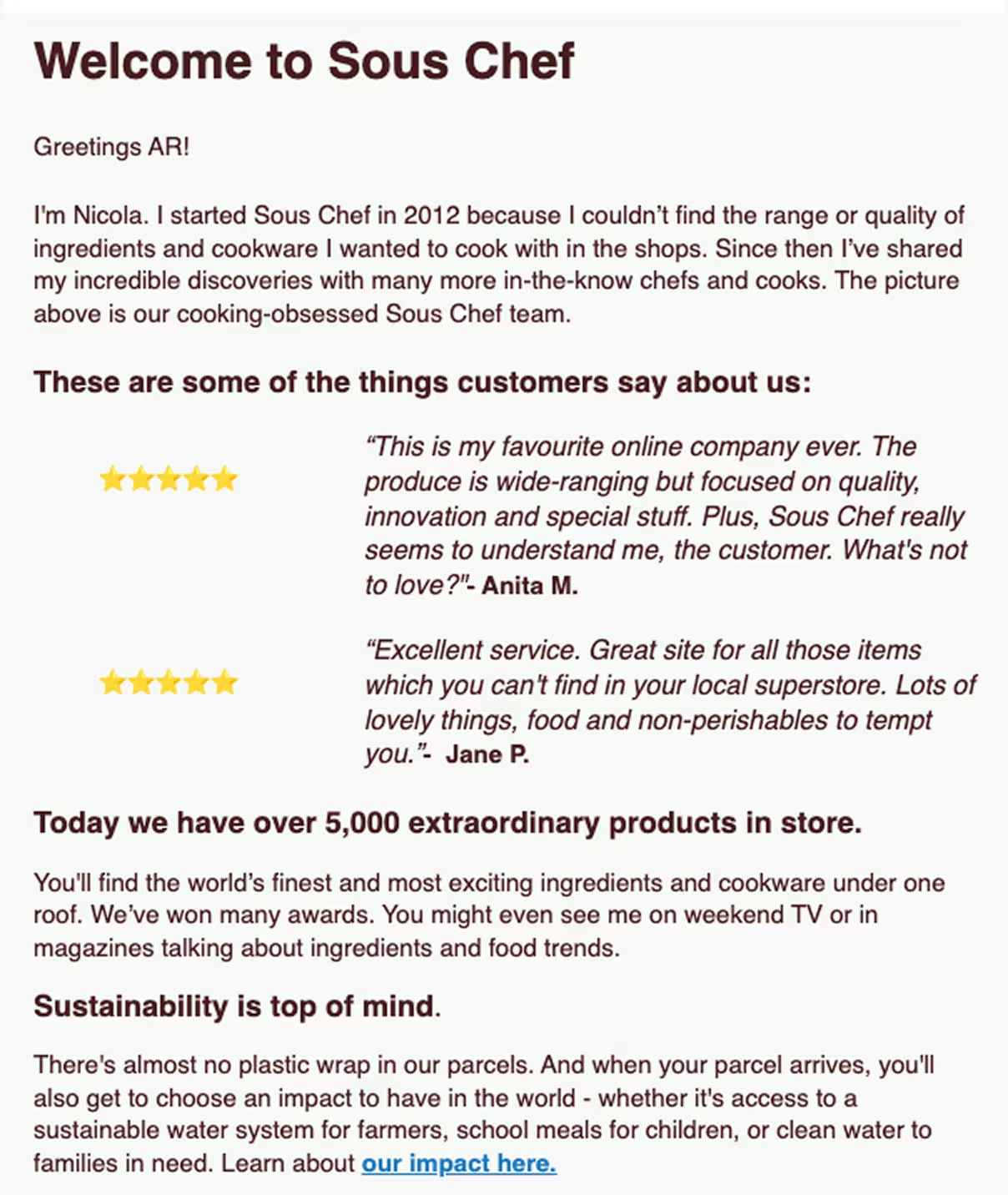
Trigger: Newsletter signup, lead magnet request, account creation at checkout
Number of emails and timing: 3 emails: If the customer does not make a purchase after the first email, which gets triggered immediately after signup, you can send two more in a staggered manner.
Abandoned Cart Series
An abandoned cart series automatically reminds shoppers to complete a purchase after they add products to their cart but leave without checking out.
Purpose: Recover lost revenue by bringing shoppers before the purchase intent completely fades.
Recommended content angle: Start with a helpful reminder, follow up with social proof or reviews, and if neither works, give a small incentive in the final email
Example:
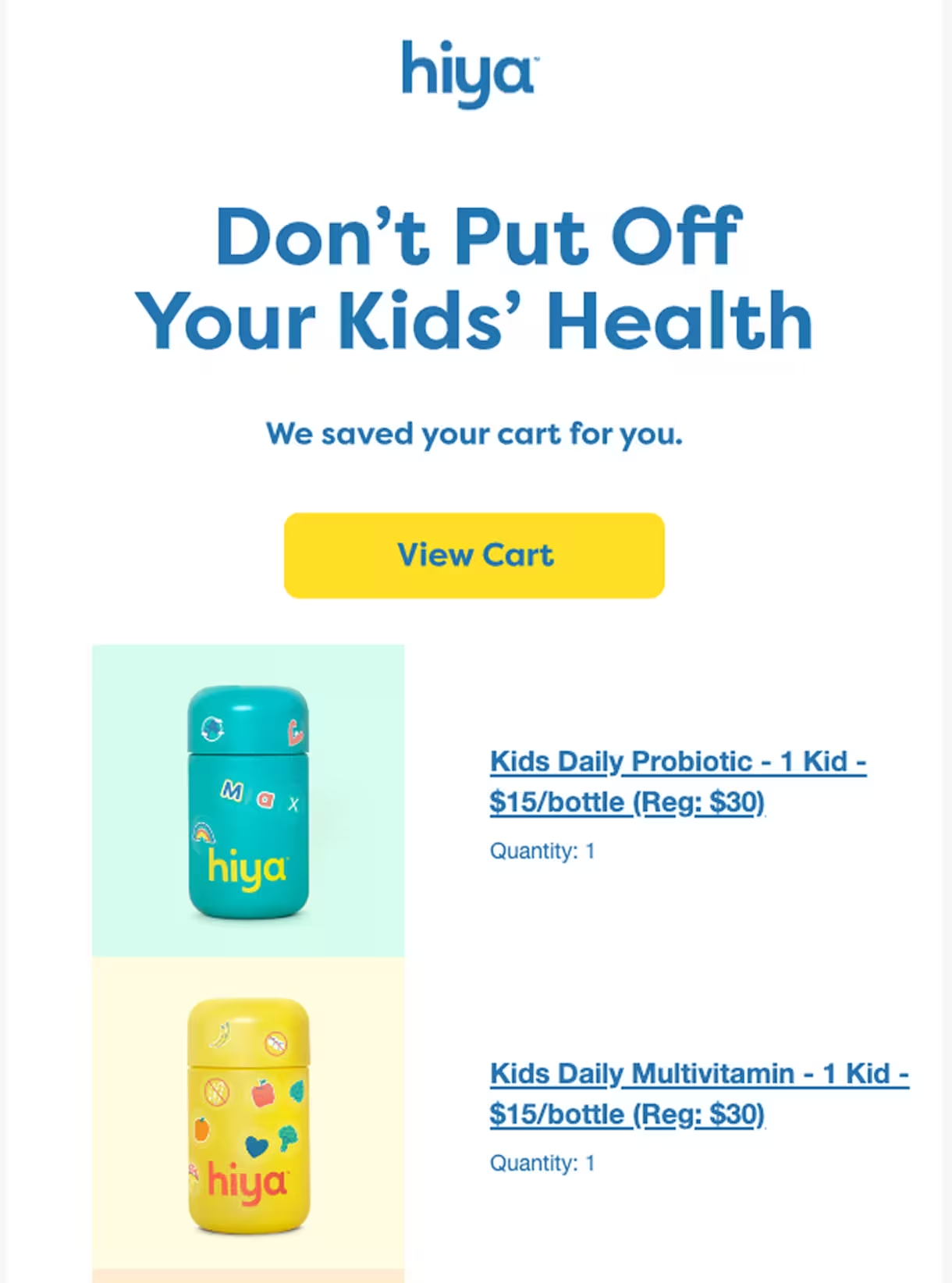
Trigger: Products added to the cart but checkout not done within a specified time
Number of emails and timing: 3 emails: 1st email within one hour, 2nd email within 24 hours, and 3rd email within 72 hours
Post-Purchase Follow-Up
Post-purchase emails are automated messages sent after an order to strengthen customer relationships and encourage repeated purchases.
Purpose: Keeping customers in the loop to reduce support requests
Recommended content angle: Cover the entire fulfillment process: order confirmation, shipping notification, delivery confirmation, followed by requests for reviews, product education, and replenishment reminders based on usage cycle
Example:
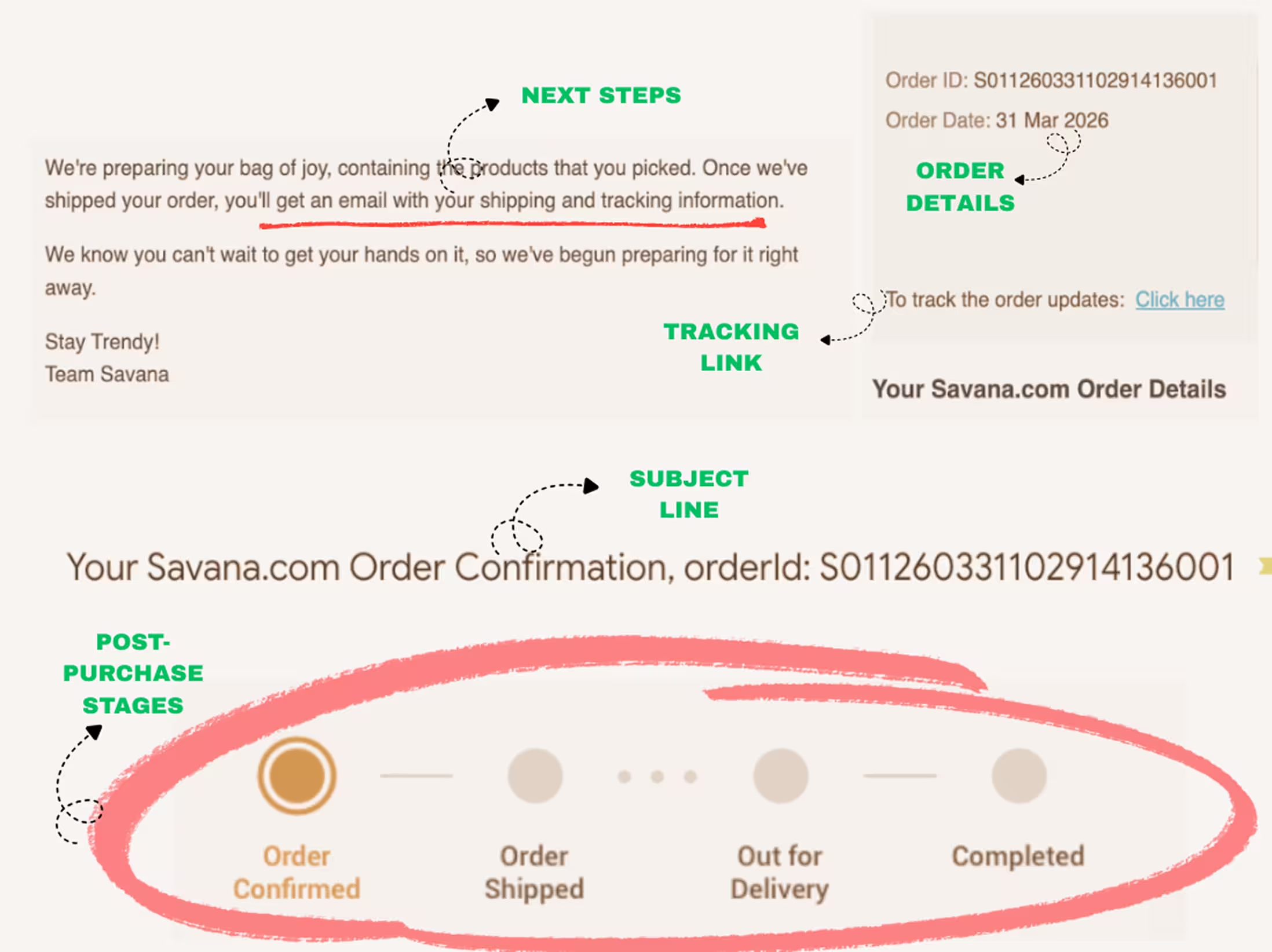
Trigger: Order received, order shipped, and order delivered, followed by time-based milestones for reviews/product education and replenishment
Number of emails and timing: 5 (for each stage of the fulfillment process, then several days after delivery for review and product education; a replenishment reminder after the usage cycle is complete)
Win-Back Series
A win-back email series automatically re-engages customers who have not purchased for an extended period.
Purpose: Reactivate dormant customers
Recommended content angle: Give personalized product recommendations, mention products that have launched since the last purchase, and in the final email confirm that you will be removing them from the email list.
Example:
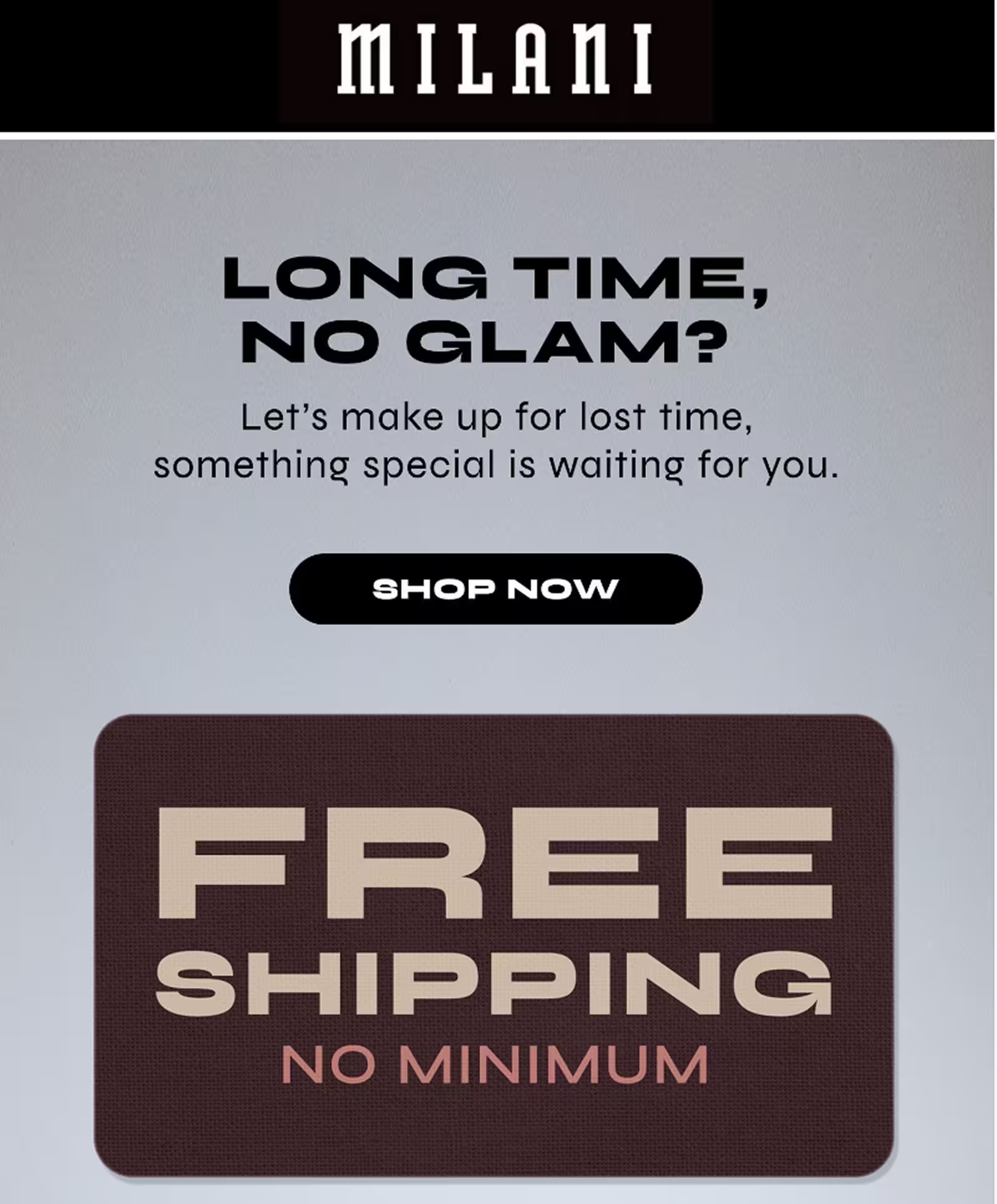
Trigger: No purchases for 60, 90, or 120 days, depending on your industry
Number of emails and timing: 2 emails: Initial reminder followed by a second email a week later
Cross-Sell/Upsell Recommendations
With cross-sell and upsell emails, you can recommend complementary products related to the customer’s purchase history.
Purpose: Increase average order value and customer lifetime value
Recommended content angle: Recommend accompanying products or similar products
Example:
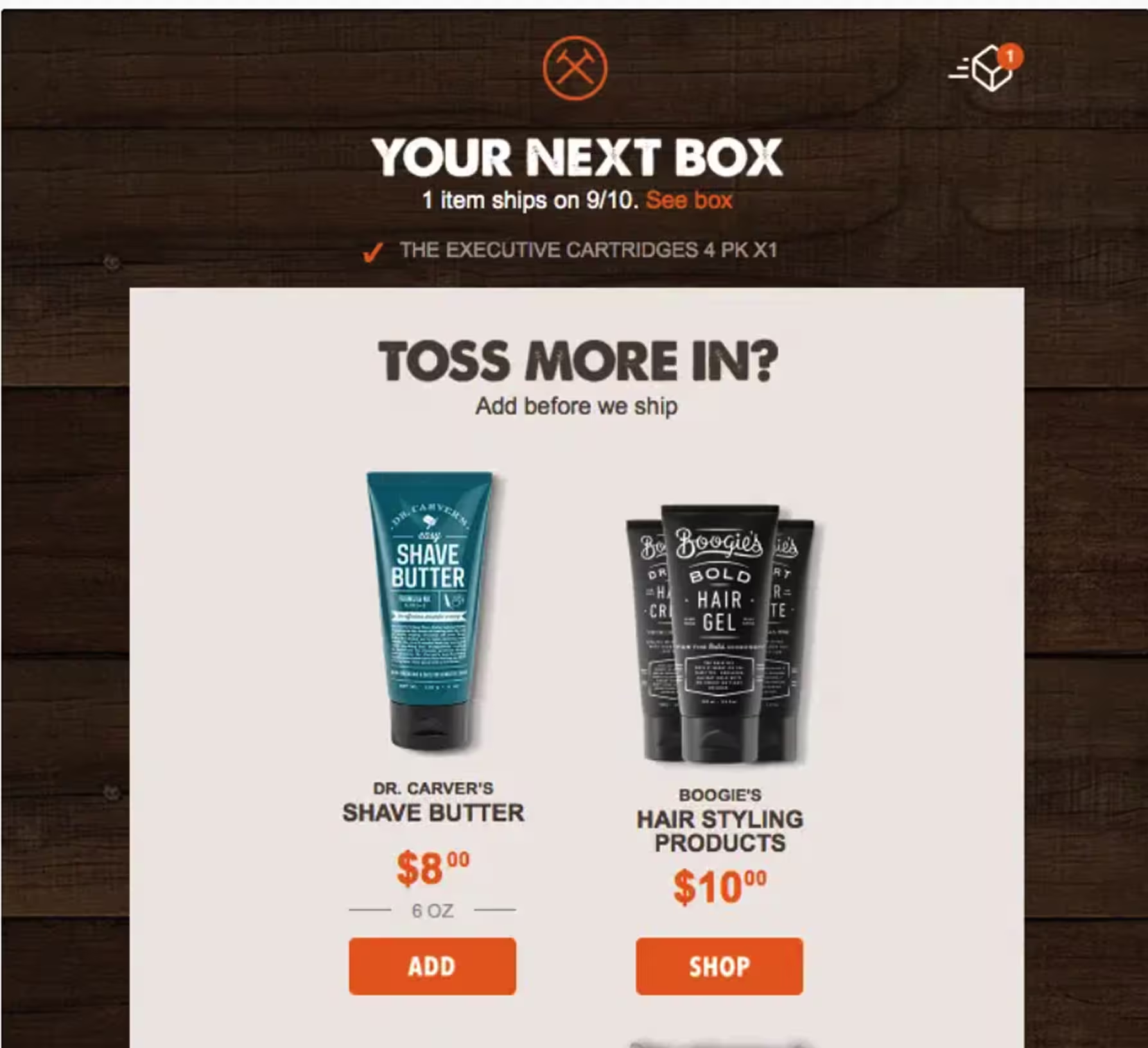
Trigger: Browsing history and purchase history with a pattern of identifiable product categories/preferences
Number of emails and timing: 1-2: Once the order is confirmed but before it is shipped (so that they can add related products to the order)
VIP/Loyalty Emails
Emails introducing your loyalty program and rewards for customers who have met a certain purchase threshold will make your brand a top choice for their products.
Purpose: Reward high-value customers and encourage continued loyalty
Recommended content angle: Congratulate customers on reaching VIP status, highlight benefits and tiers, provide early access to new launches and flash sales
Example:
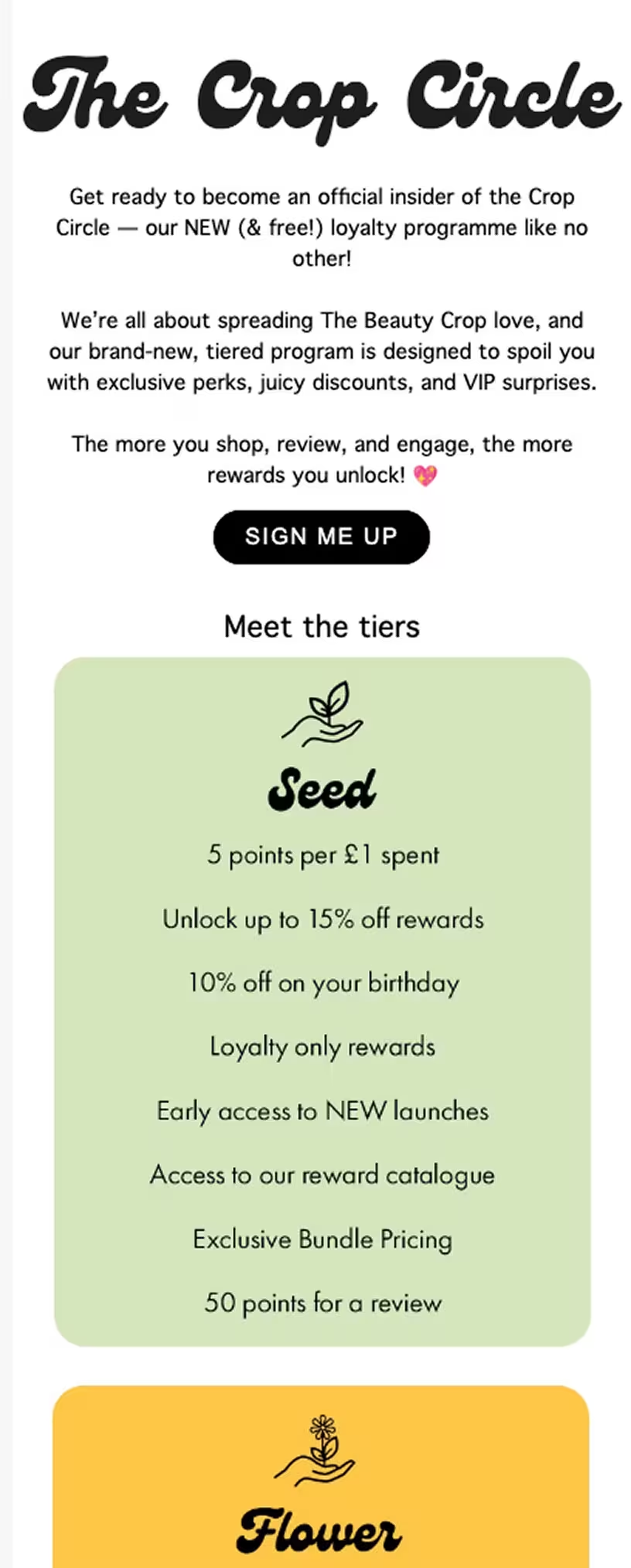
Trigger: Lifetime spend, order count, or loyalty tier threshold reached
Number of emails and timing: 1-2 emails, immediately after qualifying for loyalty status
Birthday/Anniversary/Brand-Related Milestones
Campaigns related to celebrating important customer milestones, such as birthday emails or “you completed one year with our brand today” kind of alerts
Purpose: Strengthen your customer relationships through personal connection and personalized offers
Recommended content angle: Celebrate the milestone with a personalized message and a time-limited reward
Example:
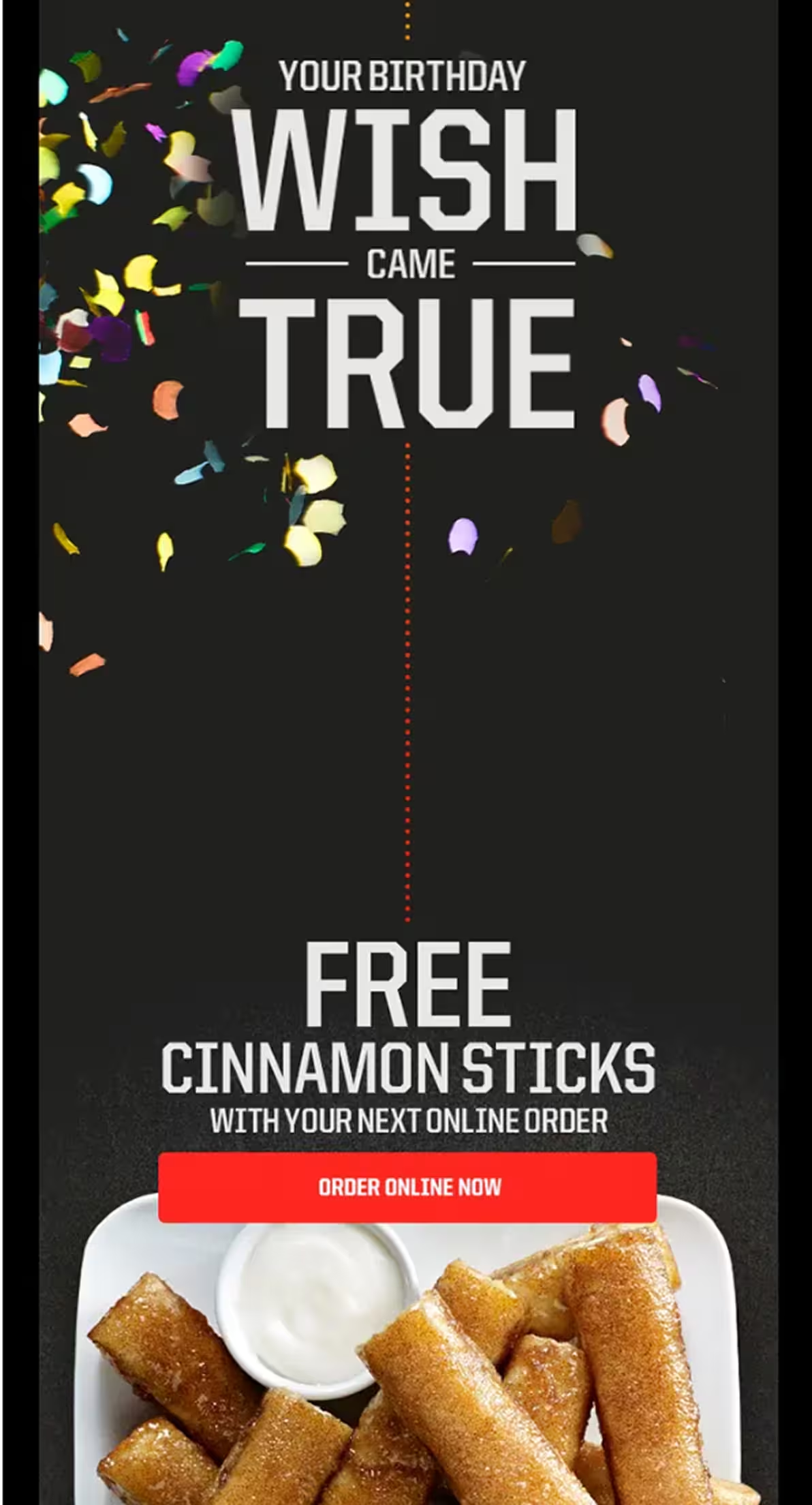
Trigger: Birthday, account anniversary, first-purchase anniversary, any other celebration based on data provided by customer
Number of emails and timing: 1 email on the day of the event or several days beforehand
Other emails to consider, once you have the essential campaigns set up:
- Back-in-stock emails
- Browse abandonment emails
- Checkout abandonment emails
- Product launch emails
How To Set Up Email Automation in Magento
Setting up email automations involves more than installing an email marketing platform.
You will need reliable email delivery, an integration that syncs your store data, and automation workflows that respond to customer behavior in real time.
Step 1: Set Up Reliable Email Delivery
Before building automations, make sure your email infrastructure is ready. Magento's native email functionality is not designed to be a complete email delivery solution.
Instead, configure an SMTP relay or use an email platform that provides SMTP to improve deliverability, authentication, and monitoring.
You will also need to authenticate your sending domain:
- SPF (Sender Policy Framework): Confirms that your mail server is authorized to send emails on behalf of your domain.
- DKIM (DomainKeys Identified Mail): Adds a digital signature that verifies your emails have not been altered in transit.
- DMARC (Domain-based Message Authentication, Reporting, and Conformance): Builds on SPF and DKIM to tell mailbox providers how to handle unauthenticated emails while providing visibility into authentication issues.
Together, these protocols improve sender reputation and help keep legitimate emails out of spam folders.
Step 2: Install a Magento Email Automation Plugin
Next, install an email automation platform that integrates with Magento.
For example, the Brevo plugin is available through the Adobe Commerce Marketplace and supports Adobe Commerce and Magento Open Source.
After installing the extension, connect your Magento store to Brevo by following the official setup guide. The integration synchronizes your store with Brevo, including contacts, products, categories, customers, and orders.
Brevo Tip: If you need installation instructions, follow Brevo's official Magento 2 integration guide, which walks you through installing the extension, connecting your store, and configuring the integration.
It also supports multi-store environments, making it suitable for merchants managing multiple Magento storefronts.
Step 3: Sync Your Customer and Behavioral Data
Once connected, perform the initial data synchronization.
The Brevo plugin imports your existing e-commerce data, then automatically syncs new customers, products, and orders as they are created.
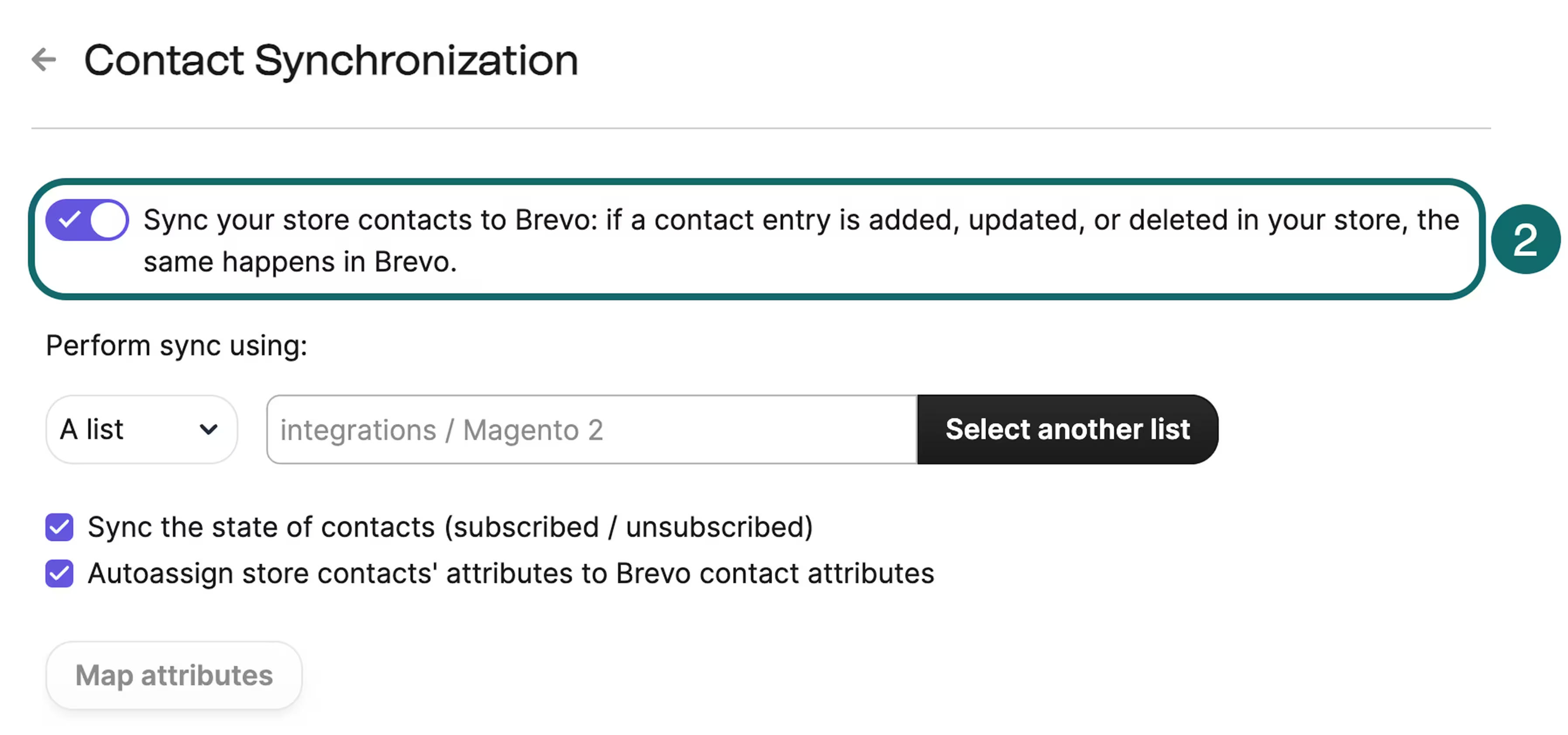
The integration also installs the Brevo Tracker, which captures customer actions such as product views, cart activity, and purchases. This behavioral data powers lifecycle automations like abandoned cart, browse abandonment, and post-purchase emails.
Because events are tracked in real time, workflows can trigger immediately instead of waiting for scheduled data imports.
Step 4: Build Your First Automation Workflows
Start with the three workflows that deliver the biggest business impact:
- Welcome series
- Abandoned cart recovery
- Post-purchase follow-up
Together, these automations provide a strong foundation before expanding into more advanced campaigns.
Step 5: Segment Your Audience
Use customer data to create more relevant automation journeys.
- Attribute-based segmentation: Group contacts by location, purchase history, customer type, or other profile data.
- Behavior-based segmentation: Trigger emails based on actions such as browsing products, abandoning a cart, or engaging with previous campaigns.
- Predictive (AI) segmentation: Where available, use AI-powered insights, such as purchase propensity or churn risk, to further personalize messaging.
Your customer segmentation will tailor your messaging.
Step 6: Measure and Optimize Performance
Monitor key metrics such as open rate, click-through rate, conversion rate, and revenue per recipient (RPR).
While opens and clicks help identify engagement trends, e-commerce teams should ultimately optimize for the revenue each automation generates and continuously test subject lines, content, timing, and audience segments to improve results.
How To Choose a Magento Email Automation Platform
The best Magento email automation platform should fit the way your store operates.
Look for a solution that connects directly to Adobe Commerce and keeps your customer data in sync. The chosen Magento email platform should help you create personalized customer journeys without adding unnecessary complexity.
Here are the key features to compare before making a decision.
Choose an Email Automation Platform With Real-Time Data Sync
Timing matters in e-commerce.
If someone abandons their cart or browses a product without buying, you want to reach them while they are still interested.
Look for a platform that syncs customer activity in real time instead of relying on scheduled imports, so your automations can trigger as soon as shoppers take action.
Look for a Native Magento Integration
A native Magento integration is usually more reliable than connecting multiple tools through third-party connectors or middleware. It should sync key e-commerce data, such as customers, products, orders, and subscriptions, so that you can build automations without manual data imports.
Check if the Email Platform Supports Customers Across Multiple Channels
Email is just one part of the customer journey.
If you plan to expand beyond email, choose a platform that also supports channels such as SMS, WhatsApp, web push notifications, and transactional messaging, all from the same customer data.
This makes it easier to deliver a consistent experience as your business grows.
Assess the Pricing Model
Magento stores often have large customer databases but do not email every contact every month. Some platforms charge based on the number of contacts you store, while others charge based on the number of emails you send.
Compare pricing based on your sending habits to understand the true long-term cost.
Prioritize Email Deliverability
Even the best automation will not drive results if your emails do not reach the inbox.
Look for features like SMTP support, sender authentication (SPF, DKIM, and DMARC), delivery reporting, and dedicated IP options if you send high volumes to ensure high email deliverability.
Make Sure the Email Platform Supports Advanced Segmentation
As your store grows, you will want to go beyond basic customer lists.
Choose a platform that lets you segment customers based on profile data, purchase history, browsing behavior, and engagement so you can send more relevant messages.
Check if the Platform Has Automation Templates
Pre-built workflows can save hours of setup time.
At a minimum, your platform should include email templates for welcome emails, abandoned carts, post-purchase follow-ups, and win-back campaigns that you can customize for your store.
Do Not Overlook Privacy and Compliance
If you sell internationally, make sure your platform supports consent management, unsubscribe handling, and privacy regulations such as GDPR.
This helps you build trust with customers while staying compliant.
| FEATURE | BREVO | KLAVIYO | MAILCHIMP | DOTDIGITAL |
|---|---|---|---|---|
| Native Magento integration | ✅ | ✅ | ✅ | ✅ |
| Real-time customer data sync | ✅ | ✅ | Limited | ✅ |
| Pricing model | Per email sent | Per contact | Per contact | Custom pricing |
| Email, SMS, WhatsApp, Web push | ✅ | No web push | No WhatsApp or web push | No web push |
| Pre-built automation templates | ✅ | ✅ | ✅ | ✅ |
| Customer data and behavioral tracking | ✅ | ✅ | ✅ | ✅ |
| Free plan | ✅ | ✅ | ✅ | ❌ |
Beyond the budget, the right platform depends on your business goals and technical requirements.
As your Magento store grows, prioritize a solution that offers strong deliverability and the flexibility to automate customer journeys across marketing channels without relying on multiple disconnected tools.
Common Magento Email Automation Mistakes (and How To Avoid Them)
Even with the right automation platform, a few common mistakes can limit your results.
Here are some common mistakes stores make while using Magento:
Relying on Magento’s Default Email Setup
Out of the box, Magento is not designed to be a complete email delivery solution.
Configure SMTP and authenticate your domain with SPF, DKIM, and DMARC to improve deliverability and protect your sender reputation.
Sending Automated Emails Too Late
Timing matters, especially for abandoned cart emails.
If your platform relies on delayed data syncing, shoppers may receive reminders hours after they have left your store. Choose an integration that captures customer activity in real time so that automations are triggered while purchase intent is still high.
Sending the Same Emails to Everyone
Customers expect relevant experiences.
Use customer attributes, purchase history, browsing behavior, and other customer-specific data to segment your audience instead of sending identical messages to every subscriber. Email blasts will not be enough.
Overlooking Transactional Emails
Order confirmations and shipping updates are often your most-opened messages. Keep them mobile-friendly, on-brand, and easy to read, and use them to reinforce trust throughout the customer journey.
Ignoring Privacy and Compliance
If you market to customers in the EU, the UK, or other regulated regions, make sure you obtain the appropriate consent, honor unsubscribe requests, store data properly, and comply with regulations such as the GDPR.
Not Testing Your Emails on Mobile
Before launching any automation, test your emails on different screen sizes and email clients.
Use a responsive template, keep subject lines concise, make buttons easy to tap, and ensure important information is visible without excessive scrolling.
Ready to Give Magento a Try?
Magento gives you the flexibility to build sophisticated e-commerce experiences, but effective email automation requires the right tools.
If you are just getting started, focus on three core workflows first: a welcome series, an abandoned cart sequence, and a post-purchase follow-up. Together, they create a strong foundation for recovering lost sales, engaging new customers, and encouraging repeat purchases.
When you are ready to put your strategy into action, install the Brevo Magento plugin from the Adobe Commerce Marketplace to connect your store and start building automated customer journeys.
Explore Brevo's free plan to test email automation before scaling your campaigns.


