
SMS marketing for WooCommerce helps online stores connect with customers through timely, relevant text messages.
From abandoned cart reminders to order updates and flash sale alerts, SMS can support every stage of the customer journey with messages that are designed to be seen and acted on quickly.
Choosing a platform for SMS marketing is only part of the process. You will also need to understand when to send the SMS, how to collect customer consent, and which messages to automate.
This guide covers everything you need to get started with WooCommerce SMS marketing, including essential automations, compliance requirements, platform comparisons, pricing considerations, and best practices for building an effective SMS strategy.
- What Is SMS Marketing for WooCommerce?
- Does SMS Marketing Work for WooCommerce Stores?
- SMS Compliance for WooCommerce: TCPA, GDPR, and Consent Requirements
- 7 Essential WooCommerce SMS Automations (With Examples)
- Common WooCommerce SMS Marketing Mistakes
- How to Set Up SMS Marketing on WooCommerce
- Best WooCommerce SMS Marketing Platforms Compared
- Ready to Launch SMS Marketing Using WooCommerce?
What Is SMS Marketing for WooCommerce?
SMS marketing for WooCommerce is the practice of sending promotional and transactional text messages to your store's customers.
A WooCommerce store might send an order confirmation immediately after checkout, a shipping notification when the package leaves the warehouse, and an abandoned cart reminder if a shopper leaves without purchasing. Each message is triggered automatically based on customer activity rather than being sent manually.
Since WooCommerce does not natively support SMS, e-commerce merchants need a plugin or marketing platform to send messages triggered by customer behavior or scheduled campaigns.
E-commerce brands typically use SMS for time-sensitive messages such as abandoned-cart notifications, shipping updates, delivery notifications, and flash-sale reminders.
But not every text message follows the same rules from a compliance perspective.
Most stores send two types of SMS messages: transactional and marketing. Some businesses also support two-way, non-automated conversational messaging for customer support.
Transactional messages are triggered by system events like order confirmations, shipping updates, and delivery notifications. Customer behavior or campaigns, such as abandoned cart reminders, flash sales, and win-back campaigns, trigger marketing messages.
| SMS TYPE | TRIGGER | EXAMPLE |
|---|---|---|
| Transactional | System event | “Your order#ABCD has been shipped.” |
| Marketing | Behavior/Schedule | “Flash sale: 30% off for the next 24 hours!” |
| Two-way conversation | Manually initiated by the customer or the support team | “Hi [customer name], how can we help today?” |
Because WooCommerce is a self-hosted WordPress plugin, merchants are responsible for setting up consent collection and ensuring their SMS campaigns comply with applicable regulations.
Key Takeaways
- WooCommerce merchants can combine SMS with email and WhatsApp for better customer journeys.
- WooCommerce does not support SMS natively. Use an SMS platform to automate abandoned carts, shipping updates, and post-purchase campaigns.
- Marketing SMS requires consent, while transactional SMS follows different consent rules.
Does SMS Marketing Work for WooCommerce Stores?
SMS is designed for moments that need immediate attention.
Unlike email, which customers may check throughout the day, text messages are typically read within minutes. SMS messages have an average open rate of 90-98%, making them especially effective for time-sensitive interactions like shipping updates and final reminder messages.
Timing is only part of what makes SMS effective. Automation also plays a big role in ensuring messages reach customers when they are most likely to take action.
According to SimpleTexting’s 2024 data, most businesses reported SMS conversion rates between 21% and 30%, higher than many other automated channels. Because messages are triggered by customer behavior, they reach shoppers when they are most likely to take action.
WooCommerce merchants also have access to rich customer and order data that can power real-time automations.
Instead of waiting for scheduled syncs, connected platforms can trigger messages based on cart activity, purchases, shipping milestones, and other customer behavior as they happen.
For example, platforms like Brevo capture WooCommerce order and cart events in real time, enabling abandoned cart reminders to be triggered shortly after cart activity, while purchase intent is still high.
Ultimately, SMS performs best when messages are triggered by customer behavior rather than sent as generic promotions.
SMS Compliance for WooCommerce: TCPA, GDPR, and Consent Requirements
SMS is one of the most effective marketing channels, but if you do not comply with regulatory requirements, you may face penalties. Before sending promotional text messages, understand the rules that apply to your business and your customers.
While SMS regulations vary by country, the fundamentals remain the same: collect consent and respect opt-outs.
Understand the TCPA Rules for US Customers
If you are sending promotional SMS messages to customers in the United States, you must comply with the Telephone Consumer Protection Act. The law requires businesses to obtain express written consent before sending marketing text messages, among other USA-specific compliance guidelines.
Transactional and marketing messages should be treated as separate message types. Do not assume that permission to receive order updates also covers promotional SMS. Classify each message according to its purpose and content, keep consent records separate, and apply the rules governing the recipient’s country.
If a message contains marketing elements, it may be subject to stricter consent requirements.
Register for A2P 10DLC Before Sending SMS in the US
Businesses sending SMS messages to US phone numbers typically need to register through A2P 10DLC (Application-to-Person 10-Digit Long Code). This carrier framework helps reduce spam while improving SMS deliverability.
SMS platforms like Brevo support the A2P 10DLC registration process. E-commerce stores need to provide business information and campaign details during registration.
Follow GDPR and ePrivacy Requirements
If you market to customers in the UK or Europe, you will need to comply with GDPR and applicable ePrivacy rules. Before sending promotional SMS messages, you need to follow specific GDPR provisions applicable to data collection, such as:
- Collect explicit, informed consent
- Make it easy for subscribers to withdraw consent at any time
- Keep auditable records showing when and how consent was collected
- Avoid using pre-checked opt-in boxes during checkout
These requirements help protect customer privacy while ensuring your market practices remain transparent.
How to Collect SMS Consent at Checkout
A checkout page is the best place to ask for marketing consent. The customer is about to make a purchase, so the intent is high. Add an SMS opt-in field and ensure you are following these best practices:
- Explain what subscribers are signing up for, including message frequency, where applicable
- Mention that standard messaging and data rates may apply
- Consider using double opt-in for an additional layer of verification
Properly collecting consent keeps your subscriber list healthy, since customers know exactly what they are signing up for.
7 Essential WooCommerce SMS Automations (With Examples)
The worst SMS campaign is a generic one.
When your SMS campaign has a specific goal, whether it is to remind customers to complete a purchase or to improve the post-purchase experience, you will be able to meet them where they are in their customer journey.
Before we dive into the examples and triggers for each SMS automation, here is a recap of the consent rules for each:
| SMS AUTOMATION | CONSENT RULES |
|---|---|
| Abandoned cart SMS | 🚨Marketing Opt-In is required |
| Order confirmation SMS | 🟡 Marketing opt-in is not required as long as you do not include promotional elements and treat it as a transactional SMS |
| Shipping notification SM | 🟡 Marketing opt-in is not required as long as you do not include promotional elements and treat it as a transactional SM |
| Delivery confirmation and review request SMS | 🟡 Delivery confirmation is transactional 🚨 Review requests may require marketing consent, depending on your jurisdiction |
| Post-purchase Upsell SMS | 🚨 Marketing Opt-In is required |
| Flash Sale or VIP Early Access SMS | 🚨 Marketing Opt-In is required |
| Win-Back SMS | 🚨 Marketing Opt-In is required |
The seven workflows below form the foundation of WooCommerce SMS marketing strategies:
Abandoned Cart SMS Alerts
An abandoned cart SMS reminds shoppers to complete their purchase after leaving items in their cart without checking out.
Trigger: Customer adds products to their cart but does not complete the purchase.
Recommended timing: Send the first reminder within 30 to 60 minutes. Then follow up 24 hours later.
Abandoned Cart Example SMS:
• Hi [customer’s first name], you left items in your cart! Complete your purchase here: [cart URL] before the items go out of stock. Reply STOP to opt out.
• Your cart misses you, [customer’s first name]! Complete your order today using the discount code SAVE10 at [cart URL]. Reply STOP to opt out.
WooCommerce tip: When you use SMS alongside email, you can target your customers across multiple marketing channels so they do not feel like they are being spammed continuously.
Because these reminders reach customers when purchase intent is still high, abandoned-cart SMS remains one of the highest-performing e-commerce automations.
Order Confirmation SMS Alerts
An order confirmation SMS reassures customers that their order has been placed successfully.
Trigger: The order is marked as completed in WooCommerce.
Recommended timing: Send the message as soon as the order-completed event is triggered. The exact timing depends on your payment gateway and WooCommerce order-status configuration.
Order Confirmation Example SMS:
• Hi [customer’s first name], your [brand name] order #[order_id] has been confirmed. Keep an eye out for shipping updates. Reply STOP to opt out.
• Hi [customer’s first name], thanks for shopping with [brand name]. Your order #[order_id] has been confirmed. Order total: [amount]. We will send another SMS when it ships. Reply STOP to opt out.
WooCommerce tip: Include not just the order number, but also what happens next, to set clear expectations with your customers. This reduces support requests.
Immediate confirmations reassure customers that their order has been received while reducing unnecessary “Did my order go through?” support requests.
Shipping Notification SMS
A shipping notification SMS lets customers know their order is on its way and provides tracking information.
Trigger: Order status changes to shipped
Recommended timing: As soon as the shipment is dispatched.
Shipping Notification Example SMS:
• Your [brand name] order #[order_id] has shipped via [carrier]. Track your package here: [tracking_url]. Reply STOP to opt out.
• Good news, [customer’s first name]! Your [brand name] order #[order_id] has shipped via [carrier]. Track your delivery here [tracking_url]. Reply STOP to opt out.
WooCommerce tip: Always include a tracking link in your SMS so that the customer can check delivery progress without contacting support or checking their email.
When you keep customers informed throughout the fulfillment process, trust in your brand increases. You are also giving them a glimpse of how smooth future orders will be.
Delivery Confirmation and Review Request SMS Alerts
Delivery confirmation SMS campaigns confirm successful delivery and encourage customers to share feedback after they have had time to use the product.
Trigger: Order marked as delivered
Recommended timing: Send the delivery confirmation immediately, and mention that you will be sending a review request soon, and then follow up with a review request SMS.
Delivery Confirmation Example SMS:
• Your [brand name] order #[order_id] has been delivered. Thanks for shopping with us! If you have any questions, we are here to help. Reply STOP to opt out.
• Delivered Today: #[order_id] by our courier partner [courier name]. Enjoy your purchase!
WooCommerce tip: Do not ask for a review immediately after delivery. Giving customers a few days to experience the product often results in meaningful feedback.
These two SMS alerts together complete the purchase journey with timely updates. You can continue the post-purchase communication by sending product education over email.
Post-Purchase Upsell SMS Alerts
A post-purchase upsell SMS recommends complementary products after a customer has received their order.
Trigger: Order delivered.
Recommended timing: Around seven days after delivery
Post-Purchase Upsell Example SMS:
• Love your new purchase, [customer’s first name]? Customers also pair it with [recommended product]. Buy it here: [product URL]. Reply STOP to unsubscribe.
• Thanks for your order! Save 15% on [recommended_product] for the next 48 hours. Use code THANKYOU15: [product URL]. Reply STOP to unsubscribe.
WooCommerce tip: Use WooCommerce purchase history to pick personalized product recommendations, rather than sending generic suggestions or best-sellers unrelated to the product they bought.
Relevant product recommendations can increase average order value while making follow-up messages feel genuinely helpful and tailored.
Flash Sale SMS/VIP Early Access SMS Alerts
Flash sale SMS campaigns create urgency around limited-time offers or give loyal customers early access to new products.
Trigger: Promotional campaign sent to a selected audience
Recommended timing: Shortly before or at the start of the promotion, and a final reminder when it’s about to end
Flash Sale/VIP Early Access Example SMS:
• You are on the VIP list, [customer’s first name]! Get early access to our latest collection before everyone else: [early_access_url]. Reply STOP to unsubscribe.
• Last chance! Our flash sale ends tonight. Shop now and save up to 30%: [sale URL]. Reply STOP to unsubscribe.
WooCommerce tip: Reserve SMS for your most time-sensitive campaigns, and avoid overdoing promotions. If every sale leaves a slew of text messages in your customer’s inbox, they are more likely to unsubscribe.
Limiting promotional SMS to genuinely time-sensitive campaigns helps maintain subscriber engagement over time.
Win-Back SMS Alerts
A win-back SMS encourages inactive customers to return after a long period without a purchase.
Trigger: No purchase for 60 to 90 days is the standard rule, but it depends on your typical purchase cycle.
Recommended timing: Send one message after the typical purchase cycle has passed, then follow up a few days later.
Win-Back Example SMS:
• It's been a while, and honestly… we missed you. We've kept the good stuff ready for you. Here's a little gift: Buy 1, Get 1 FREE. Use code FREEBIE7ZZEX6J3J at checkout. Reply STOP to opt out.
• It has been a while. Discover what’s new at [brand name]: [collection URL]. We would love to have you back. Reply STOP to opt out.
WooCommerce tip: Adjust the timing based on your products. Stores selling consumables may re-engage customers sooner than stores selling high-value products.
A well-timed win-back campaign can re-engage dormant customers without relying on constant discounts.
Common WooCommerce SMS Marketing Mistakes
Here are some common SMS marketing mistakes WooCommerce stores should avoid:
Using a Pre-Checked Opt-In Box at Checkout
Collecting SMS consent through a pre-checked box may seem like an easy way to grow your list, but it can create compliance issues.
Moreover, many online stores assume that customers who have agreed to receive transactional messages have also consented to marketing SMS. This can quickly become a compliance problem.
Regulations like the TCPA in the US and the GDPR in Europe generally require explicit consent for marketing SMS messages. Sending campaigns to customers who never actively opted in can lead to complaints, unsubscribes, and even fines.
Instead, use an unchecked opt-in box with clear language explaining what customers are signing up for. Consider adding double opt-in for an extra layer of compliance.
Keep records of how customers opted in and ensure promotional messages are sent only to subscribers who explicitly agreed to receive them.
Treating SMS Like Email Marketing
WooCommerce email marketing and SMS marketing serve different purposes, but merchants often use them interchangeably. It is tempting to pack a text message with multiple offers, links, and calls to action.
The problem is that SMS is an interruption-based channel. Long, cluttered messages can overwhelm customers and reduce engagement. They may also exceed character limits and split into multiple messages, increasing costs.
Keep SMS messages short and focused. One message and one clear action are usually enough.
Overusing SMS and Relying Only on Discounts
Because SMS delivers high engagement, it is easy to fall into the habit of sending constant promotions.
Many stores treat text messaging as a discount channel and increase send frequency whenever sales slow down. Over time, this approach can train customers to ignore your messages or unsubscribe altogether.
It can also reduce customer lifetime value by teaching shoppers to wait for the next coupon.
Reserve SMS for high-intent moments and mix promotional campaigns with transactional updates, product launches, and personalized recommendations. Setting frequency caps can also help prevent subscriber fatigue.
Ignoring Customer Segmentation
Sending the same message to every subscriber may seem easier, especially when you are just getting started.
But not every customer has the same needs or buying behavior.
Blanket campaigns often lead to lower engagement because the message feels irrelevant. A first-time customer and a repeat buyer should not receive identical promotions.
Instead, segment customers based on purchase history, engagement, location, or lifecycle stage.
Even simple segmentation can make SMS campaigns more relevant and effective.
Forgetting STOP and HELP Instructions
Some merchants focus so much on the message itself that they forget to include opt-out instructions.
Others assume customers already know how to unsubscribe.
Missing STOP and HELP instructions, among other SMS keywords, can create a poor customer experience and may violate carrier and compliance requirements in certain regions.
Every marketing SMS should clearly identify your brand and explain how subscribers can opt out or get support. Making it easy to leave your list helps maintain trust with the customers who stay.
Sending Messages Without Context or Relevance
SMS is one of the most personal marketing channels available, which makes relevance even more important.
Generic messages that appear out of nowhere often feel intrusive.
Customers are more likely to ignore messages that do not connect to their actions or relationship with your brand. Frequent and irrelevant automated texts can quickly turn a high-engagement channel into a source of frustration.
Use customer behavior to guide your campaigns. Messages tied to abandoned carts, recent purchases, loyalty rewards, or product interests feel more timely and valuable.
How to Set Up SMS Marketing on WooCommerce
Here are the steps you need to take to set up SMS marketing on WooCommerce:
Step 1: Choose an SMS Platform for WooCommerce
WooCommerce does not natively support SMS, so you will need a platform that can connect to your store and trigger messages based on customer actions. You can combine an SMS gateway with a plugin or use an all-in-one platform like Brevo that supports email, SMS, automation, and customer segmentation in one place.
Step 2: Install and Connect Your WooCommerce Plugin
Once you have chosen a platform, install its WooCommerce plugin and connect your account.
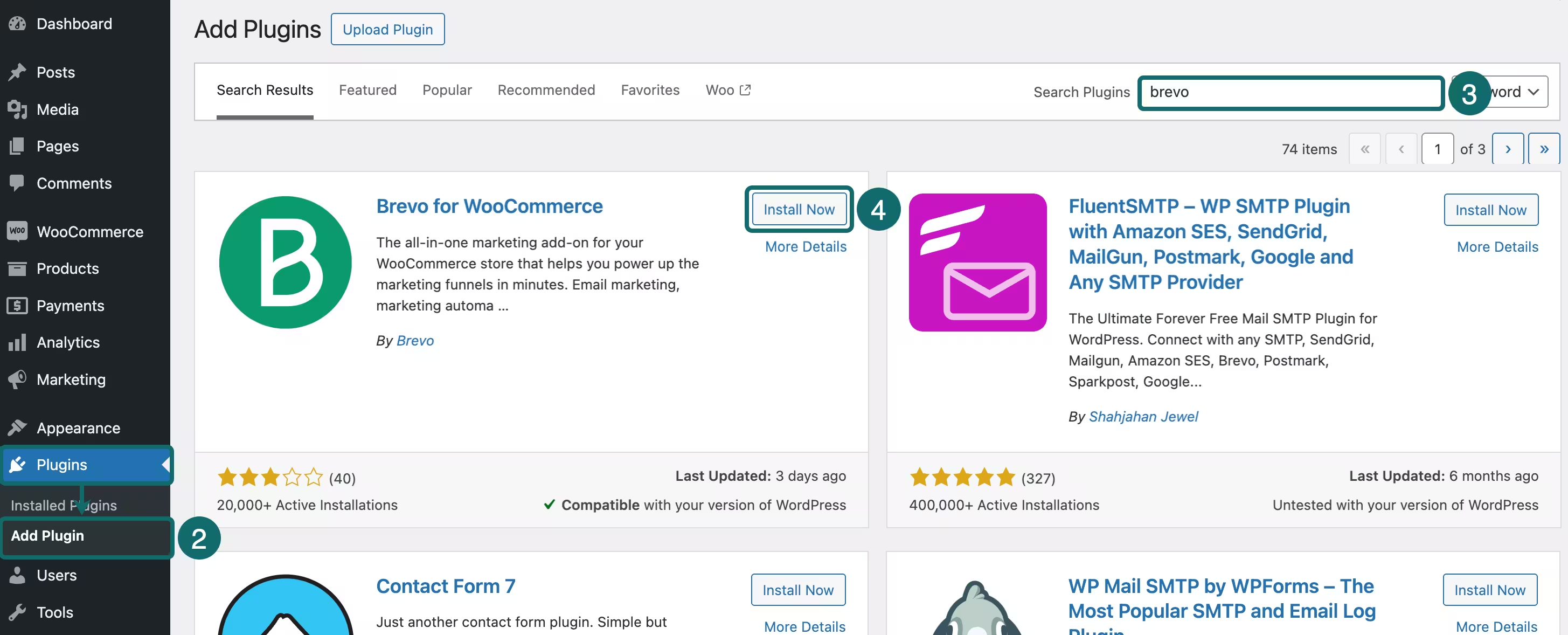
Once connected, the Brevo plugin automatically syncs contacts, products, and order data from WooCommerce. That information becomes the foundation for personalized SMS automations.
Step 3: Sync Customer Data and Collect Consent
Before launching campaigns, make sure your customer data is syncing correctly and that you are collecting consent for promotional SMS. Keep transactional and marketing consent separate, and avoid sending promotional messages to contacts who have not explicitly opted in.
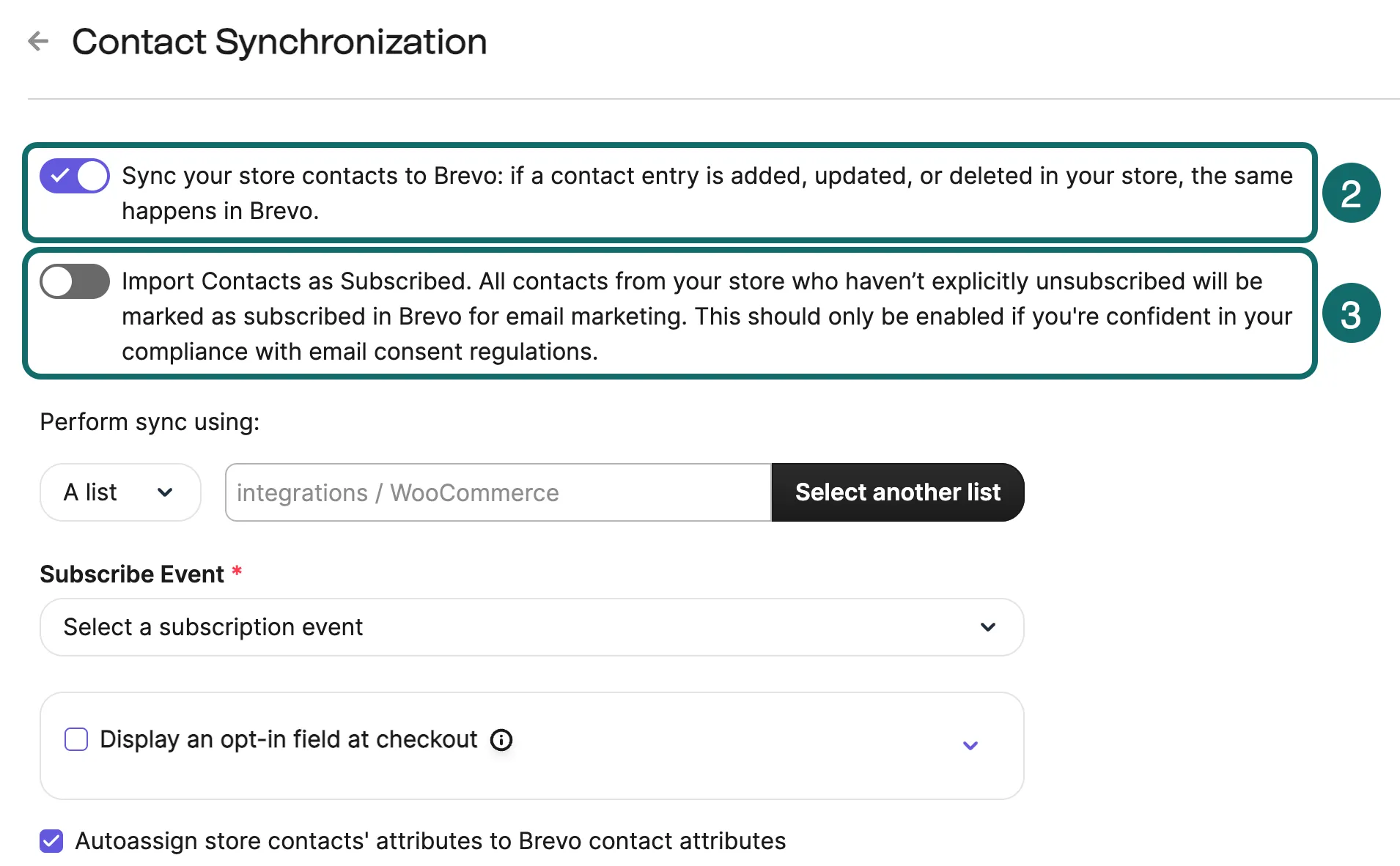
Before sending marketing campaigns, review your existing contact lists. Historical customers may need to opt in again before receiving marketing texts.
Step 4: Build Your First SMS Workflows
Not all SMS messages serve the same purpose. Start with transactional workflows such as order confirmations and shipping notifications to help customers stay informed throughout the purchase journey.
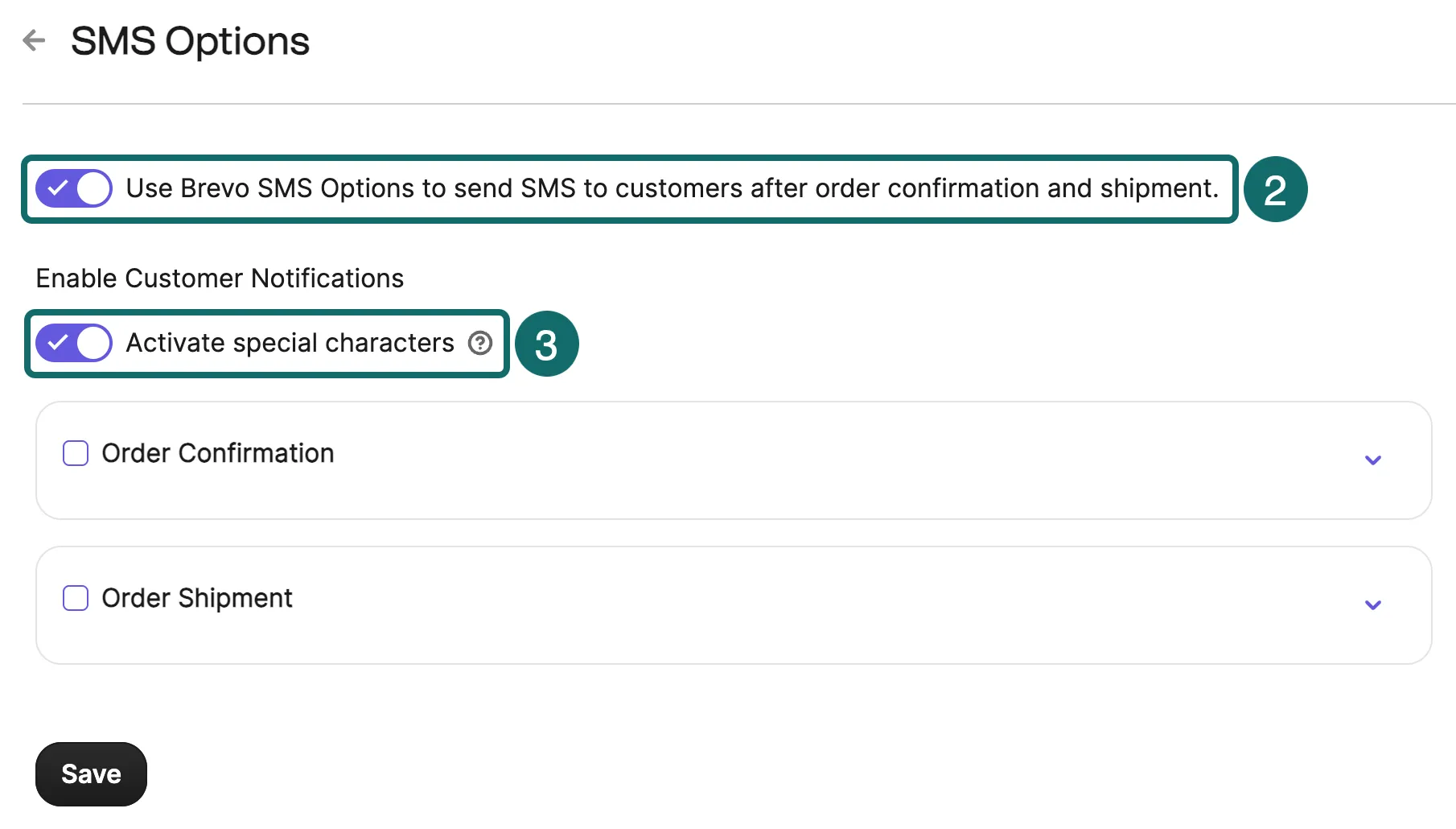
Then add marketing automations, such as abandoned-cart reminders, post-purchase offers, and win-back campaigns.
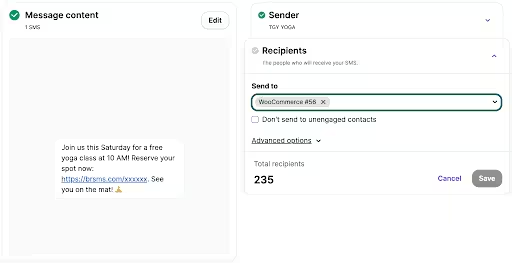
Because these messages are subject to different consent requirements, it's important to separate service messages from promotional campaigns. System events typically trigger transactional messages, while marketing SMS requires explicit subscriber consent in many regions.
Related Reading: Brevo Plugin for WooCommerce Guide
If you are launching SMS for the first time, start with three core workflows:
- Order confirmations
- Shipping notifications
- Abandoned cart reminders
These automations cover the most common customer touchpoints while keeping your automation strategy manageable.
Step 5: Monitor Performance and Optimize
Once your workflows are live, track e-commerce metrics such as delivery rates, click-through rates, conversion rates, and opt-out rates. SMS works best when messages are timely and relevant, so review performance regularly and adjust your frequency and segmentation as your audience grows.
Best WooCommerce SMS Marketing Platforms Compared
The best WooCommerce SMS marketing software depends on your business needs and budget.
Some tools focus exclusively on SMS, while others combine email, SMS, WhatsApp, web push notifications, and automation in a single platform. Here is how SMS marketing platform options compare:
| FEATURE | BREVO | OMNISEND | KLAVIYO | SENDLANE |
|---|---|---|---|---|
| Native WooCommerce plugin | ✅ | ✅ | ✅ | ❌ |
| Real-time sync | ✅ | ✅ | ✅ | ✅ |
| Transactional SMS | ✅ | ✅ | ✅ | ✅ |
| Marketing SMS | ✅ | ✅ | ✅ | ✅ |
| Email + SMS + WhatsApp + Web Push | ✅ | Email + SMS + Web push only | Email + SMS only | Email + SMS |
| Usage-based SMS pricing | ✅ | ✅ | ❌ | ✅ |
| A2P 10DLC support | ✅ | ✅ | ✅ | ✅ |
No single platform is the right fit for every WooCommerce store. Here is when each option makes the most sense:
- Pick Brevo if: You want a unified retention platform with email, SMS, WhatsApp, automation, and pay-as-you-go SMS pricing
- Pick Omnisend if: You want an email-first platform with pre-built e-commerce automation workflows.
- Pick Klaviyo if: You want data-heavy segmentation and advanced analytics.
- Pick Sendlane if: You want an e-commerce-focused email and SMS platform but don’t need additional channels.
What Determines the Cost of WooCommerce SMS Marketing?
The cost of SMS marketing depends on three factors: the number of messages you send, the countries you are sending to, and your chosen platform’s pricing model.
Most providers charge per message, while some also require a paid plan or a monthly SMS subscription. Businesses sending messages to US customers may also need to account for A2P 10DLC registration and carrier fees.
| COST COMPONENT | TYPICAL COST |
|---|---|
| SMS message | Usage-based |
| Platform subscription | Provider-dependent |
| Carrier and registration fees | Country-dependent |
| Total monthly spend | Depends on volume |
Before choosing a platform, compare more than just the cost per message. WooCommerce integration, automation capabilities, multichannel support, and pricing flexibility can all affect the total cost of running SMS campaigns as your business grows.
Ready to Launch SMS Marketing Using WooCommerce?
SMS marketing works best when it is timely and tied to relevant customer behavior.
Start with a handful of high-impact automations and collect consent correctly so that you can expand your strategy as your subscriber list grows.
Brevo’s WooCommerce integration lets you automate SMS, email, and WhatsApp campaigns from a single platform, making it easier to create connected customer journeys.
Set up highly tailored SMS marketing campaigns with Brevo and WooCommerce today.


