
A shopper adds a product to their cart, gets distracted, changes their mind, or leaves at checkout.
A guaranteed sale? Gone.
While WooCommerce has an abandoned cart recovery option, it is experimental and limited to one reminder. You will need more.
Abandoned carts are an expected hazard that requires the right email automation. You need to identify shoppers you can reach, understand what stopped them from completing their purchase, and use relevant messaging to bring them back.
In this guide, we will cover how to build an abandoned cart recovery strategy for WooCommerce, including how to capture contacts and structure a three-email sequence.
We will also share a roadmap to choosing a cart recovery plugin for your online store.
Why is WooCommerce abandoned cart recovery important?
Abandoned cart recovery helps WooCommerce stores re-engage shoppers who showed purchase intent but did not complete checkout. A recovery strategy can bring some of these shoppers back.
In 2025, Baymard Institute reported a cart abandonment rate of 70.22% based on over 50 different e-commerce studies. Recovering even a fraction of these can translate into meaningful additional revenue, particularly for stores with high average order values and substantial checkout traffic.
Unlike acquisition campaigns, cart recovery targets shoppers who have already shown purchase intent, so you are not starting from scratch when pursuing them.
Recovering abandoned carts with email campaigns that include useful information beyond a reminder (for instance, product education or social proof) also helps build customer relationships before the purchase is complete.
Another reason why it is essential to focus on recovering abandoned carts beyond higher revenue and stronger customer relationships is that it forces online stores to understand why customers are not completing purchases.
- Is the form on the checkout page too long?
- Are customers getting discouraged due to hidden fees?
- Is the website slow?
By creating systems to track the above, you can improve your store’s navigation and overall UX.
How to build email lists for abandoned cart recovery?
Building an email list requires capturing the details of identifiable shoppers who have provided an email address and can be reached through your marketing setup.
If you cannot identify who abandoned the cart, there’s nobody to send the automation to.
Some marketers will say: “Oh, I can just offer a discount on the website in exchange for their email address.”
While that is a common strategy, it’s not the strongest one. As Kirill Meshyk, the Head of AI Data Collection at Unidata, puts it:
“Generic pop-ups for discounts shown right after a visitor lands on a page turn into low-quality leads, as the customer has to understand the benefit relevant to them for them to share their information.”
The goal is not to collect as many emails as possible. Rather, the aim is to build a pool of engaged contacts you can actually reach when they show purchase intent.
Here are three main ways to do that:
| CAPTURE METHOD | PROCESS | TRADE-OFF |
|---|---|---|
| Email at checkout | The shopper enters their email address during checkout before leaving without completing the purchase | Captures shoppers with strong purchase intent, but only once they reach checkout and provide their details. |
| Known-contact tracking | An existing subscriber or returning customer is already identifiable when they browse, add products to their cart, or begin checkout | Only covers people you already have a way to identify |
| On-site capture | A signup form, exit-intent popup, lead magnet form, and social media form that collects the shopper’s email before they build a cart | Expands your pool of known contacts, but requires trial and error to eliminate poorly timed or generic pop-ups that produce low-intent leads |
And there’s an important distinction around guest checkout.
A guest shopper is not automatically anonymous. If they provide an email address during checkout and the store’s tracking setup can identify them, the cart can be associated with a contact.
What the automation can’t recover is a completely anonymous visitor who never provides an address or otherwise becomes identifiable.
That leaves a gap email cannot solve on its own: the anonymous shopper who adds something to their cart and disappears. Meshyk elaborates:
Guest shoppers do not present as many opportunities for personalization since there is very little customer information. However, there are cart-saving features that can be implemented, including saved carts, wish lists, price alerts, and more.
Web push notifications can reach such shoppers. A browser-level opt-in does not require an email address or phone number, so a store can use push to reach opted-in visitors who were never captured as email contacts.
That’s why cart recovery starts before abandonment.
The more shoppers you can identify, and the more channels you have for reaching them, the more opportunities you have to recover the purchase.
What is a good abandoned cart recovery rate for WooCommerce stores?
No universal recovery rate applies to every WooCommerce store. Results vary by industry, offer, automation strategy, and other factors. Instead of chasing a single benchmark, use your recovery rate to establish a baseline and measure improvements over time.
Alys Reynders, a marketer with 30+ years of marketing and communication experience who is also the CMO of Quickbase, a no-code CRM builder, puts the practical range slightly higher:
“Your cart recovery rate will depend heavily on your sector, but on average for most small-to-medium e-commerce stores, a range of between 10% and 15% is common. If you’re consistently exceeding 15%, then you’re doing something exceptionally well, but if you’re sitting below 8%, then it’s definitely time to reassess your approach.”
Think of the 8%-15% range as a reference point, not a target every store has to hit.
Cart recovery has a natural ceiling because not every abandoned cart represents a shopper who was about to buy.
According to Baymard’s 2026 research, 42% of US shoppers who abandoned a cart said they were just browsing or not ready to buy; they're unlikely to be the target of your recovery automations.
When you measure the result, focus on recovery rate, revenue recovered, and recovered revenue as a share of total revenue.
The 3-email sequence for abandoned cart automations
A three-email cart recovery sequence gives shoppers several opportunities to return and complete their purchase. This sequence works because each message has a different job.
You do not need to repeat the same “come back and complete your purchase” message three times. And you do not have to offer a discount in the first (or even the second!) email.
As Teresa Tran, the COO of LaGrande Marketing, explains:
“The objective of each communication is different as well. The first notice serves simply as a reminder, the second one cleans up any uncertainty, and the third one makes a final effort to finalize the sale instead of repeating the same request every time.”
Here is a breakdown of this email sequence:
Email 1: The reminder
Send this within a few hours of cart abandonment. This email should be the simplest. Since the shopper just left, you don't need to persuade them with a discount or a long sales pitch.
Include:
- The names, prices, and images of products left in the cart
- A clear link back to the cart in the form of a distinct CTA button
- Minimal supporting copy/playful reminder
The first email will reel in any shoppers who got distracted while completing the purchase.
Email 2: Addressing the hesitation
Send this email within 24-48 hours of the first one. By the second email of the sequence, the question changes from “Did you forget?” to “What stopped you?”
Use this email to remove friction and uncertainty.
Social proof, product benefits and FAQs, shipping information, and returns reassurance can answer practical questions that stop shoppers from completing the purchase.
You can also offer a minor incentive such as free shipping, if your margins allow it.
Email 3: Final Nudge
The third cart abandonment email, which you can send 48 to 72 hours later, is the final attempt to recover the purchase. If you want to send a discount code, this is the email to include it in.
But not every brand needs to. As Reynders explains:
“You should steer clear of adding discounts if it contravenes your brand image. If, for instance, you’re a luxury brand with an image to maintain or a custom goods business operating on tighter margins, it’s worth issuing something like a multi-buy discount rather than a simple 10% offer.”
The final email’s incentive should fit the business.
You can also use the final email to highlight related products. Giving the shopper relevant alternatives creates another route to conversion.
Here is a handy list of other ways to softly persuade the customer to complete the purchase without offering discounts or including urgency-based language:
- Highlight product benefits
- Appeal to compassion when the end-user of the product is someone the buyer is responsible for, such as pets and children
- Provide social proof for the specific product in the cart
- Include any press mentions or shoutouts by authoritative sources
- Plug in links to social media content featuring that product, such as influencer collaborations
- Give product education up-front rather than post-purchase so that the customer is confident they can use the product
- Indicate low inventory
- Acknowledge that the shopper is busy and/or distracted
- Ask what is stopping them from buying
None of these involve incentives; rather, they focus on being relatable and building confidence in your product.
Abandoned cart email examples for WooCommerce stores
These abandoned cart examples show how brands use product benefits, customer feedback, urgency, social proof, and social impact to encourage shoppers to return:
Tactic #1: Visually highlight product benefits
Your abandoned cart email does not have to rehash your product page. Instead, summarize the USP visually so the customer is instantly reminded why they considered your product in the first place.
Here is an example by Immi, a ramen brand:
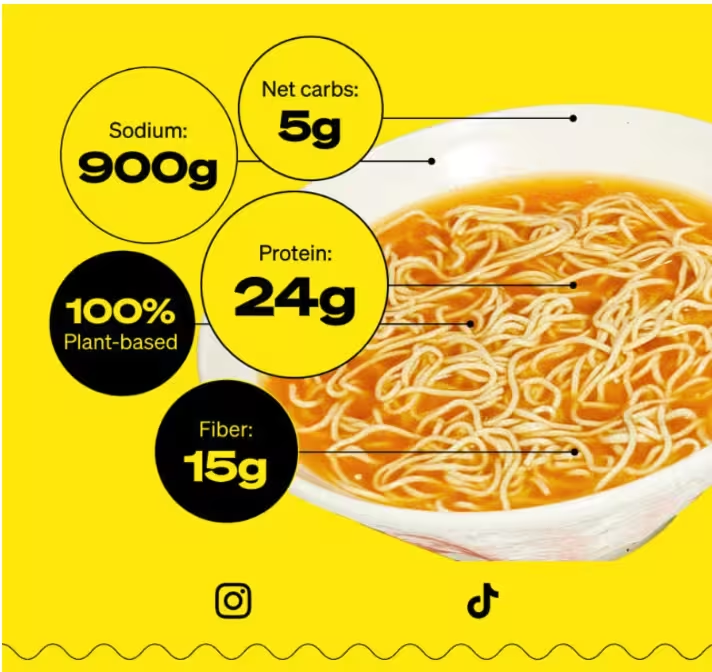
A 5-second glance at this will remind the customer that this is a high-protein, low-carb, plant-based product worth buying without any salesy persuasion tactics.
Tactic #2: Ask the customer why they didn’t buy
Sometimes the simplest strategy is to just ask. Here is how Hiya Health, a kids’ vitamin brand, opens a two-way conversation about an abandoned cart:
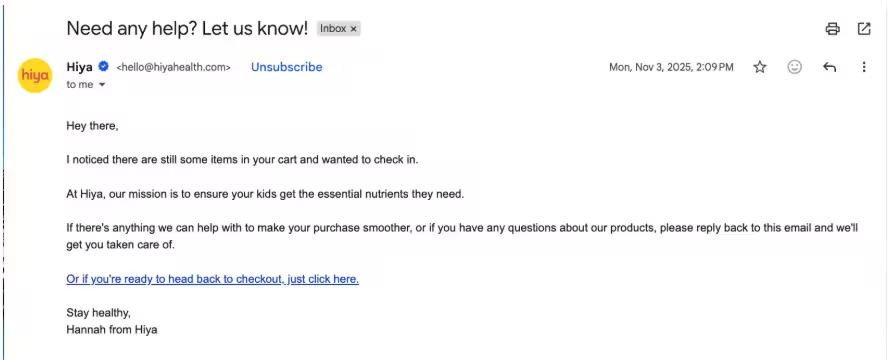
The email copy is conversational and includes a link to the cart, but it focuses on solving any issues a customer may be facing. If you replicate this strategy, one improvement is to identify who the sender is in the email copy itself, not just in the signature block.
Tactic #3: Emphasize limited inventory
Use this sparingly so subscribers do not think you are misrepresenting low stock as a sales tactic. Walkee Paws, a dog accessories brand, uses this technique as part of its abandoned cart sequence:
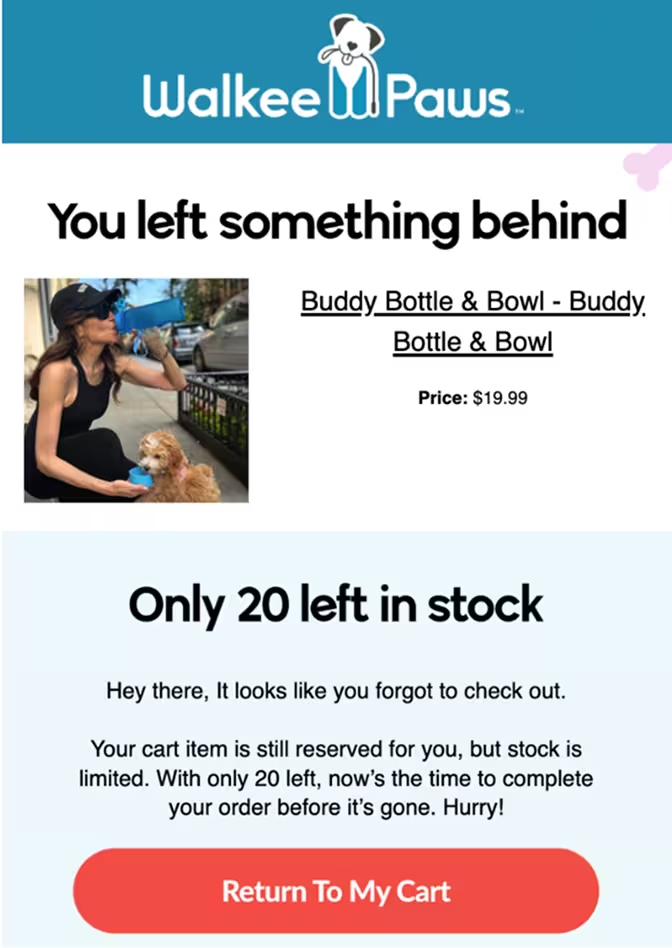
The phrase “Only 20 left in stock” stands out alongside the CTA button, immediately pulling the reader’s focus.
Tactic #4: Include quantitative social proof
Highlight how popular a product is that is in the customer’s cart without explicitly saying it.
Sephora includes some convincing figures in its abandoned cart emails, including how many people have added the product to their cart or wishlisted it, along with an average star rating:
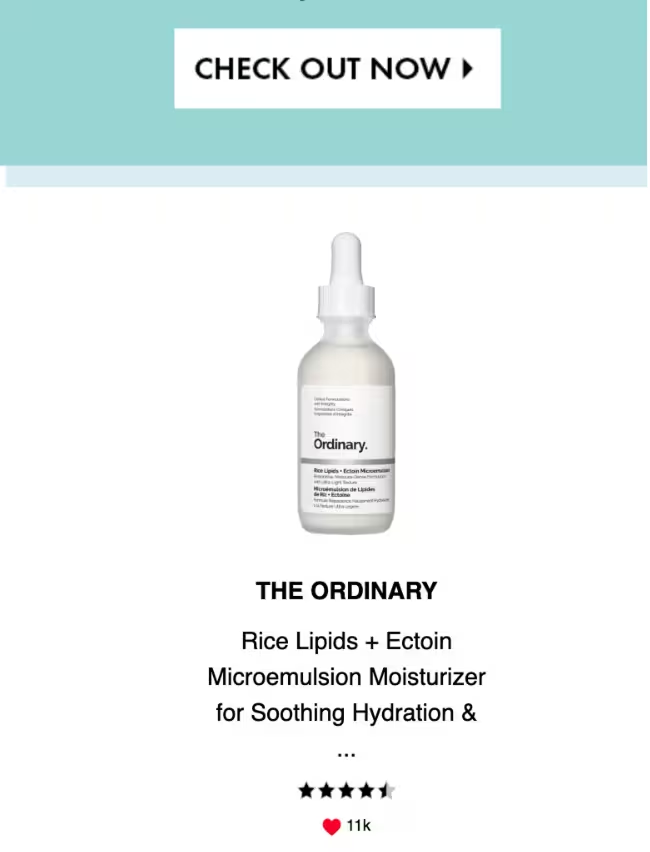
These numbers immediately stand out and are highly persuasive.
Tactic #5: Communicate social impact
If your store has an environmental or social impact, mentioning it in your abandoned cart email can help with recovery. Rainn, a sustainable clothing brand for babies, mentions the tangible impact on the environment with each order a customer completes:
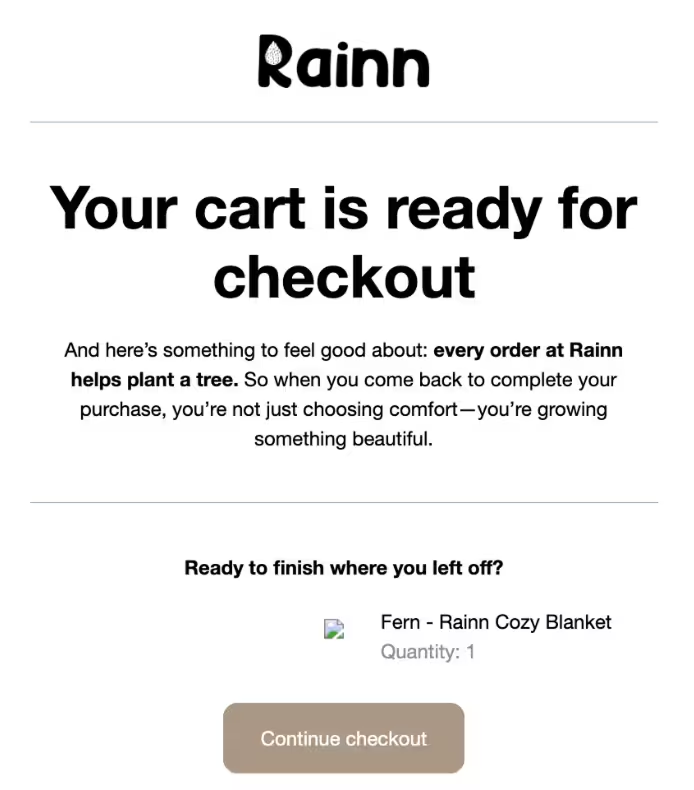
Environmentally conscious buyers will appreciate this, which may prompt them to complete the purchase to support the cause.
Obtaining subscriber consent for abandoned cart emails
Abandoned cart emails are considered marketing communication, so your store needs consent before firing off this automation.
If you want shoppers to subscribe to marketing communication on your WooCommerce website, turn on the opt-in checkbox deliberately and leave it unticked by default. Shoppers should take a clear affirmative action to subscribe; pre-ticked boxes are not active consent.
For example, Brevo’s WooCommerce plugin lets you display an opt-in checkbox at checkout. Configure the checkbox and subscription process according to the consent requirements that apply to your store and customers.
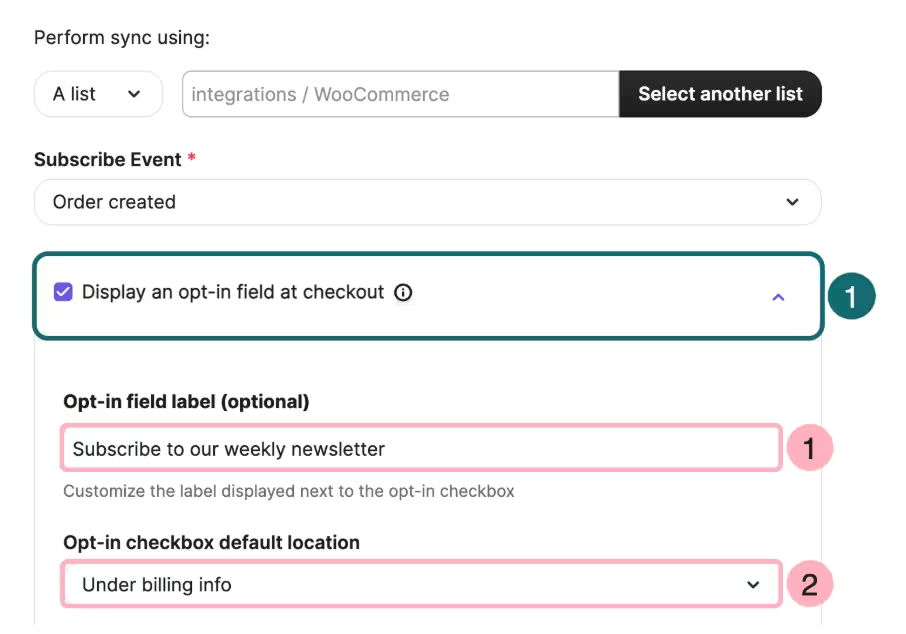
Another aspect to consider is which kind of emails the customer has consented to.
An email address collected to process an order can be used for shipping and delivery updates. Generally, that does not automatically give the store permission to send marketing emails, including abandoned cart emails.
You need to obtain consent for marketing communication separately; it’s not implied consent just because a customer places an order.
The applicable rules for consent depend on where your store and customers reside and any other legislation the store must comply with. For example, here are the relevant laws for the following regions:
- USA: CAN-SPAM Act
- UK: Privacy and Electronic Communications Regulations (PECR)
- EU: General Data Protection Regulation (GDPR) and ePrivacy Regulation
The above regulations govern not just consent but also data processing, storage, and deletion, among other data collection practices. The consent standard isn't identical in each market, so we cannot assume a checkout setup that works in one region automatically complies in another.
The safest approach for consent mechanisms is to make the choice explicit, explain what the shopper is consenting to, and make opting out easy.
Which WooCommerce cart recovery plugin should you use?
No single WooCommerce cart recovery plugin fits every store.
A small store that only needs basic reminders has different requirements than businesses that want more sophisticated automations.
But before you jump into features, start with the basics. Rafael Sarim Oezdemir, the Head of Growth at EZContacts, breaks down the two parameters to focus on:
“Features shouldn't be the main criterion for selecting a plugin. The first one should be about the effect on site speed. An inefficient plugin can seriously affect the loading time, which means bad conversion rates and SEO for us. The second criterion is the ability to recover guests. Most of your abandoned customers won't sign in before checking products and placing a product in the cart, so without guest email collection, you won't recover them.”
Apart from the above factors, focus on the scope of control the plugin gives you. Meshyk lists the following that require consideration:
- Flexibility in tracking
- Capability for rule-based push notifications
- Segmentation
- Integration with email advertising tools
- Quality of reporting
Here are a few WooCommerce plugin tools to consider:
| PLUGIN | CAPTURE METHOD | CHANNELS | Free plan available? |
|---|---|---|---|
| CartFlows | Email captured at checkout | Free version with no limits | |
| FunnelKit Automations | WooCommerce/contact activity | Email, SMS via integrations | Free version available; Pro adds advanced automation |
| Retainful | Checkout + signup forms | Email, SMS, WhatsApp | Free plan with 500 emails/month |
| CartBounty | Cart tracking and email capture | Email, SMS, WhatsApp, web push | Free version available |
| Klaviyo | Behavioral and customer tracking | Email, SMS, mobile push | Free plan for 250 profiles, 500 emails per month |
| Brevo | WooCommerce tracking and known contacts | Email, SMS, web push | Free plan with 300 emails per day |
When deciding which plugin is right for you, also consider how it will perform as your store scales. As Meshyk points out:
“Basic plugins become inefficient for stores as more traffic is logged, segments of customers increase, and higher-level marketing strategies are implemented. While eCommerce stores in the early stages can benefit from an abandoned cart reminder plugin through the recapture of potential profit, more advanced businesses need to have automation and email sending control.”
For example, if you are a small business and your immediate requirement is simply recovering abandoned carts, CartFlows is the straightforward choice. If you do not need an entire marketing stack, it is enough. Even CartBounty would be worth exploring.
FunnelKit is a stronger fit for merchants who want to keep their customer data and marketing automation within their WordPress environment. It combines WooCommerce data with customer profiles and automated workflows.
If your focus is e-commerce retention across email, SMS, and WhatsApp, Retainful is an excellent choice as a practical middle ground for stores that want more than email.
Klaviyo is a more feasible option as your store accumulates more customer data and your automation strategy becomes more sophisticated. Its WooCommerce integration supports in-depth behavioral tracking and segmentation across multiple channels.
Finally, Brevo makes the most sense when abandoned cart recovery is only one part of what you want to do, and you have a large email list, since pricing is based on email sends rather than the number of contacts.
With Brevo, you can layer abandoned cart recovery across multiple channels along with other email marketing campaigns.
5 strategies for WooCommerce abandoned cart emails
A strong WooCommerce abandoned cart strategy combines timely recovery emails with a checkout experience that makes completing a purchase easy.
Before building your automation, identify why shoppers abandon, fix preventable friction, choose the right recovery tool, and segment your messages where useful:
Start with the reason for cart abandonment
Not all reasons for abandonment can be addressed with an email automation.
Some relate to the website experience itself. Making that distinction ensures you address any friction the customer may face while navigating your store.
Here are some reasons you can address to prevent a shopper from abandoning their cart in the first place:
- Complicated/lengthy forms on checkout page
- Unexpected costs
- Mobile compatibility issues
- Slow loading speed
- Complicated navigation
- Data security concerns
Other reasons that can be addressed with a cart recovery automation are related to when a shopper is:
- Considering competitors
- Getting distracted while visiting your website
- Needing more time to decide
- Planning to return later
The distinction matters because an email cannot fix a complicated checkout or explain away unexpected fees. Those problems need to be solved on the website itself.
But how do you figure out why shoppers abandoned their carts? Kriszta Grenyo, the COO of Suff Digital, an SEO agency, relies on website heatmap data:
“As a digital marketing agency, we constantly analyze where users are clicking, how far they're scrolling, and where they're dropping off in the conversion process. This information is extremely useful in a checkout process because it helps small business owners see specifics they need to change, and why users aren’t completing their purchases.”
Once you know the reason behind the cart abandonment, you can troubleshoot (or personalize the automation) accordingly.
Fix the checkout process
As explained, if checkout is difficult to use, improving the abandoned cart email will not solve the underlying problem. Optimizing the checkout process is essential. Grenyo shares an example:
“We had a client with a WooCommerce store whose checkout wasn’t optimized for mobile layouts, had oversized elements, and a slow-loading cart experience. Customers had to do more tapping than necessary to finalize their purchases.”
Fixing these issues increased conversion rates and mobile traffic.
Another issue is geographic discrepancies. Oscar Scolding, the founder of Eclypseo, a Dubai-based agency, shares two often overlooked roadblocks:
“Currency switching and address formatting issues on the checkout page kill a surprising number of baskets. When the customer sees the final price in USD in the cart, but AED appears at checkout, it breaks trust.
The same goes for a phone number field that only accepts the +971 format. These issues are usually invisible to analytics.”
Scolding also emphasizes transparency. He believes that "showing landed cost, delivery time estimate, and additional taxes/duties prevents abandonment better than any email strategy.”
Other checkout page-related obstacles can include:
- Mandatory account creation
- Form errors
- Payment failures
- Limited payment methods
A checkout page is the final potential drop-off point, so you need to optimize every layer.
Test the entire recovery experience
Once the underlying checkout experience is working, test the recovery campaign itself. As Meshyk notes:
“The best recovery campaigns come from extensive testing and optimizing on timing, messaging, means of communication, and behavioral nudges at key points in the checkout process. Automation technology is only as good as the customer data and insights on the buyer behavior informing it.”
Change one meaningful variable at a time, and measure outcomes in recovered orders and revenue rather than optimizing purely for email engagement.
Do not overbuild the automation because of plugins
More features do not automatically make a recovery campaign better. Meshyk’s warning is useful here:
“Too many independent features, like overcomplicated automation, customization, and advanced AI, are likely to be excessive for stores without enough customer data and low traffic.”
Start with the simplest workflow that addresses your actual cart abandonment problem. Add complexity when your data or store goals justify it.
Don’t send the same automation to everyone
The final step is deciding who gets which message. Sending the same cart abandonment automation to everyone is not the right approach. Grenyo has seen brands stumble in these situations:
“A first-time purchaser should always be put into a different email sequence than a repeat customer, and the same goes for someone who abandons their cart, who receives a message relating to their items in the cart versus a generic promotional message.”
That does not mean every store needs dozens of segments. Start with distinctions that actually change the message, such as first-time versus returning customers.
“Just because your competitor is running 6 cart recovery emails, retargeting ads, and SMS text reminders doesn’t mean you should,” Scolding warns.
Resist the temptation to keep layering on emails to the sequence.
Other than the above strategies, classic email marketing tactics for recovering abandoned carts will help as well, such as:
- Creative subject lines that remind the customer their cart is waiting
- Effective call-to-action (CTAs) that are not just “buy now” or “back to my cart”
- Smart email design with visual breaks so that there are no large walls of text
- A clear unsubscribe option
When you layer your cart abandonment emails with other channels like SMS and web push, you can reach your customers without spamming them on one front.
WooCommerce Abandoned Cart Recovery with Brevo
You can set up abandoned cart recovery for WooCommerce in Brevo in six steps:
- Install and connect the Brevo plugin for WooCommerce.
- Sync your WooCommerce data and verify cart and purchase tracking.
- Create your abandoned cart email template.
- Create the pre-built abandoned cart automation in Brevo.
- Set the delay, email, and exit conditions.
- Test the workflow and then activate it.
Here is a breakdown of each step:
Step 1: Install and connect the WooCommerce plugin
From your WordPress dashboard, go to Plugins > Add New, and search for Brevo.
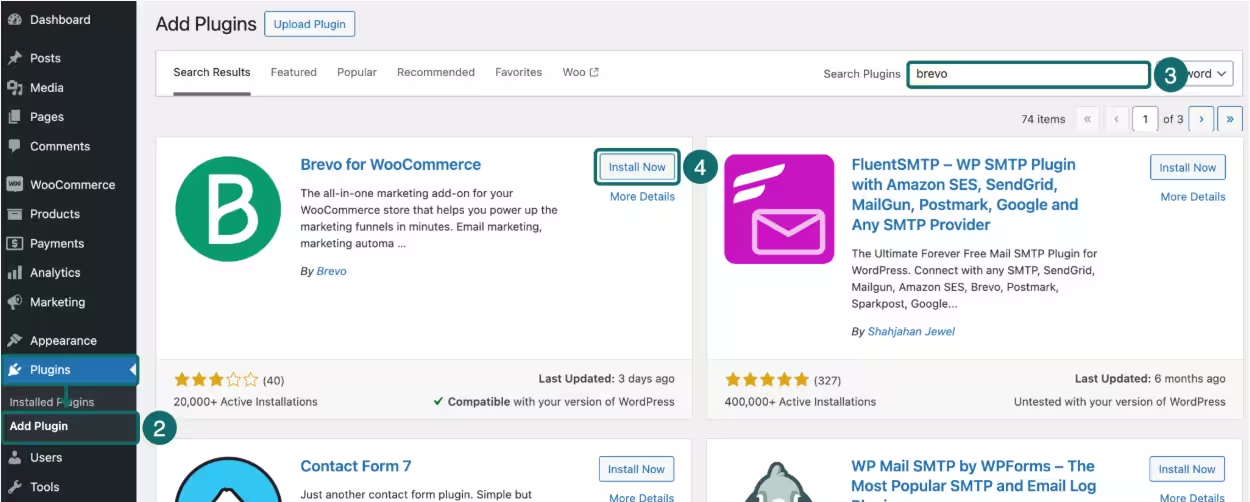
Install and activate the Brevo plugin. Then go to WooCommerce > Brevo and connect your Brevo account.
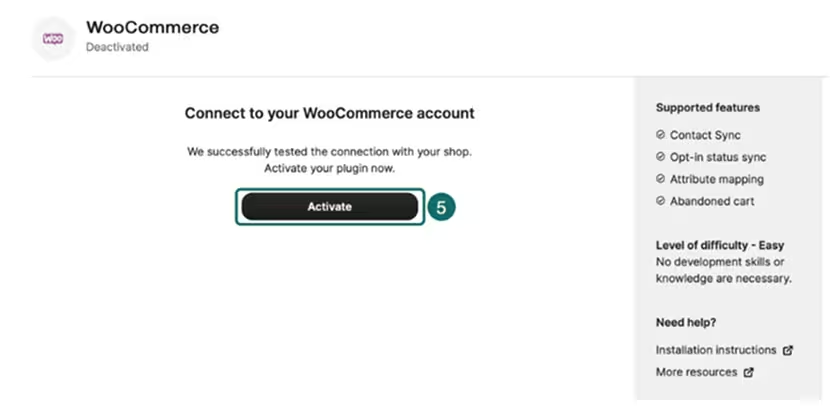
Once connected, configure the plugin’s contact and e-commerce settings so WooCommerce can send your data to Brevo.
Step 2: Sync your WooCommerce data and verify tracking
Enable the relevant WooCommerce sync settings.
The plugin can sync your WooCommerce contacts, orders, and products with Brevo. The tracker records e-commerce activity that Brevo can use in automation, including cart updates and completed orders.
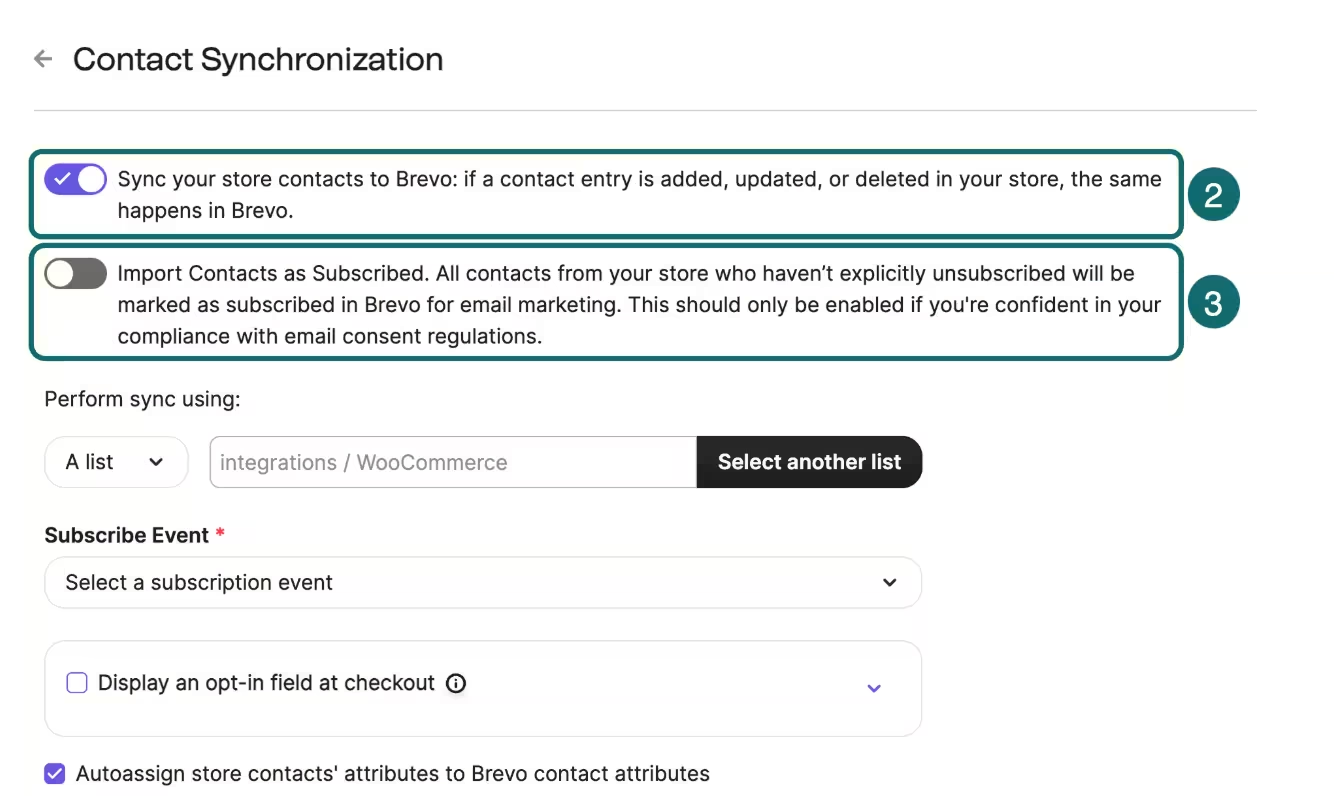
Before building the workflow, verify that the events are reaching Brevo. This matters because the automation depends on those events to know when a shopper creates a cart and completes an order.
Step 3: Create your abandoned cart email template
Create the email that shoppers will receive after abandoning their cart. Keep the first message focused on the products they left behind, and link the CTA to the cart page.
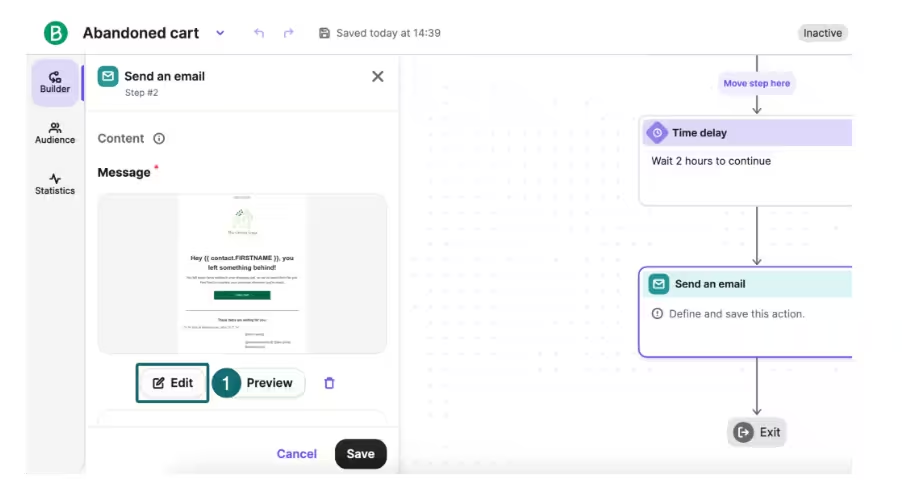
Brevo’s abandoned cart workflow supports dynamic information from the cart event, allowing you to personalize the message with specific details. You can preview the message with abandoned cart event data and make sure that the products and cart link populate correctly.
Step 4: Create the pre-built abandoned cart automation
In Brevo, go to Automations > Workflows > Create an automation and select the Abandoned Cart pre-built automation. The workflow uses the Cart Updated event as its entry point.
When an identifiable contact updates their cart, they can enter the abandoned-cart workflow. From here, you can configure the timing and messages that should follow.
Step 5: Set the delay and exit conditions
Add the delay (the time period before your first recovery email triggers), then select the email template you created.
The exit conditions (the filters that make a subscriber leave the automation) are just as important as the email itself. Brevo’s abandoned cart workflow event uses order completion and cart deletion to determine when a contact should leave the workflow.
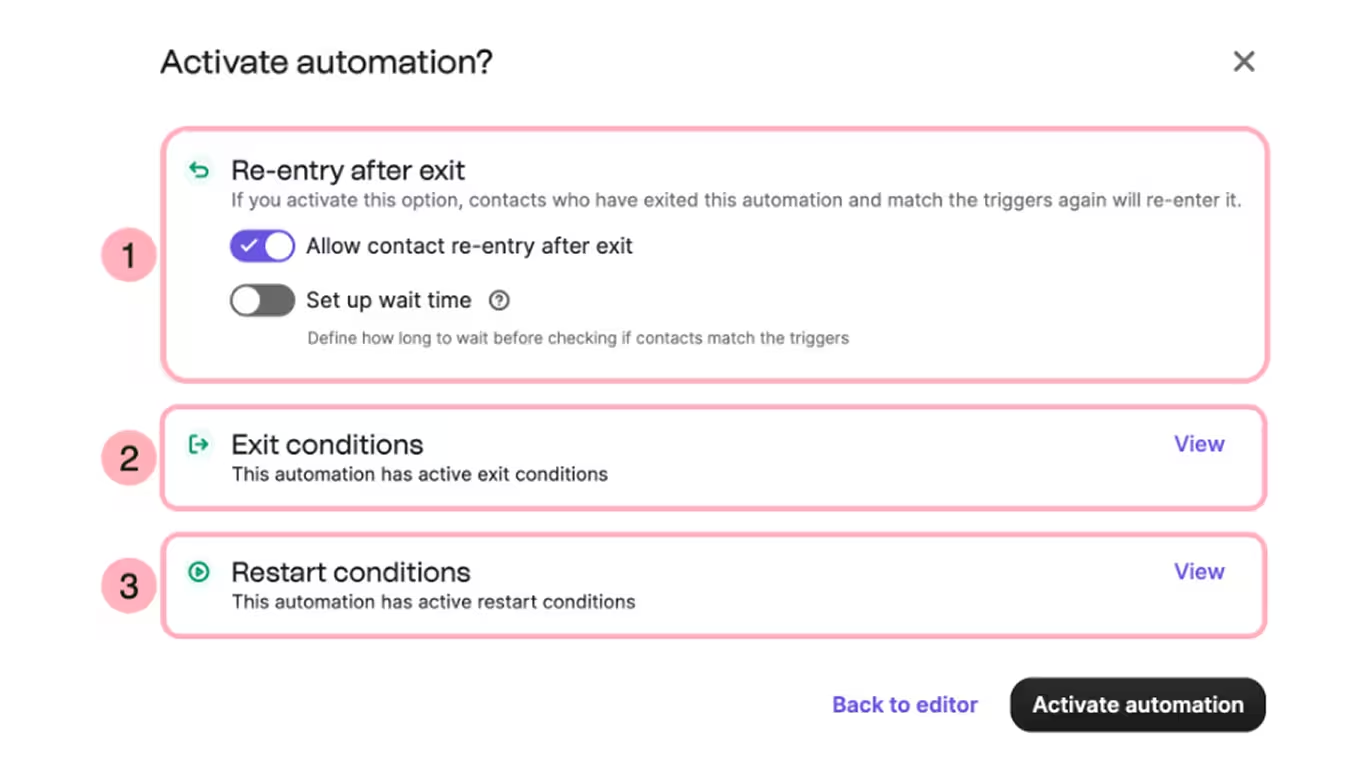
If you are building a multi-email sequence, make sure the contact can exit as soon as the cart is no longer abandoned. A subscriber should not receive a cart abandonment email after completing their purchase.
Step 6: Test the workflow, then activate it
Before switching the automation on, test the entire journey. Check for the following:
- Cart events are being recorded
- The intended contact enters the workflow
- The delay works as expected
- The email pulls in the correct cart information
- The CTA takes the shopper back to the right cart
- A completed order causes the contact to exit the recovery sequence
Across these steps, the WooCommerce plugin syncs WooCommerce data to Brevo.
Do not confuse this with the separate Brevo WordPress plugin, which does not sync e-commerce data. For a WooCommerce store, use the dedicated WooCommerce plugin when you need e-commerce events, order data, and abandoned cart automation.
Recover more carts with Brevo
Some shoppers need a reminder about their cart. Others need reassurance, and a few will not purchase without an incentive. Your recovery strategy should account for these situations and build your automation accordingly.
Brevo gives you the tools to build a foundation for your cart recovery automation by capturing email IDs and active consent, then creating the email sequence itself.
All with clean templates and the option to layer in other marketing channels with ease.
Build your first abandoned cart recovery automation for free


