
The simplest e-commerce automations are also the easiest to get wrong. An abandoned cart reminder makes sense until it lands after the customer has already checked out.
No customer wants to receive “Hello from Brand X!” emails when they expect delivery updates for the product they purchased. Nor do they want to receive multiple emails a day just because they are browsing, buying, signing up, and more all at once.
The best automation systems trigger at the right time and stop before a horde of emails overwhelms customers just because the focus was on building automations and not figuring out how to stop them.
This guide covers ten e-commerce automations worth building, the order to build them in, the exit and suppression rules that keep them from colliding, and the metrics that you need to focus on.
- What is e-commerce marketing automation?
- What do you need before building your first marketing automation?
- The 10 e-commerce automations worth building
- Other e-commerce marketing factors: exit conditions, frequency caps, and more
- Which marketing channel for which automation?
- How to build marketing automations with Brevo
- Choosing an e-commerce automation platform
- Measuring marketing automation performance
- E-commerce marketing automation mistakes to avoid
- Execute relevant e-commerce marketing automations with Brevo
What is e-commerce marketing automation?
E-commerce marketing automation is the practice of sending messages, including emails, based on what shoppers do in an online store.
If a shopper abandons a cart, places an order, views a product, or signs up for a list, they receive a message without a marketing team manually scheduling each send.
The difference between a campaign and an automation comes down to what starts or triggers the send. A marketer schedules a campaign on a calendar, while customer behavior triggers an automation.
Both are useful, but they serve different purposes.
A campaign, for example, can send emails about weekend sales to an entire segment regardless of what customers in that segment are doing. In contrast, an automation can send an abandoned cart reminder to each shopper who leaves items behind.
Examples of other marketing campaigns that are not triggered by customer behavior and therefore not a part of marketing automations include:
- Newsletters
- Product launches
- Generic holiday marketing announcements
- Brand-related announcements, such as the opening of a new store
The reliance on store activity and customer behavior is what makes e-commerce automation different from basic email campaigns.
Triggers come from e-commerce events (purchases, signups, product views, and cart abandonment) or customer data, like birthdays.
From there, marketers can build workflows that respond to shopper behavior at scale, delivering messages at a relevant point in the customer journey rather than because a calendar lists it.
What do you need before building your first marketing automation?
Before building e-commerce automations, make sure the e-commerce events the workflow depends on are actually reaching your marketing platform.
Otherwise, you can create a perfectly configured workflow that never sends a single message.
The email may look fine in the builder, but if the platform never receives the event that starts it, nothing will trigger.
| PRE-REQUISITE | WHY IT MATTERS |
|---|---|
| Store connected to your marketing platform | The store is the source of the ecommerce events that trigger your workflows. |
| Tracking script installed | Browse and cart events need on-site tracking. |
| Historical data synced | Past order data needs to be available if you want to segment customers based on previous purchases. |
| Consent captured at signup and checkout | Marketing automation requires appropriate consent. Transaction messages follow different requirements depending on their purpose and applicable regulations. |
| Sending domain authenticated | SPF, DKIM, and DMARC help authenticate your emails and support deliverability. |
But a connected store is not necessarily a correctly configured one. Check that the events your workflow needs arrive with the data required to act on them.
An event related to order creation, for example, is more useful when it also contains information such as the customer, products purchased, order value, and purchase date. If an event does not appear immediately, check for any documented sync delay before assuming the integration is broken.
Then test the events with a real test order.
Abandon a real test cart on the live store and confirm that automations related to both events (cart abandonment and order placement) arrive as expected.
This is more useful than simply previewing the workflow. A preview confirms the email renders correctly, but it will not confirm that a trigger fires when a real shopper takes action.
The 10 e-commerce automations worth building
The following automations cover key parts of the customer journey (in order of priority):
| WORKFLOW | TRIGGER | TIMING | EXIT CONDITION |
|---|---|---|---|
| Abandoned cart recovery | Product added to cart with no subsequent purchase | 1-4 hours | Order placed |
| Welcome series | Signup | Immediate | Order placed or product added to cart |
| Post-purchase communication | Order placed | Delivery + 3 days | None; runs to completion |
| Browse abandonment | Product viewed and not added to cart | 4-24 hours | Add to cart or order placed |
| Back-in-stock alerts | Stock above zero with waitlist | Immediate | Order placed |
| Win-back automations | No order in the time period identified as an inactive window | Immediate on entry | Order placed |
| Review requests | Delivery confirmed | Delivery + 7-14 days | Review submitted |
| Loyalty program automations | Spend or order-count threshold | On threshold | Tier change |
| Replenishment reminders | Order delivered date + consumption cycle | According to cycle | Reorder placed |
| Price drops | Price falls on browsed or wishlisted items | Immediate | Order placed |
The automation timing that works for a brand can vary from the recommendations above depending on the specific purchase behavior of their customers.
When choosing what to automate, Teresa Tran, the COO of LaGrande Marketing, considers the following three factors:
- Task requiring maximum manual effort
- Frequency of the task
- The way the task directly affects the outcomes
These determine which automations get built first. Let’s dive into each workflow in detail:
Workflow #1: Abandoned cart recovery automations
An abandoned cart workflow encourages customers to complete their purchase after they add a product to the cart and then abandon the process.
Start with an email reminder after the cart becomes inactive, then send another message with social proof or additional product information to persuade the customer to return to their cart.
The anatomy of an abandoned cart recovery email includes:
- High-quality images, names, and prices of the products in the cart
- Distinct CTA button linking back to the cart
- Soft persuasive language that addresses the likely reason for abandonment
Avoid a discount in the first message of the abandoned cart sequence. Here is Taza Chocolate’s first communication regarding an abandoned cart:
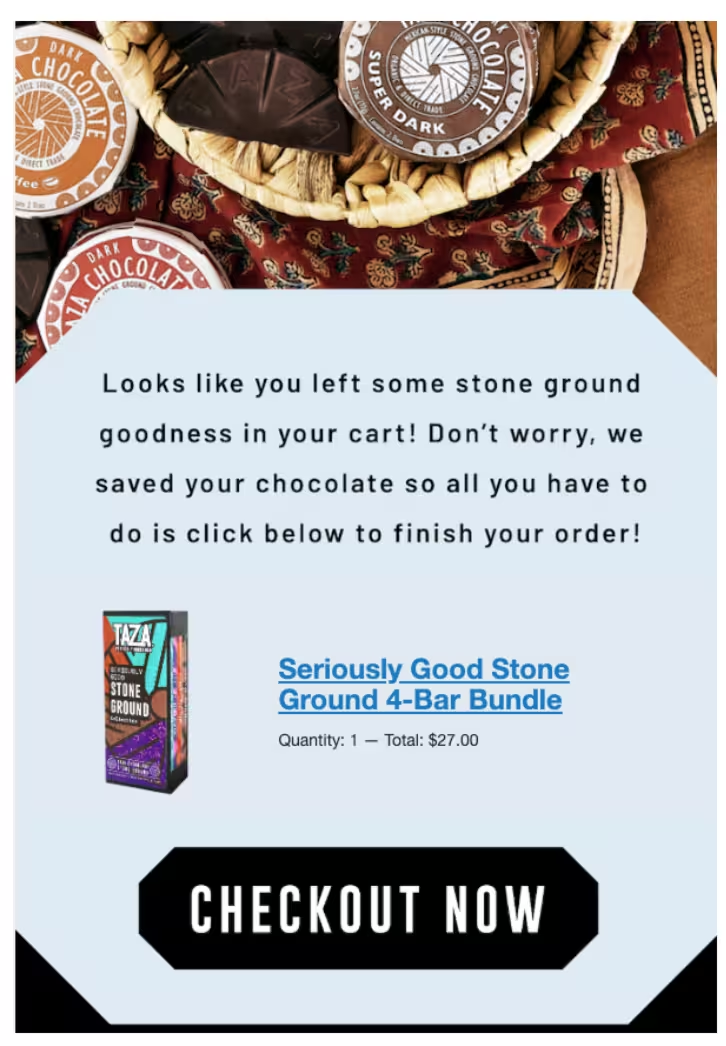
The crucial elements in an abandoned cart email are the product name, a product image, and the price to remind the customer what they added to the cart, along with a distinct CTA button that links to the checkout page.
Workflow #2: Welcome email automations
A welcome series starts when someone signs up and gives a new subscriber a reason to engage before asking them to buy.
Trigger the first message immediately on signup, then follow with one or two messages that introduce the brand story or ethos, explain what makes the product different, or help subscribers choose what to buy.
When you treat the welcome sequence as a way to start the relationship with the customer rather than send a coupon, you capture customers who will buy from you even without a discount while highlighting what your brand stands for or is known for.
Sous Chef, a sustainable cookware and ingredients brand, welcomes new subscribers in the form of a founder’s letter that emphasizes its vision and provides social proof:
The email also sets expectations by outlining the additional content a subscriber will receive in the welcome email sequence.
Sometimes a subscriber buys a product (or adds a product to the cart) in the midst of a welcome sequence. Brands that include filters to remove purchasers from the acquisition-focused welcome sequence can avoid clashing automations.
Workflow #3: Browse abandonment reminders
Browse abandonment follows a shopper who viewed a product but did not add it to their cart.
This marketing automation is slightly less persuasive than cart recovery since viewing a product signals interest rather than purchase intent.
Product recommendations or a reminder of what they viewed can work better than aggressive reminders. Here is the browse abandonment email by Pela Case, a sustainable phone case brand:

Instead of pushing the subscriber to the next step of the buying process, the brand focuses on its USP.
The biggest limitation most brands face with browse-abandonment automations is tracking.
The store needs to capture browser activity and associate it with a known contact before the workflow can send an identifiable message.
Workflow #4: Post-purchase automations
A post-purchase workflow begins after the order has been placed.
This includes (and goes beyond) transactional communication related to order confirmations and delivery updates. Your post-purchase communication can include product education through UGC content, checklists, and tutorials.
Some brands combine post-purchase content with marketing messages once they have ensured customers have consented to both transactional and marketing communication.
For example, post-purchase communication can be an excellent opportunity to stack purchases through cross-sell suggestions or by including a referral reward.
Workflow #5: Back-in-stock notifications
A back-in-stock workflow alerts shoppers when a product they wanted becomes available again.
The trigger is straightforward: the customer subscribes to notifications for when an item is back in stock, and when inventory is restored, a message is sent to those on the waitlist.
Timing matters here as much as it does for abandoned cart recovery. The subscriber has shown higher intent than a casual browser, and they would have purchased or added the product to their cart had it been available.
Send the first message immediately and only once the item is actually available. If the restock message leads to another out-of-stock page, then it causes the friction it is supposed to solve.
You can also send back-in-stock messages for bestsellers that run out often. Here is a simple back-in-stock email by Youth To The People, a skincare brand:

The email then highlights the benefits of refills to emphasize the impact of sustainable packaging.
Workflow #6: Win-back automations
A win-back workflow re-engages inactive customers who have not purchased within the period when they would normally be expected to return. Here is an example by Candle Delirium, a luxury candle brand:
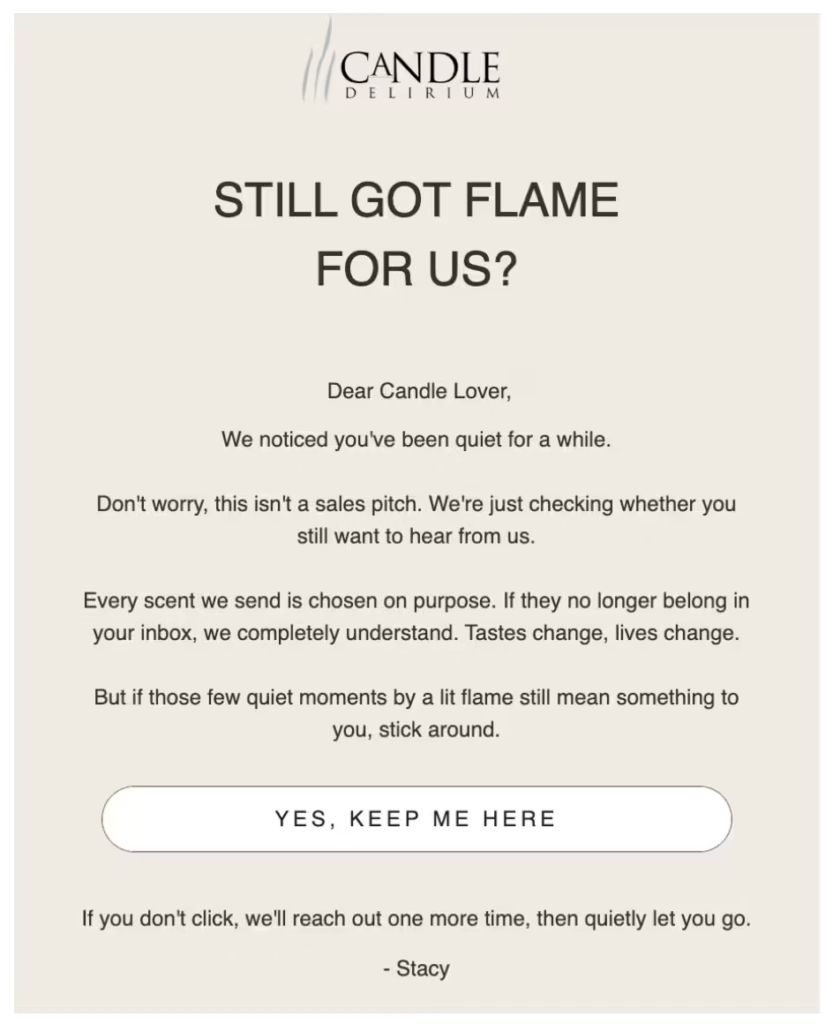
The email acknowledges the lack of engagement/purchases and, instead of forcing a purchase, lets the subscriber know they will be removed from the list if they don't opt in again.
While the general benchmark for win-back workflows may be 90 days, that threshold may not apply to your store. Use your store’s own customer behavior metrics and buying cycle to identify the time period after which it makes sense to trigger win-back automations.
A skincare brand and a furniture store should not define an “inactive” customer the same way.
The wrong timing can make loyal customers look inactive or reach genuinely lapsed customers too late.
Workflow #7: Review request automations
A review workflow asks customers for feedback after they have had enough time to experience the product. The trigger should be delivery confirmed, followed by a request roughly 7 to 14 days later, depending on the product.
What makes this automation valuable is timing the request around the customer’s actual experience.
For example, with skincare products like exfoliating serums, it might not be right to ask for reviews within a week, since that’s too short a time duration for them to have any meaningful effect.
But if the customer bought shampoos or moisturizers, a week is ample time to review the product. For example, mCaffeine, a skincare brand, sends its customers the following review request about a week after delivering moisturizers:
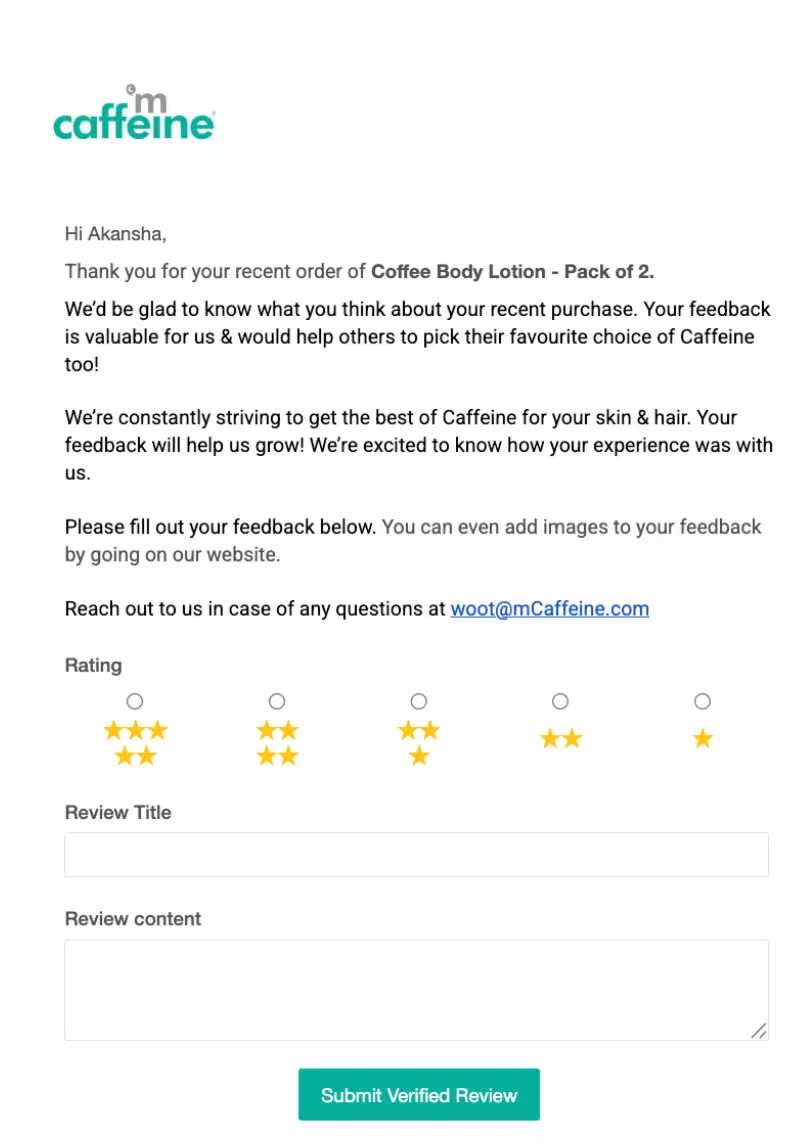
The review email includes an embedded form where customers can add comments and rate the product, so they don't have to go to the website.
For products like mattresses, the review request timeline is much longer, since it takes weeks to decide whether the quality is satisfactory. Sending it too soon can lead to the customer ignoring the email or sharing a generic review saying they have not decided whether buying it was worth it.
Count the number of days until a review request is triggered from the delivery date, not the order confirmation date, so the customer has enough time to use the product.
Workflow #8: Loyalty program automations
A VIP workflow recognizes customers when they cross a meaningful spend or order-count threshold.
Triggers could include reaching a lifetime spending target, placing their fifth order, ordering a certain number of times within a specified period, or moving into a defined loyalty tier by showing non-purchase behavior like adding a review.
The message should acknowledge the milestone and explain what the customer gets next.
Here is an example email from The Beauty Crop UK, a masstige skincare and makeup brand, that lays out the benefits of their loyalty program:
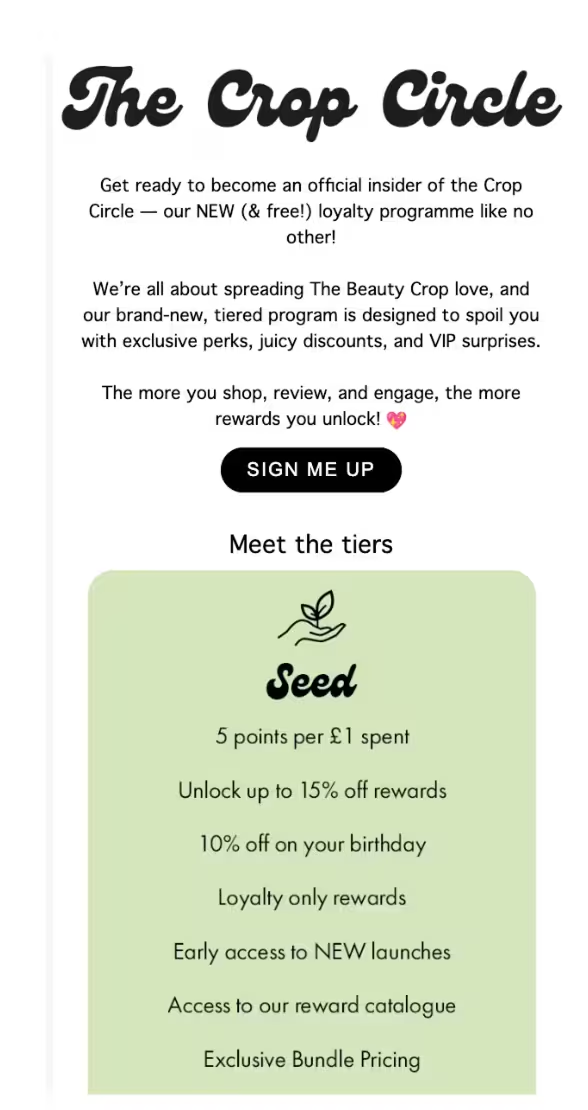
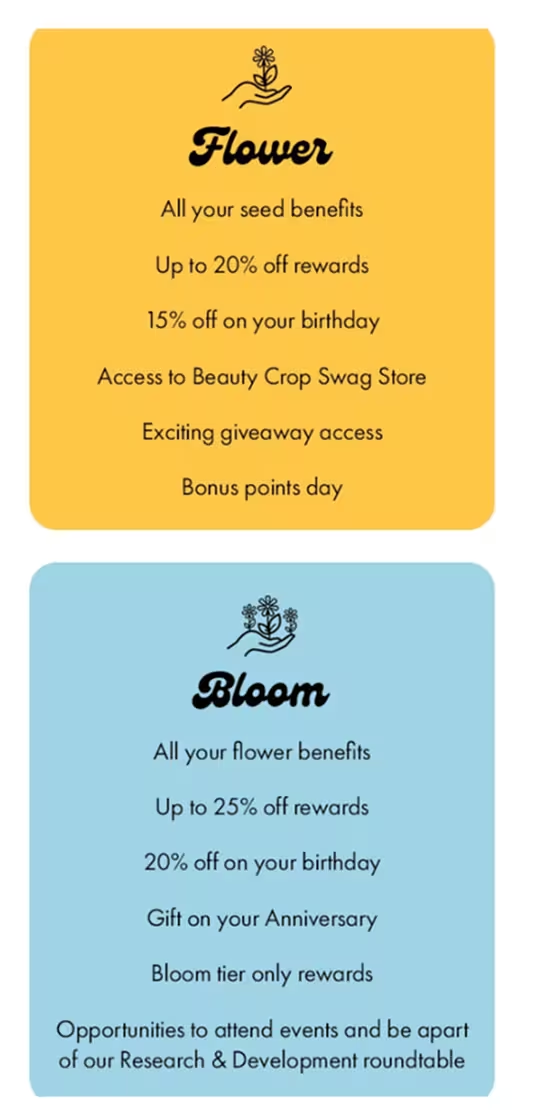
VIP tiers with tangible benefits gamify the purchase process, encouraging more purchases and customer engagement.
Workflow #9: Replenishment reminders
Replenishment automations remind customers to reorder products they regularly consume.
You can trigger them based on order data and the expected consumption cycle, then stop when the customer places another order.
Replenishment reminders are particularly useful for products with predictable usage: supplements, skincare, food and beverages, pet food, and household essentials that run out.
A simple reminder like this is often enough (the important part is the CTA linking to the specific product page):
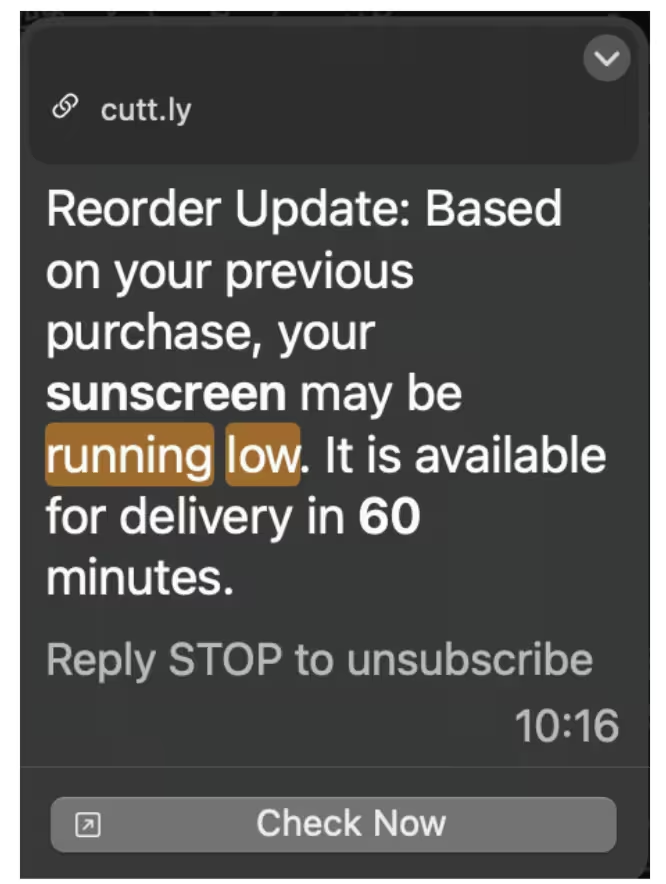
Brands that do not sell products with a predictable replacement cycle can skip this automation.
Workflow #10: Price drop alerts
A price-drop workflow alerts shoppers when the price of a product they have browsed or wishlisted falls. The trigger is the price change itself, and the message should get triggered immediately while the price is still relevant.
This automation works best for products the customer has already shown clear interest in (either by browsing or adding them to the cart at some point in the past) as long as the price fluctuation is considerable.
If you send it for all products, then it won’t be any different from a sales promo. Restrict the workflow to products and contacts where the alert is likely to influence a purchase.
Other e-commerce marketing factors: exit conditions, frequency caps, and more
Several workflows do what they are supposed to, but when they clash, they hurt customer experience.
That’s where exit conditions, suppression rules, and frequency caps come in.
Brevo’s automation builder lets you add exit conditions and suppression filters with multi-channel steps, so email, SMS, and push messages can be a part of the same automation instead of being managed as separate sequences.
They add guardrails to automations so customers receive relevant communication without spam.
Every workflow needs an exit condition
You know which kind of cart abandonment email frustrates customers?
One that gets sent after the customer has already completed the purchase. It signals that the brand isn't paying attention, and it clutters the customer’s inbox.
The same applies to a win-back workflow that continues after a customer returns. Before activating any automation, define the event that should remove a contact from it.
The rule is: if an event makes a message irrelevant, treat that event as an exit condition.
For most e-commerce workflows, a placed order is the primary exit condition. Others may need more than one; a browse-abandonment workflow might stop when the shopper purchases the product or adds it to a cart.
In Tran’s case, the agency’s main clientele is law firms, and the lack of exit criteria created issues. “We faced an issue when clients kept calling the intake department regarding consulting appointments. Our system only tracks the date on which the message is sent, but it does not track the actual status of the conversation,” she stated.
The solution? Here is what Tran recommends:
“Most companies skip the exit condition that must run a live status check at the end. Any workflow automation must have access to both points of exit. So, now, in our company, we make sure all exit criteria in our CRM are tied directly to the scheduled appointments for the clients.”
Beyond live status checks, all automations should apply other exit conditions.
According to Kirill Meshyk, the Head of AI Data Collection at Unidata, "Exit conditions should also include customer response, unsubscribes, refunds, complaints, and changes in customer status.”
Since these can clearly indicate that a subscriber is uninterested or disengaging from part of the buying process, sending automations about price drops and replenishments will only add noise.
Suppression stops conflicting workflows
Exit conditions control individual workflows.
Suppression controls what happens when multiple automations compete for the same customer.
A shopper could be in the midst of receiving a welcome series, trigger a browse abandonment workflow, and receive a promotional campaign within the same 48 hours. Each message might make sense on its own, but together they can feel like spam.
When you set suppression rules before launching your automations, you ensure that when a contact is in an active automation, that workflow takes priority and other automations that might get triggered are suppressed.
For example, suppression rules can exclude recent purchasers from acquisition-focused messages. The goal is to filter out automations when multiple triggers occur at once so that only the most relevant message gets through.
Frequency caps as safety nets
Even well-planned suppression rules won’t catch every possible combination.
A global frequency cap adds another layer of protection by limiting the total number of marketing messages a contact can receive within a set period.
Set the cap once, and it applies across future workflows, reducing the risk that a new automation accidentally adds to an already crowded message schedule.
Test this especially before a major sales period.
Black Friday is an ideal stress test; abandoned cart workflows, browse reminders, post-purchase sequences, win-back automations, and so many more can become active while the campaign calendar is already packed.
Audit your exit conditions, suppression rules, and frequency caps before the peak period, not during it.
Which marketing channel for which automation?
Not every automation needs to use every channel. Rely on the following parameters to pick your channel:
- Cost
- Reach
- Purpose
For example, SMS bills per message, so SMS automations with long sequences can eat into your marketing budget.
Web push notifications reach opted-in visitors without an email address, so reach is higher.
When choosing a channel by purpose, emails are ideal for long-form storytelling such as welcome series or loyalty program benefits, while SMS and web push are better for time-sensitive reminders and updates.
The most effective setup is usually the simplest one that gets the message in front of the right customer.
| Workflow | Primary channel | Add a second channel when... |
|---|---|---|
| Abandoned cart recovery | The cart value is high enough to justify SMS as a second touch | |
| Welcome series | Rarely. Long-form onboarding content belongs in email | |
| Back-in-stock alerts | Web push or SMS | The product is genuinely urgent, the audience is small, and the potential sale justifies the cost |
| Shipping updates | SMS or email | The message is transactional and the customer needs it quickly |
| Flash sales | Email + web push | SMS is reserved for the highest-value segment |
| Win-back | Rarely. SMS is usually difficult to justify for a lapsed contact |
You can also pick channels based on a combination of the above factors.
For example, since web push can reach anonymous visitors who have opted in but have not provided an email address, it is particularly useful for time-sensitive use cases such as browse abandonment and back-in-stock alerts for newer visitors.
The same workflow can also use different channels at different points in the customer journey.
An abandoned cart automation might start with an email, then follow up with SMS if the cart value justifies the additional cost. As Meshyk warns:
“Brands should avoid adding every channel just because it is available.”
Instead, use each channel where its cost, reach, urgency, and message format make sense.
How to build marketing automations with Brevo
Once your store is connected and events are coming through correctly, you can build the workflow.
The exact setup varies by e-commerce platform, but the logic stays largely the same.
Step 1: Connect your store
Shopify merchants can connect to Brevo using the Brevo PushOwl app.
WooCommerce uses the Brevo plugin, and PrestaShop uses the Brevo module. If you already have Brevo connected to Shopify, check Brevo’s migration instructions before installing the new app.
Step 2: Install the tracker
Connecting the store is not enough if you want to trigger automations based on browsing behavior.
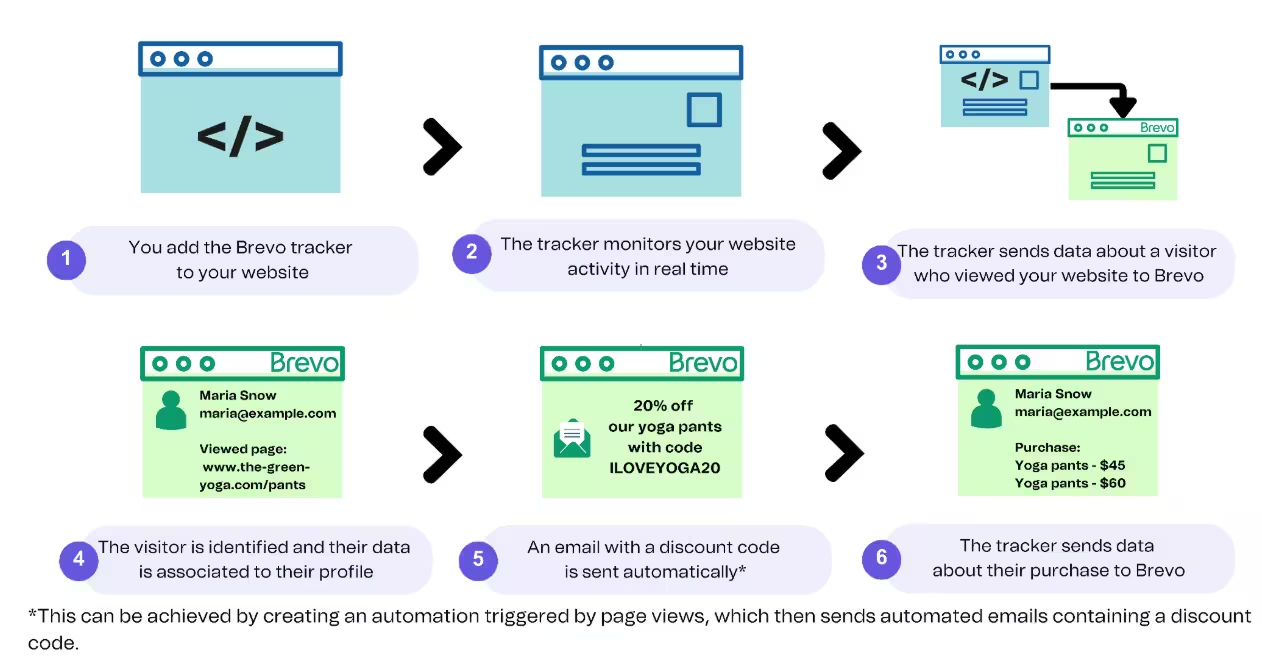
Install the Brevo tracker so events like product views and cart activity reach your account.
Step 3: Start with a workflow template
Rather than building every automation from scratch, choose a workflow template for your chosen use cases.
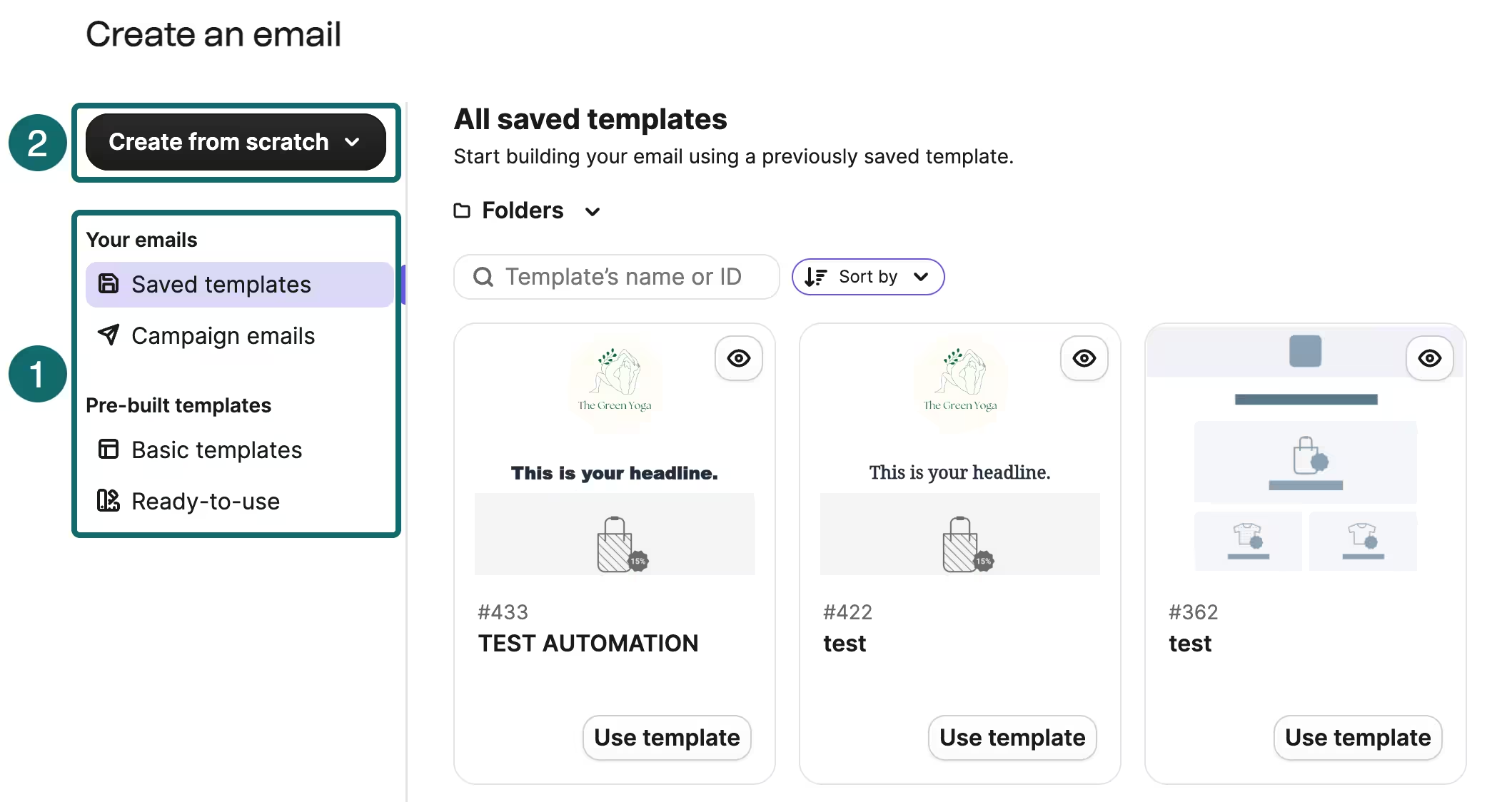
Then adapt its triggers, timing, conditions, and message content to your store and customer behavior.
Step 4: Add steps to your automation
Decide the triggers, actions, and exit conditions before writing the copy.
An exit condition for an abandoned cart automation, for example, is usually a completed purchase. Doing this before building messages prevents the workflow from continuing after it has fulfilled its purpose.
Step 5: Layer marketing channels
Add SMS, web push, or WhatsApp only when the use case justifies another customer touchpoint. Multi-channel automations can keep those messages under the same set of conditions, and you do not need to create separate automations for each channel.
Instead, you layer them into one sequence.
Step 6: Test the triggers
Place a real test order and abandon a real test cart on your store website. Then check whether the automation triggers as intended and whether you enter and exit the workflow under the right conditions.
Choosing an e-commerce automation platform
Before picking a tool or comparing features, focus on what your store needs, then match it to what you're paying for with each tool.
“Becoming too excited about automation tools means that your business could risk wasting its time on complicated workflows before you have the insights or traffic you need to make them work.” - Alys Reynders, CMO at Quickbase, a no-code CRM builder
For instance, Brevo primarily bills by emails sent, while Klaviyo’s pricing is tied to active profiles.
Some tools like Omnisend and Mailchimp price around the number of contacts stored. The same store can therefore have very different costs as its customer database grows, even when its messaging volume stays similar.
Contact-based pricing can become expensive as an email list grows, whereas send-based pricing can make more sense for stores with large lists but relatively low messaging volume.
Calculate the cost based on your expected list size and monthly sends, rather than comparing only the plan price.
Once you understand this aspect, compare platforms based on:
- Store events: Can the platform trigger workflows from the events your store actually produces, such as product views, cart abandonment, purchases, and refunds? More triggers are not automatically better if the events you need are not supported.
- Channels: Check which channels you need so you do not pay for channels you might not use. Assess plan restrictions or add-on costs associated with channel upgrades.
Transactional messaging: If order confirmations, shipping updates, and other transactional messages can live alongside marketing automation, you can manage customer communications in one holistic dashboard. Otherwise, you may have to maintain separate systems. - Automation depth: Look beyond the number of templates. Complex stores may need branching logic, detailed revenue attribution, advanced segmentation, and AI email marketing tools to build sophisticated customer journeys.
The right platform depends on your priorities.
| Pick... | If you are |
|---|---|
| Klaviyo | A revenue-focused DTC brand that needs deep e-commerce data collection and synthesis along with advanced revenue attribution. |
| ActiveCampaign | A brand that needs sophisticated automation logic |
| Omnisend | Looking for an accessible starting point with a free plan |
| Brevo | Searching for broad e-commerce platform coverage for omnichannel automations and pricing based on send volume |
For a side-by-side look at the options above (and more), dive into e-commerce marketing automation software comparisons to identify the tool that will work best for your store.
Measuring marketing automation performance
Automation performance is easy to overestimate if you rely on campaign metrics or generic email marketing benchmarks.
For example, open rates can look impressive for triggered messages because the recipient has already shown intent, but that will not mean much if the customer does not move to the next stage of the journey.
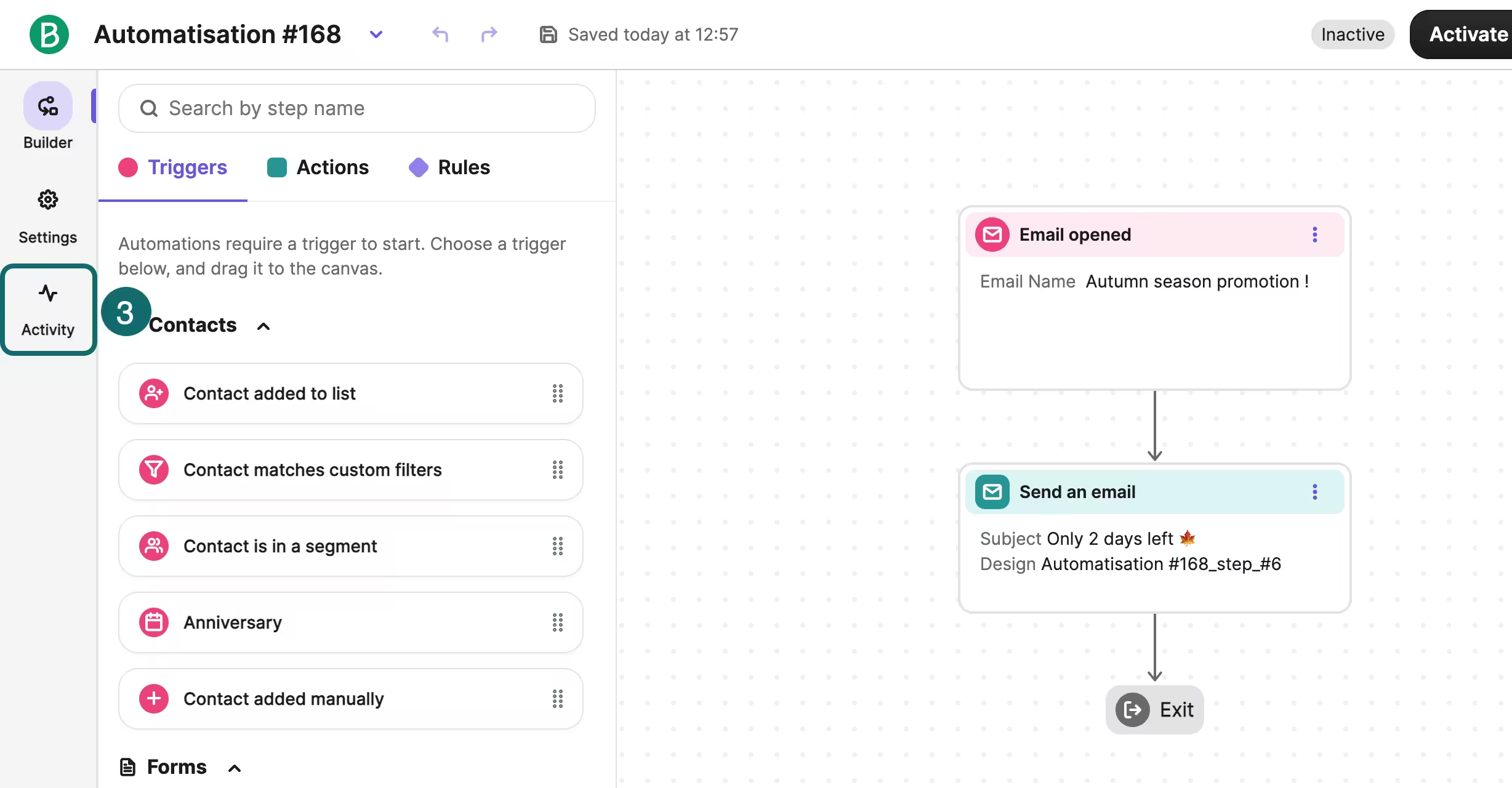
A better question is whether the workflow creates incremental revenue and moves customers toward the action the automation was designed to drive.
Monitor the following e-commerce metrics for your marketing automations:
- Revenue per recipient: The clearest measure of an automation’s commercial value. It accounts for both how many people enter the workflow and the revenue it generates.
- Workflow performance over time: Compare each automation against its own historical performance, not campaign averages. A cart abandonment workflow and a promotional campaign have different audiences, triggers, and intent levels, so the metrics aren't directly comparable. Moreover, the “upkeep” of an automation is minimal when compared to campaigns that require multiple rounds of creative briefs, follow-up, and manual scheduling.
- Exit rate: A high exit rate is not necessarily a problem. If contacts leave the workflow because they completed the purchase, a high exit rate indicates the workflow is doing what it is designed to do. Look at why contacts exit, not just how many do.
- Automation revenue as a share of total revenue: This puts individual workflows in the context of the whole business. It also makes it easier to explain automation's value to stakeholders.
A common mistake brands make when measuring automation performance is pulling numbers too early.
Reynders, who has nearly 30 years of marketing experience, reminds brands that:
“If you’re looking to create automated re-engagement flows based on the churn that you’re seeing, it’s always a good idea to wait until you actually have a baseline to work with that has enough data to cover average customer buying cycles.”
Without this data, you are going in blind. As Meshyk mentions:
“Oftentimes, poor automation is due to incorrect data, not a poor automation solution.”
Meshyk further adds, “Advanced segmentation and personalized product recommendations are built by most brands prior to collecting enough customer behavior data. These automations can look impressive in an automation platform, but most of the time they fail because the brand doesn't understand customer buying behavior.”
When you have sufficient customer data, you can investigate performance drops and gauge which of the following needs tweaking:
- Automation trigger
- Customer segment
- Timing
- Message template/content/subject line
- The offer
Once you identify the issue, you can tweak that portion of the automation without rebuilding from scratch.
E-commerce marketing automation mistakes to avoid
E-commerce automation gets complicated or ineffective when brands tailor workflows to generic benchmarks instead of their own niche or when they use discounting as a strategy rather than a last-resort incentive. Here are some other marketing automation mistakes to look out for:
Mistake 1: Using generic timing filters
Don’t assume every workflow should wait 24 hours, 48 hours, or 30 days because that’s the industry norm.
As Meshyk explains:
“The right delays depend on your customer journey and buying cycle. Take, for instance, brands that sell products with repeat purchase cycles. These brands would need shorter delay workflows. In contrast, it may take customers of higher-priced goods a longer period of time to consider and buy the product; thus, a longer delay workflow may be justified.”
Look at the typical inter-purchase interval for win-back automations or how quickly a cart tends to convert before deciding the timing for your abandoned cart sequence.
Consider how long after product use a customer should have to leave an informed review before sending a review request at the 7-day mark.
Once you have this data, run tests to compare delay times and identify the sweet spot.
Mistake 2: Not optimizing discounts
Leading with a discount code teaches shoppers that abandoning a cart or joining your email list is a guaranteed route to a lower price. Instead, build a relationship first, then use discounts as the last step in the automation sequence.
With an abandoned cart automation, start with a reminder or list the benefits of the product the customer abandoned.
For a welcome series, share the brand story before offering a first-purchase discount. When you use discounts as a last resort to recover a sale or secure a purchase, you protect your margins and don't train customers to expect discounts.
“I often see a lack of stress testing discount codes when setting up automations.” - Juan Castells, the marketing manager at Arke Agency
According to Castells, when brands don't prioritize QA processes when launching campaigns, they may end up selling at a loss because of parallel welcome automations. Here is an example he provides:
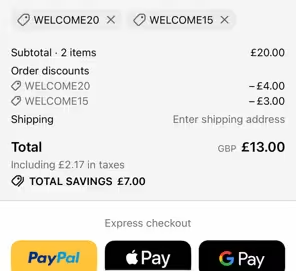
Running multiple campaigns with discounts requires brands to ensure customers can apply only one discount at a time. Castells explains:
“You need to ensure that your discounting strategies across multiple campaigns (email and/or SMS) don't hurt your bottom line. Specially with savvy shoppers or multiple plugins out there for finding coupons and discount codes.”
When using discounts, assess whether you are offering them at the right time and whether multiple discount codes are in play.
Mistake 3: Launching ten workflows at once
Start with high-impact automations such as the welcome series, abandoned cart recovery, and post-purchase communications. Measure their performance and use the data to decide what to build next.
Creating and optimizing your automations one workflow at a time makes the overall customer journey more cohesive rather than haphazardly patched together.
Mistake 4: Measuring every automation by revenue
Revenue makes sense for a cart recovery or win-back workflow, but transactional and customer-experience automations may have different goals.
But what should these goals be?
According to Meshyk, “if an automation cannot improve conversions, retention, or customer experience, it should not be built.”
When you define outcomes for each automation, it gets easier to track it to a metric.
Mistake 5: Not looking out for sync delays
Another mistake brands make is not accounting for sync delays when setting up automations.
Tran explains:
“You can get automation running, and it looks fine in the builder and all the statuses are exactly as they should be, and the timelines align, and everything is checked off. Then the messages begin to come in again. The thing is, the status field has not yet synced, and it's almost always a sync delay between the CRM and the platform running the workflow.”
Slow servers or batch processing can contribute to the sync mismatch. Depending on your data load, you can run real-time syncs instead of batch processing or schedule syncs during off-peak hours to avoid this problem.
Execute relevant e-commerce marketing automations with Brevo
E-commerce marketing is not about building all automations on day 1. Get the foundations right and use results to decide what comes next.
- Verify the event flow first
- Build three workflows first
- Set exit conditions before writing the copy
- Measure revenue per recipient
Then expand gradually. Add browse abandonment, back-in-stock, win-back, replenishment, and other automations when the underlying event data is reliable, and the existing automations have a clear performance baseline.
And the best part? You do not need to start with a paid plan.


