
If you run a BigCommerce store and want to create a promotional email, you may be confused: there is no traditional Campaigns tab. BigCommerce gives you the customer data, customer groups, and product and order data, along with a native abandoned cart tool.
Campaign sending and advanced email marketing happen through a connected app.
BigCommerce’s native abandoned cart saver can make a store feel like it has email marketing covered, but that is only one layer of the automation setup. You also need other automations, such as welcome emails, post-purchase journeys, win-back campaigns, and e-commerce analytics.
This guide covers BigCommerce email marketing, including how to choose the right email platform, which campaigns to run, and which metrics to focus on.
- What is BigCommerce email marketing?
- What is BigCommerce used for?
- 7 email campaigns every BigCommerce store should run
- How to set up email marketing on BigCommerce in 6 steps
- How to use BigCommerce for transactional emails
- How to set up BigCommerce email marketing in Brevo
- How to choose an email platform for BigCommerce
- BigCommerce email marketing best practices
- BigCommerce email marketing mistakes to avoid
- Get started with BigCommerce email marketing
What is BigCommerce email marketing?
BigCommerce email marketing uses an email platform to send campaigns and automated workflows to customers.
You connect this email platform through the BigCommerce App Marketplace.
BigCommerce does not include a native campaign builder. Instead, it focuses on product catalog management, storefront templates, and transaction support.
The connected email app handles the marketing channels, while BigCommerce supplies the customer, order, and cart data these marketing campaigns use. Connecting an email platform to BigCommerce syncs contacts with order history, abandoned carts, product catalog data, and more.
The exact data available depends on the integration, but the purpose is consistent: give the email platform enough context to personalize campaigns and automate messages based on shopper behavior.
BigCommerce also has a useful segmentation advantage: customer groups.
Stores organize customers based on attributes such as purchase history, order data, and order total, along with other factors like location. They then use those groups to build targeted marketing audiences, thus reducing the need to recreate every audience manually inside the email platform.
Automated workflows are triggered based on these audiences.
What is BigCommerce used for?
BigCommerce is an e-commerce platform used to manage online stores, including products, storefronts, orders, customers, and transactional communications.
It also provides customer groups and, on eligible plans, native abandoned cart recovery, but it does not provide a full promotional email marketing platform.
| Capability | Native in BigCommerce? | What that means |
|---|---|---|
| Order confirmations and shipping updates | Yes | BigCommerce provides native transactional email templates that are customizable with dynamic data [under Marketing > Transactional Emails] |
| Account-related emails (password resets, account creation) | Yes | Same as above |
| Abandoned cart emails | Yes, depending on the plan | Available on Plus Plan and above. It can send a customizable series of recovery emails |
| Customer segmentation | Partly, depending on the plan | BigCommerce supports customer groups for organizing your list and applying discounts |
| Newsletter or campaign builder | No | You will need to connect an email marketing platform |
| Welcome series, post-purchase, win-back automations | No | You will need to connect an email marketing platform |
| Signup forms and pop-ups | Partly | BigCommerce supports newsletter subscription fields, including storefront themes and checkout, but not dedicated pop-up and lead capture |
| A/B testing | No | You will need to connect an email marketing platform that offers testing |
| Email analytics beyond basic order attribution | Limited | BigCommerce provides analytics around its native marketing features Advanced campaign reporting and lifecycle analytics require an email marketing platform |
| Customer SMTP for storefront email | Yes | BigCommerce supports transactional email configuration; custom SMTP can be configured under the store’s email settings |
BigCommerce’s scope is clear: it covers transactional messaging and, on some plans, supports abandoned cart recovery, but it does not replace a dedicated email marketing platform.
7 email campaigns every BigCommerce store should run
The best BigCommerce email campaigns are triggered by something the customer actually did: subscribed, abandoned a cart, viewed a product, placed an order, or stopped buying.
Start with the seven campaigns below, then adjust the timing to the store’s products and buying cycle. The timing for the email sequences mentioned is a suggestion.
Automation #1: Welcome series
Trigger: Someone signs up for your marketing emails
Timing: Immediately, then day 2, then day 5
The welcome email should deliver exactly what the subscriber was promised when signing up, such as a welcome gift. It should also set expectations regarding future emails.
Use the second email to explain why the brand is worth buying from, and if there’s a third email in the sequence, use it to introduce products and provide social proof.
You can also send a single welcome email. Here is an example by Liquid IV, an electrolyte brand:
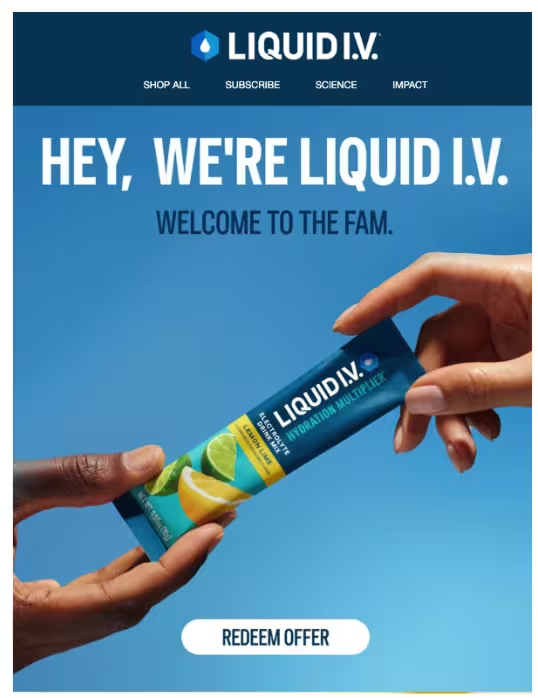
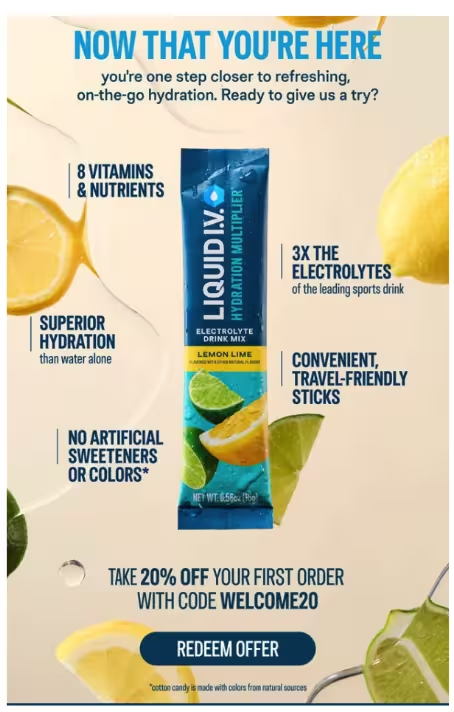
The email highlights the product's benefits and lists its product categories (sugar-free, energy, and immune support). The “welcome fam” is an attempt to relate to its Gen Z target audience.
Many brands include too much information in these welcome emails, such as discounts, company history, bestsellers, shipping information, and more. This approach not only makes welcome emails long, but also confuses customers about what to focus on.
Automation #2: Post-purchase workflow
Trigger: Order placed, and continues after the order is delivered
Timing: Across the period after purchase, with each message tied to a different customer need
The order confirmation is transactional; post-purchase marketing starts after that. Use the sequence for shipping or delivery information where appropriate, product education (such as tutorials, checklists, and UGC content) after delivery, and a cross-sell based on the product purchased.
BigCommerce order data makes the last step more useful than dropping the store’s generic block into every customer’s inbox.
Automation #3: Abandoned cart recovery workflow
Trigger: Cart inactive for one hour
Timing: One hour, 24 hours, 72 hours
For abandoned cart emails, BigCommerce’s Abandoned Cart Saver tool considers a cart abandoned after there is no activity for one hour.
Use cart data to show exactly what the shopper left behind, with product names, high-quality images, prices, and a CTA that leads to the checkout page. Here is Liquid IV’s abandoned cart email:
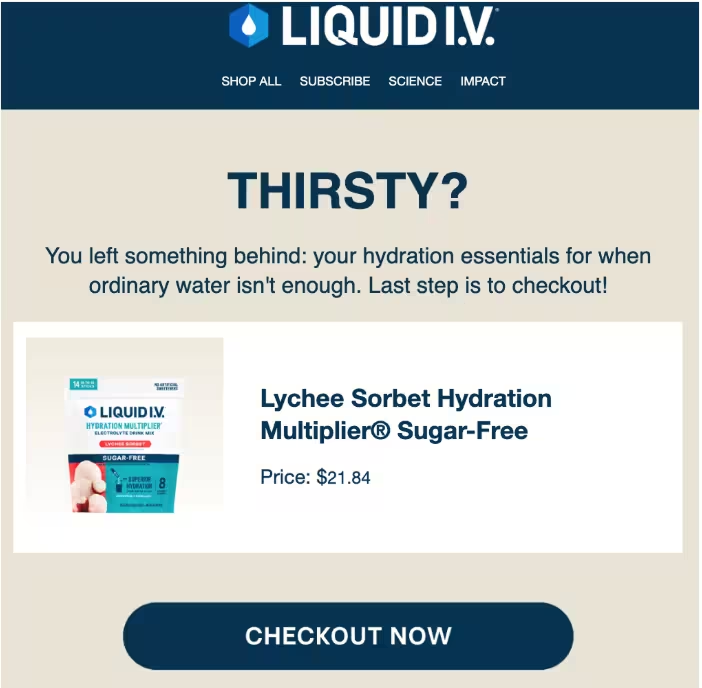
Keep the first two messages focused on completing the purchase, and reserve a discount for a third email if appropriate, since you don't want to train customers to abandon their carts for a coupon in the first email.
Automation #4: Browse abandonment workflow
Trigger: Product viewed without adding to cart
Timing: Within a few hours, followed by a second message only if it’s a high-order-value cart
Browse abandonment is a softer intervention than cart recovery because the customer has shown interest in a product or category but has not added anything to the cart.
In your browse abandonment workflow, you can add a reminder with social proof and related product recommendations. Unlike a cart abandonment workflow, you do not need multiple reminders; just a gentle redirection to the product category they were browsing.
Automation #5: Win-back workflow
Trigger: No purchase for roughly twice the store’s average repurchase interval, or 60-90 days
Timing: 1st email after the relapse window, and second after a week or so
Use BigCommerce purchase data to identify customers who have gone quiet. Tailor the win-back message to what the customer previously bought, and remind them without being pushy.
This win-back email by Delani Jewelry tries to reactivate lapsed customers with new arrivals:
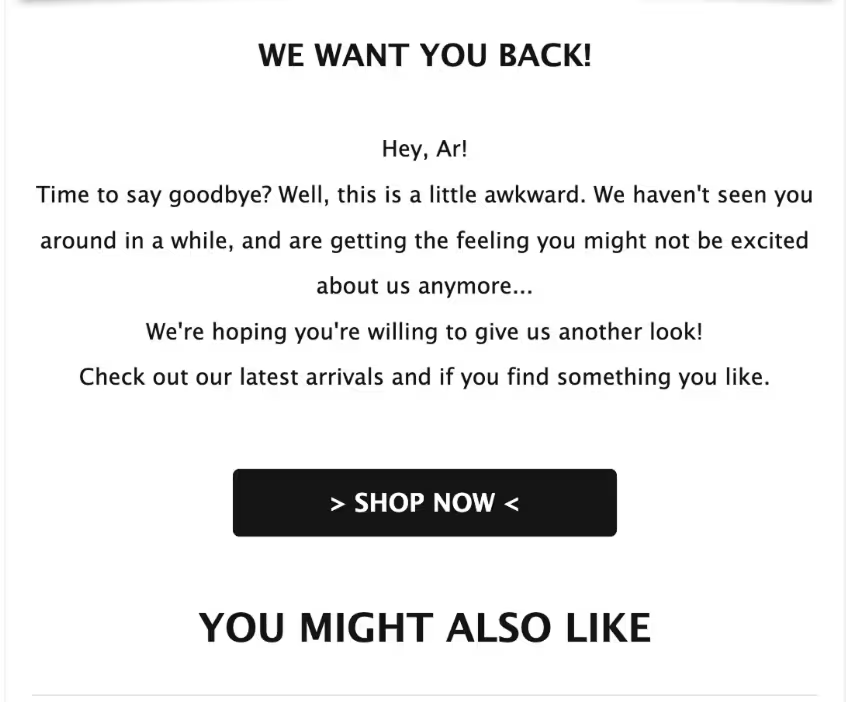
If margins allow, you can offer an incentive, but it should not be in the first email of the sequence.
The “lapsed” window should depend on actual buying behavior based on your brand and specific customer.
For example, a furniture brand cannot use a 30-day lapse window because, unlike consumables, furniture and home decor aren't bought often. Similarly, a customer who normally buys every 30 days is different from one who purchases less frequently.
Automation #6: Replenishment reminders
Trigger: Previous order data plus the product’s expected consumption cycle
Timing: Shortly before the customer is likely to run out
Replenishment automation is useful for products with predictable consumption, such as coffee, skincare, supplements, household supplies, and snacks.
Base the timing on the actual product and typical consumption period from the date of order delivery, rather than sending every customer the same reminder on an arbitrary date. Customers buying subscription packs of 3 months or 6 months should not receive reminders based on the timelines of single purchases.
Automation #7: Back-in-stock notifications
Trigger: Inventory returns above zero for a product with waitlist signups
Timing: As soon as inventory is available
One of the strongest signs of customer intent is when they explicitly sign up for restock notifications. Keep the email focused on the requested product and include a CTA to the product page.
Back-in-stock campaigns can also work for best sellers that run out often. Here is a back-in-stock email by Cocokind:
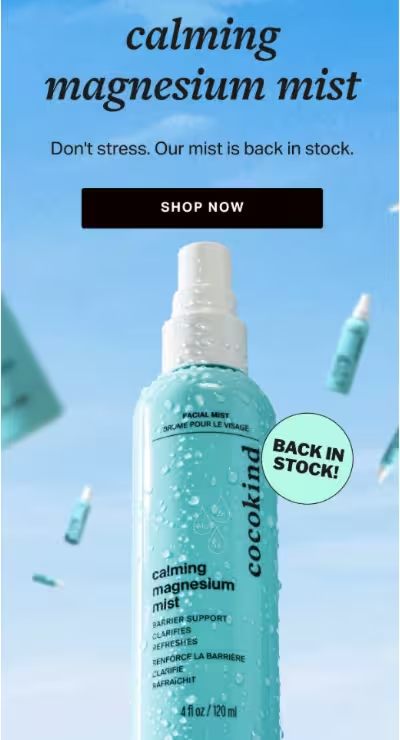
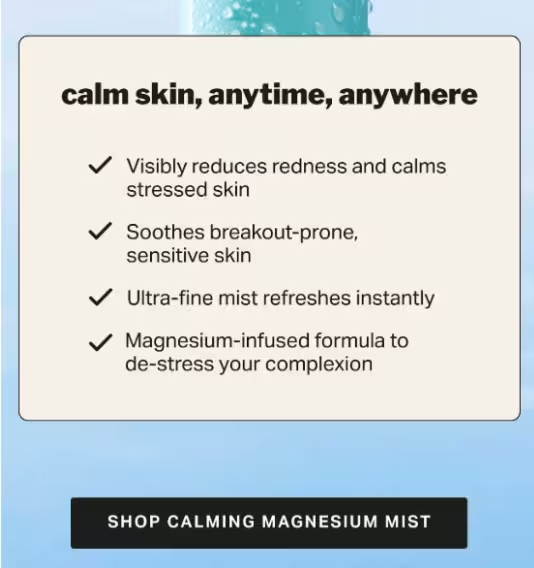
Timing is especially important with back-in-stock notifications because if you send it late, it might reach the customer after the product is out of stock again, thus causing frustration.
How to set up email marketing on BigCommerce in 6 steps
Setting up email marketing on BigCommerce involves choosing an email platform, connecting your store, verifying customer and e-commerce data, building automations, and establishing performance benchmarks.
Follow these six steps to build the foundation before increasing your sending volume:
Step 1: Define what email needs to accomplish
Start with the business goal, not the empty slots on the campaign calendar.
Decide whether email needs to drive first purchases, recover abandoned carts, increase repeat purchases, grow customer lifetime value, or support several of these goals.
The goal determines which customer segments, automations, and campaigns deserve attention.
Step 2: Choose an email platform based on your store’s needs
Compare BigCommerce integration depth and capabilities such as catalog and order sync, abandoned-cart support, SMS or other channels, automation capabilities, and the billing structure.
A platform priced by email volume behaves differently from one priced by contacts or active profiles as the database grows. Choosing the cheapest entry plan without actually calculating what the platform will cost you will lead to confusion later.
Step 3: Connect BigCommerce and verify the data
Connect BigCommerce to the chosen email platform and verify that the required marketing information arrives. Check customers, orders, products, and the events needed for abandoned cart and post-purchase journeys.
Compare the platform’s contact and order data with BigCommerce, then trigger a fresh event to confirm new activity is syncing.
Step 4: Automate your workflows
Give every automation a clear trigger, audience, and exit condition.
Choose one system to own abandoned cart recovery rather than running BigCommerce’s native flow alongside an app-based workflow.
Cover the most important customer moments with automations. This does not mean building dozens of complicated workflows. Instead, focus on two or three high-intent moments before adding more.
Step 5: Build marketing campaigns and a calendar
Build campaigns around product launches, seasonal moments, promotions, replenishment windows, and the customer’s typical repurchase interval.
Segment campaigns by purchase history, average order value, engagement, or product interest.
Avoid sending the same promotions to the entire email list, even for seasonal campaigns. Tailoring the message ensures you present only relevant information to each subscriber.
Step 6: Establish a performance baseline
Send the first campaign to a clearly defined audience, then use the data to establish a baseline for click rate, unsubscribe rate, and revenue per email, using open rate as a directional engagement metric.
Measure performance against the same audience and campaign type over time rather than judging every campaign against a single benchmark.
How to use BigCommerce for transactional emails
Your order confirmation is probably more important to your customer than perpetual 20% off discount codes.
Transactional emails that arrive promptly, for example, when a customer places an order, cancels a purchase, or receives the delivery, attract more engagement than generic promos.
Further reading: GDPR in Email Marketing: How to Be Compliant and Avoid Fines
They are also among the most overlooked automations by online stores.
BigCommerce lets you manage these directly in the app. You can enable or disable individual email types and customize their subject lines and content with customer data and order details.
This gives merchants plenty of control over these automations. However, these transactional emails operate in a silo, separate from the rest of your campaigns that the email marketing platform handles.
Moreover, BigCommerce’s native reporting does not provide the same visibility into transactional sending that a dedicated email platform can.
For developer-led stores, BigCommerce provides an API for email templates, so teams can manage templates programmatically rather than editing them manually.
You can also specify your own SMTP server, which will allow you to route transactional messages through a dedicated email provider. The benefits of this:
- Branded transactional email: Build transactional templates in your email platform and give order confirmations, shipping updates, and other high-engagement messages a consistent visual aesthetic.
- Centralized sending setup: If you are already using Brevo for marketing, you can use its SMTP relay and API for transactional emails, with your domain set up in Brevo. This keeps marketing and transactional email management in one place.
- Deliverability visibility: See whether transactional emails are delivered and whether subscribers open them and click links in the message. Brevo provides transactional reporting and real-time event data for this.
If you route transactional emails through an external email platform, disable the corresponding notifications in BigCommerce to avoid sending two identical automations to customers.
How to set up BigCommerce email marketing in Brevo
Setting up BigCommerce email marketing in Brevo connects your store’s customer, product, order, and overall e-commerce activity to Brevo so that you can use that data for automations.
The setup involves installing the integration, connecting your API key, configuring data sync, building workflows, adding signup forms, and verifying the connection.
Otherwise, contact and event data will flow into Brevo without workflows to act on it. Follow these six steps to set it up in Brevo:
Step 1: Install the Brevo App
Find Brevo in the BigCommerce App Marketplace and download the app.
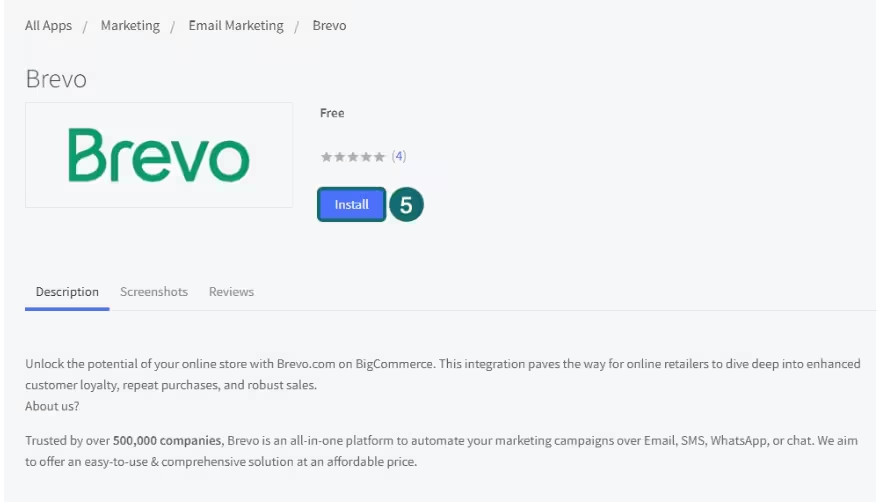
Log in to your BigCommerce account when prompted and authorize the connection.
Step 2: Connect your Brevo API Key
In Brevo, generate an API key and copy it into the BigCommerce integration.
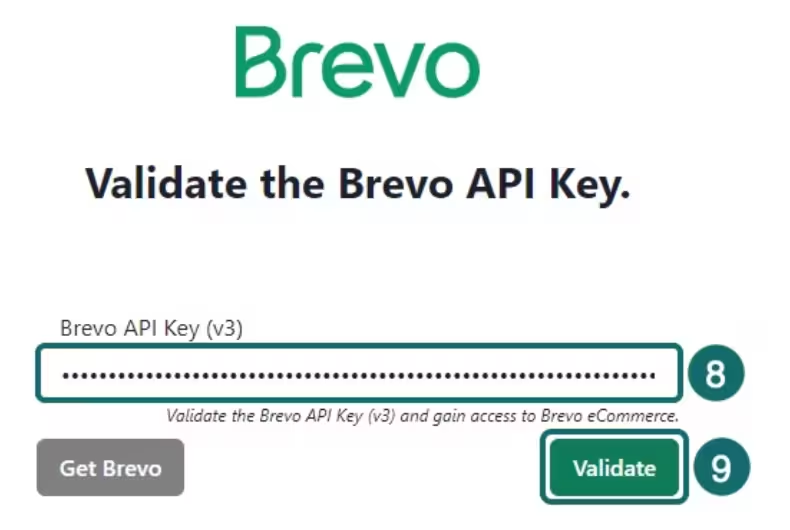
Use a dedicated key for the integration instead of sharing credentials among team members.
Step 3: Configure data sync and event tracking
Decide which customer data you want to send to Brevo and which store events you want tracked before connecting the integration.
This determines what information Brevo can use for segmentation and automation.
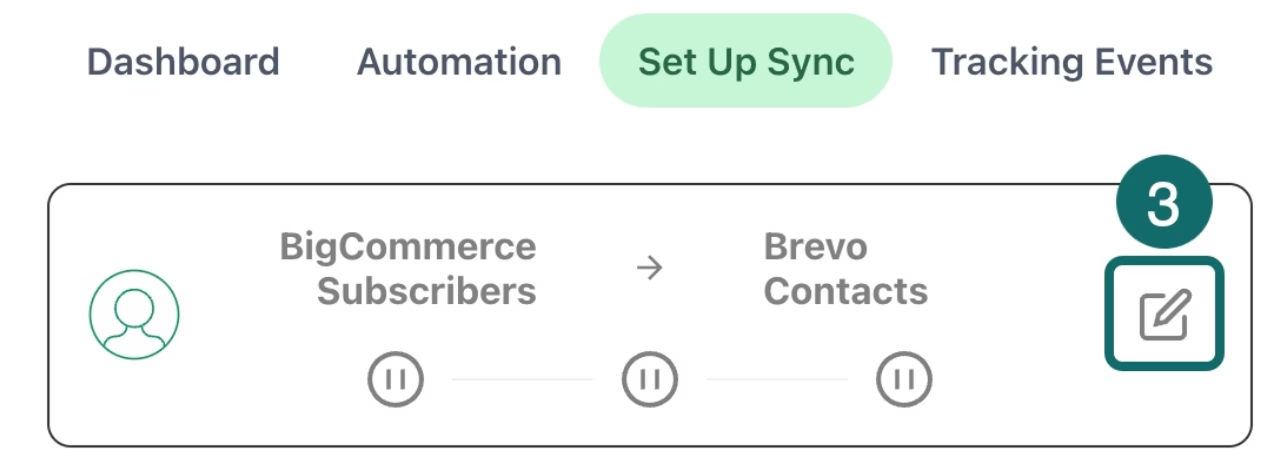
For an e-commerce store, prioritize the events that support your core customer journey rather than syncing everything without a purpose.
Step 4: Build your automations first
Set up the marketing automations you want to activate as soon as customer data starts arriving.
At minimum, build a welcome sequence and cart abandonment automation, since these cover the highest-intent customer touchpoints. Depending on your business, add other workflows before turning on the connection.
Step 5: Create and embed your signup forms
Create the forms you need to turn store visitors into qualified leads and subscribers.
Offer visitors an incentive so they are more likely to share their email ID. Also clarify what alerts they will receive when they subscribe, and get clear, active consent before sending the first marketing email.
Step 6: Connect and verify the data
Click ‘Connect’ to start the integration and allow time for the sync to occur.
Historical data will be retrieved, and then you can check the e-commerce analytics dashboard. Compare the number of records synced to Brevo with the corresponding total in BigCommerce.
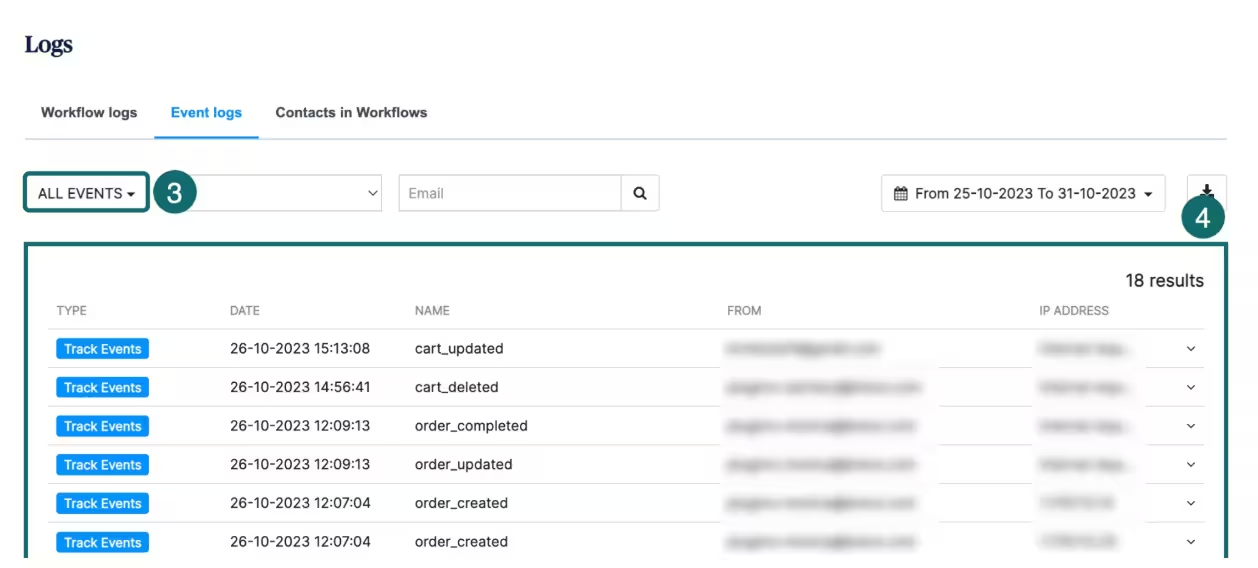
Brevo’s free plan allows up to 300 emails per day, so check your sending volume before planning a campaign around the free plan.
How to choose an email platform for BigCommerce
The biggest difference between e-commerce email platforms is not just the range of features.
It’s what a store pays for as you grow. How an email platform bills for email marketing should match your brand’s expectations:
Depending on the size of your email list, the difference can be negligible or can materially change the cost of running your campaigns.
| Platform | Billing basis | Free tier | Best for |
|---|---|---|---|
| Brevo | Email volume | 300 emails/day | Stores that want email, SMS, WhatsApp, and transactional messaging in one platform |
| Klaviyo | Active profiles | Up to 250 profiles and 500 emails/month | Stores that prioritize deep e-commerce data and revenue attribution |
| Omnisend | Billable contacts + email credits | Up to 250 profiles and 500 emails/month | Deep BigCommerce integration and e-commerce native multichannel marketing |
| Mailchimp | Contact tier + monthly send limit | Up to 250 profiles and 500 emails/month | General-purpose email marketing |
Assess your store’s priorities before picking a platform.
The free plans for each tool will help you test compatibility, but the real test is which platform’s features make sense once you scale.
Klaviyo is the stronger choice for sophisticated e-commerce analytics, while Omnisend is especially strong for native marketing, since it is also a BigCommerce Elite Partner.
BigCommerce email marketing best practices
BigCommerce email marketing best practices include using customer groups for segmentation, matching send frequency to buying cycles, using real product data, prioritizing the right performance metrics, and more.
These practices help you use BigCommerce data more effectively.
Use customer groups for segmentation
BigCommerce already gives you customer groups based on purchase history, order total, order data, and location. Start there and use that as the foundation for customer segments in your email platform.
Then layer in email and website behavior to create segments that will respond to your tailored campaigns.
Match send frequency to repurchase intervals
Your customers’ buying cycle should determine how often you email them.
A consumables brand may have a reason to send weekly; a furniture store probably does not. Start with the average time between purchases, then add campaigns when you have a genuine reason to contact the customer rather than following an arbitrary content calendar.
Include real product data in your email automations
Connect the BigCommerce catalog to your email platform and use dynamic product data wherever possible.
Product names, images, prices, and availability can then stay tied to the catalog instead of being manually recreated for every campaign. That makes personalization easier and reduces the risk of sending an email featuring a product that is no longer available.
Pick the right metrics to prioritize
Because of privacy mechanisms such as Apple Mail Privacy Protection, open rates are less reliable.
Instead, look at engagement metrics such as click rates and unsubscribe rates. Revenue per email shows whether your engagement translates into business value. Do not aim for generic benchmarks; use your store’s historical performance as a baseline to track progress.
Suppress the right customers from receiving campaigns
Every automated email needs an exit condition.
Remove a customer from an abandoned-cart sequence as soon as they place an order, stop a win-back flow when a dormant customer becomes active again, and exclude recent purchasers from promotions designed to drive a first or repeat purchase.
Product-specific campaigns should also account for previous purchases. Suppression prevents customers from receiving messages they have already acted on.
BigCommerce email marketing mistakes to avoid
Common BigCommerce email marketing mistakes include running duplicate abandoned cart workflows, overlooking transactional emails, authenticating only one sending path, ignoring consent settings, and not verifying data syncs:
Assuming your plan and app setup cover abandoned cart recovery
BigCommerce’s native abandoned cart functionality depends on your plan, while an email platform such as Brevo can run its own cart recovery automation. Check which system handles recovery and disable duplicate flows, or shoppers may receive multiple emails for the same abandoned cart.
Treating transactional emails as an afterthought
Order and account emails are a part of the customer experience, not just system notifications.
BigCommerce supports HTML and dynamic content in transactional templates, so use the available branding rather than leaving these emails disconnected from the storefront.
Authenticating only your marketing domain
Marketing campaigns and transactional messages can have different sending paths.
If you route transactional email through a separate provider, configure and authenticate that setup rather than assuming authentication on your marketing domain covers everything.
Building automations before verifying the data sync
An abandoned cart or post-purchase workflow on Brevo relies on BigCommerce events reaching Brevo. Check the data sync and activate the required tracking events before turning workflows live.
Ignoring consent settings
BigCommerce separates marketing newsletter consent from abandoned cart email consent. Store settings can determine whether abandoned cart emails require customer consent. Configure the consent rules before switching on recovery emails.
Get started with BigCommerce email marketing
Customer data, orders, transactional notifications, and native abandoned cart recovery on eligible plans can stay in BigCommerce. The rest of the lifecycle (campaigns, segmentation, and automated workflows) may need an email marketing platform.
Try the following:
- Start with a welcome series, abandoned cart recovery, and post-purchase follow-up. These cover high-value moments, and eventually, you can stack more marketing automation strategies.
- Do not stop at connecting an email platform for campaigns. Review order confirmations and other transactional messages, authenticate the appropriate sending domain, and route transactional email through a properly configured provider if BigCommerce’s native setup is not enough for the brand.
- Confirm that data related to contacts, orders, carts, and other store events required by automations are reaching the email platform correctly.
Once the core data and automations are working, you can build campaigns around the customer groups and buying cycles already visible in BigCommerce.
Install Brevo and ship your first automation this week for free


