
Vibe coding is a way of building software by describing what you want to an AI tool in plain language, then letting it take over writing code while you guide the result. Instead of reading every line, you judge the app by how it behaves and ask for changes until it works.
Building a working prototype this way can take an afternoon instead of weeks. Turning it into an app that real people can sign up for, trust with their data, and receive emails from takes real engineering on top. This guide covers both. It explains what vibe coding means, how vibe coding works, how to vibe code step by step, its pros and cons, and a practical checklist to ship. It also looks closely at the part most guides skip, which is email.
The information in this article was last updated on October 14, 2026.
Table of Contents
- What is vibe coding? Meaning and origin
- Vibe coding vs. traditional coding vs. AI-assisted coding
- Popular vibe coding tools
- How to vibe code: a step-by-step workflow for beginners
- Vibe coding pros and cons
- From vibe coding to production code: the checklist
- Email: the part of a vibe-coded app most people forget
- Ship faster, but ship it properly
What is vibe coding? Meaning and origin
The vibe coding definition is simple. You describe the outcome, a large language model takes care of generating code, and you steer by testing and giving feedback. It is a new approach to software development where the code itself fades into the background.
The term comes from AI researcher Andrej Karpathy, who described it in a February 2025 post as coding where you "fully give in to the vibes, embrace exponentials, and forget that the code even exists," as Merriam-Webster notes in its slang entry. By November 2025, "vibe coding" was named Collins Word of the Year 2025, a sign of how fast artificial intelligence changed the way people build software.
How vibe coding works
In practice, vibe coding works as a short feedback loop:
- You describe the app or feature in a prompt: "Build a booking page where clients pick a time slot and get a confirmation email."
- The AI builds it, generating code for the interface, the logic, and often the database.
- You test and react: "The calendar is too small on mobile," "Add a cancellation link."
- The AI revises, and you repeat until the behavior matches what you had in mind.
When something breaks, you usually fix it the same way: describe the problem and let the AI try a different approach. That rapid iteration is the main appeal.
What is a vibe coder?
A vibe coder is someone who builds software mainly by prompting AI rather than writing code by hand. Some are developers who use it to prototype faster. Many are founders, marketers, and designers with little technical knowledge who now build tools and websites themselves. In both cases, the role shifts from typing code to acting more like a product manager: deciding what to build, describing it clearly, and judging the output.
Vibe coding vs. traditional coding vs. AI-assisted coding
| Traditional coding | AI-assisted coding | Vibe coding | |
|---|---|---|---|
| Who writes the code | The developer | The developer, with AI suggestions | The AI |
| Who reads the code | The developer | The developer reviews every change | Often nobody, at least at first |
| Main skill | Software engineering | Engineering plus prompting | Describing behavior and testing results |
| Best for | Production code, large codebases | Professional teams moving faster | Prototypes, internal tools, experimentation |
In AI-assisted coding (or AI-assisted development), a developer stays responsible for every line and uses AI tools to go faster. In vibe coding, the person building may stop reading the code entirely. Most real projects end up in between: vibe coding to explore ideas quickly, then reviewing the parts that handle money, data, and security.
Adoption among professionals is still limited. In the Stack Overflow 2025 Developer Survey, 84% of respondents said they use or plan to use AI tools in development, but 72% said vibe coding is not part of their professional work. Startups are moving faster: Y Combinator managing partner Jared Friedman said a quarter of the W25 batch had codebases that were 95% AI-generated, as reported by TechCrunch (excluding imported library code).
Vibe coding vs. agentic coding
A newer term, agentic coding (also called agentic engineering), describes developers directing AI agents that plan, write, test, and fix code across several steps, while the developer keeps ownership of architectural decisions, code quality, and review. If vibe coding is about speed and access, agentic engineering is about applying that speed to production code without lowering engineering standards.
Popular vibe coding tools
Vibe coding tools fall into two groups: browser app builders for people who don't want to touch code, and AI editors and agents for people who do.
| Tool | Type | Good for |
|---|---|---|
| Lovable | Browser app builder | Full web apps from a chat, with built-in backend options |
| Bolt | Browser app builder | Quick full-stack prototypes in the browser |
| v0 | App and UI generator by Vercel | Interfaces and web apps that deploy to Vercel |
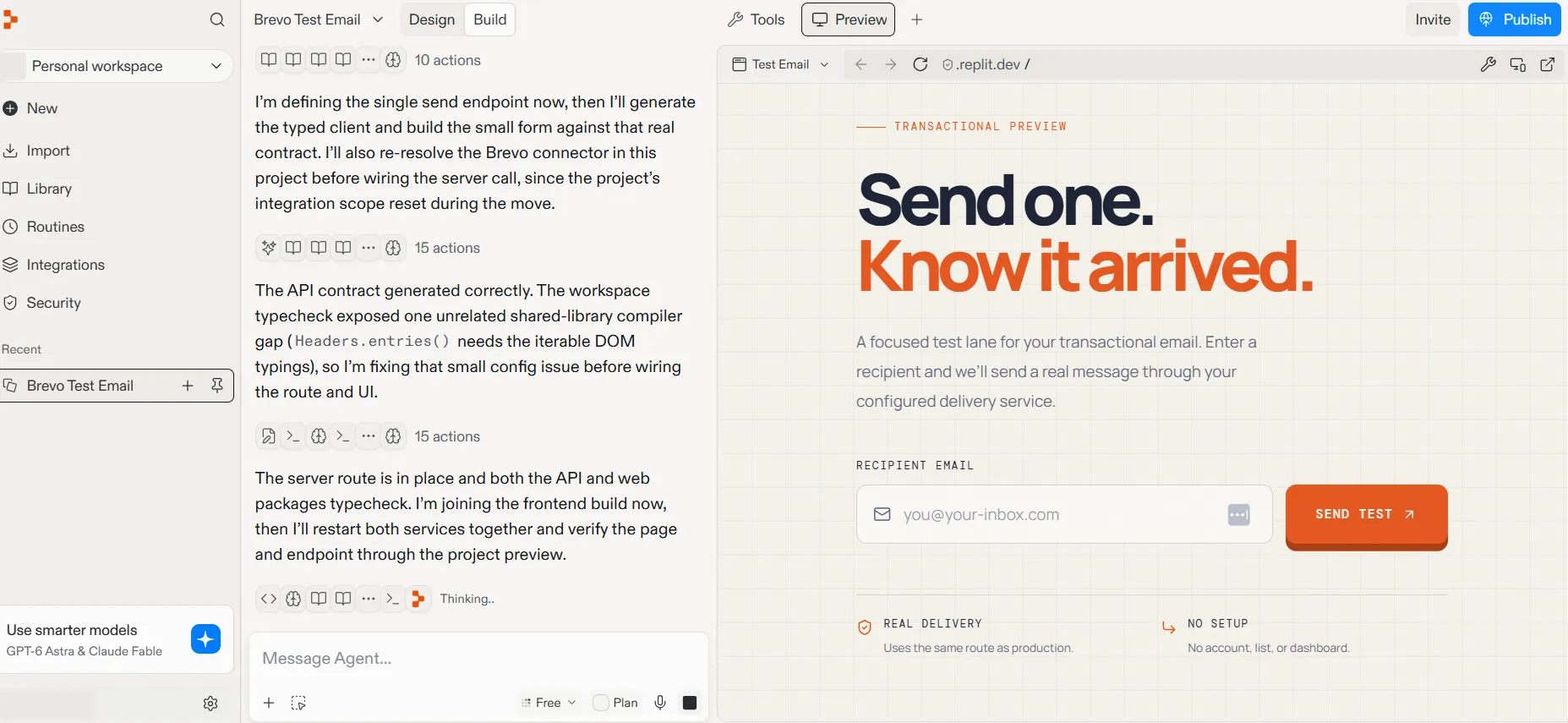
| Replit | Browser IDE with an AI agent | Building, hosting, and publishing in one place |
| Cursor | AI code editor | Developers who want AI inside a familiar editor |
| Claude Code | AI coding agent in the terminal | Larger codebases and multi-step changes |
How to vibe code: a step-by-step workflow for beginners
Anyone can start vibe coding, but a simple workflow saves a lot of frustration:
- Pick one tool. For a first project, a browser builder is easiest: no setup, and hosting is included.
- Start small. Describe one feature, not the whole product. "A sign-up form that saves emails to a database" beats "an app like Airbnb."
- Write prompts in plain language, with context. Say who the user is, what they should be able to do, and what should happen when something goes wrong.
- Test after every change. Click through the app, try edge cases (empty fields, wrong passwords, mobile screens), and report exactly what you see.
- Ask the AI to explain. "Explain how login works in this app" builds understanding and helps you spot wrong assumptions early.
- Save working versions. Use the tool's version history or Git, so you can roll back when an iteration breaks something.
- Review before launch. Before real users arrive, check security, data access, and every email the app sends, using the checklist below.
Vibe coding prompt examples
A few examples that work better than one-line requests:
The last prompt is worth running on every project: AI tools sometimes take shortcuts with secrets that a quick review catches.
Vibe coding pros and cons
| Pros | Cons |
|---|---|
| Low barrier to entry: non-technical users can build working software | AI-generated code can hide security vulnerabilities |
| Rapid prototyping in hours instead of weeks | Messy code and technical debt build up quickly |
| Cheap experimentation with new ideas, APIs, and frameworks | Speed can replace understanding, which makes bugs harder to fix |
| Faster learning: you see working examples of your own ideas | Not a replacement for engineering on mission-critical software |
The cons are real. Veracode tested code from more than 100 language models and found that AI-generated code introduced security vulnerabilities in 45% of cases. In a real-world example, researchers scanning 1,645 projects from Lovable's showcase found 170 with database access rules (row-level security) weak enough to expose user data.
Other weak spots show up after launch: API keys left in frontend code, settings that work in the preview but not in production, code quality that drops with every quick fix, and emails that never arrive. None of this means vibe coding is a bad idea. It means a vibe-coded app needs review and a short production checklist before real users rely on it.
From vibe coding to production code: the checklist
These vibe coding best practices turn a prototype into something you can launch.
1. Authentication and user data
Use the authentication your platform provides (such as Lovable Cloud or Bolt Database auth, both built on Supabase) rather than a homemade login. Then check who can read and write each table: database access rules, such as row-level security in Supabase, are where many vibe-coded apps leak data.
2. Secrets and API keys
Keys for payments, email, and databases belong in server-side secrets, never in browser code. In Vite-based apps, any variable prefixed with VITE_ ends up in the browser, so it must never hold a secret.
3. Production settings
Development and production often have separate settings. On Replit, for example, published apps read their own production secrets. Before launch, check every environment variable, redirect URL, and webhook in the production environment, not just the preview.
4. A real domain
A custom domain builds trust and is required for sending email that reaches the inbox. Set it up early, because email authentication depends on it.
5. Testing and review
Click through signup, login, password reset, checkout, and every email the app sends, on desktop and mobile (see our roundup of email testing tools). Ask the AI to write tests for these flows, and have someone with software engineering experience review the riskiest parts of the code.
6. Monitoring
Know when something breaks before users tell you: error logs from your hosting platform, and delivery logs from your email provider.
Email: the part of a vibe-coded app most people forget
Almost every app needs email from day one, usually in three layers:
| Email type | Examples | Triggered by |
|---|---|---|
| Authentication | Signup confirmation, magic links, one-time codes, password resets | Your auth system |
| Transactional | Welcome emails, receipts, booking confirmations, notifications | User actions in your app |
| Marketing | Onboarding sequences, product updates, newsletters | You, on a schedule or a segment |
Our transactional email guide explains how these messages differ from marketing email and why they need reliable delivery.
Why emails fail in vibe-coded apps
- Test email services. Built-in senders are often limited. Supabase's default email, for example, sends 2 messages per hour and only to your own team.
- No domain authentication. Without SPF, DKIM, and DMARC, inbox providers treat your emails as suspicious. Our guide to SPF, DKIM, and DMARC shows how to set them up.
- Keys in the wrong place. An email API key in frontend code can be copied and abused to send spam from your account.
- Missing production secrets. The email works in the preview, then silently stops after publishing.
- Transactional and marketing mixed together. A newsletter that triggers spam complaints can hurt delivery of password resets. These email deliverability best practices help keep both streams healthy.
How to add email to a vibe-coded app
Your app can't send email on its own. It needs an email platform to do the sending, and a way to talk to it. That way is an API: a set of rules that lets your app ask another service to do something, here "send this email to this person." If you're curious, here's more on what an email API is.
To prove each request really comes from you, the email platform gives you an API key, a long password made for apps. You paste it once into your builder, and the AI takes care of the rest.
Create a Brevo API key in two minutes. With a free Brevo account:
- In Brevo, open Settings (the gear icon), then SMTP & API.
- In the API keys & MCP tab, click Generate API key.
- Give the key a name you'll recognize, such as your app's name, and click Generate.
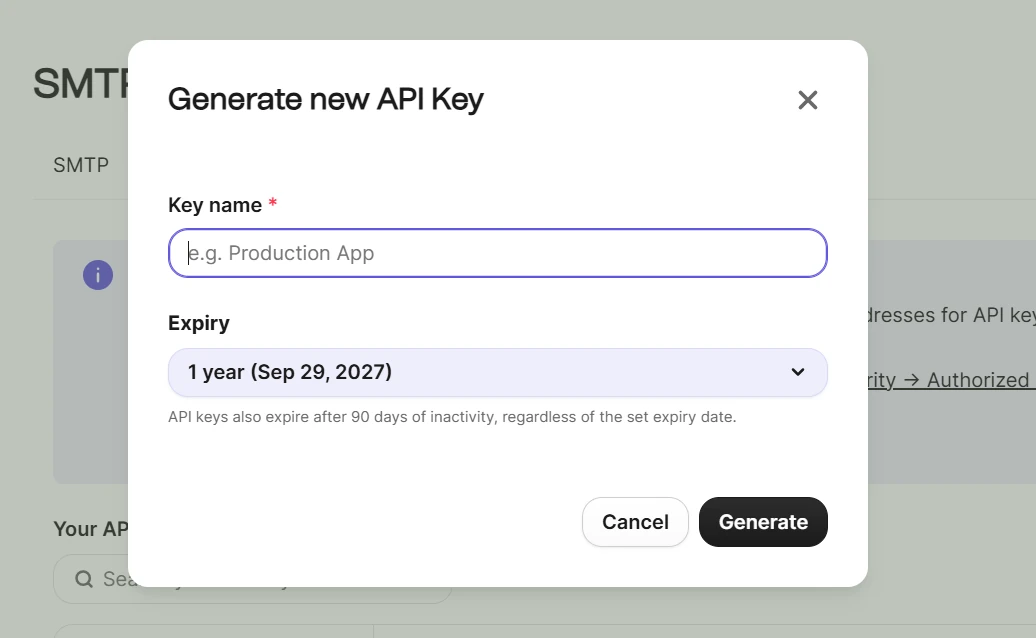
- Copy the key right away. It starts with xkeysib-, and Brevo only shows it once.
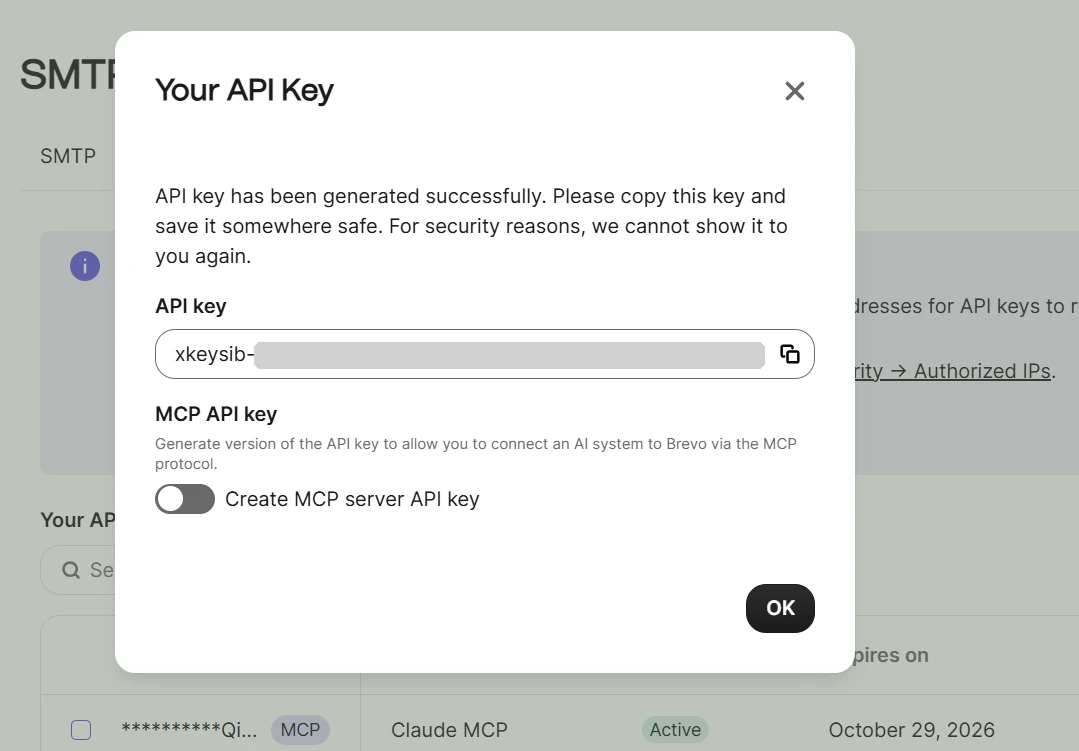
Treat the key like a password. Paste it only into your builder's connector or secrets settings, never into your app's visible code.
Then connect it to your builder. Each tool has its own way:
- Lovable: add the official Brevo connector and paste your key. Then ask for the emails you need in plain language.
- Replit: open Integrations, enable the Brevo connector, and paste your key. Replit keeps the key for you, so it never appears in your app's code.
- Bolt and other Supabase-based apps: paste the key into your project's secrets and ask the AI to send emails from the server. For login emails such as magic links and password resets, add Brevo's SMTP settings in Supabase. The guides below walk through both.
- Cursor or Claude Code: store the key in your project's environment file (.env), which stays out of your shared code, and ask the AI to call the Brevo API from the server. You can also connect the Brevo MCP server so the AI can see your senders and templates while it builds.
A prompt like this gives most AI builders the context they need:
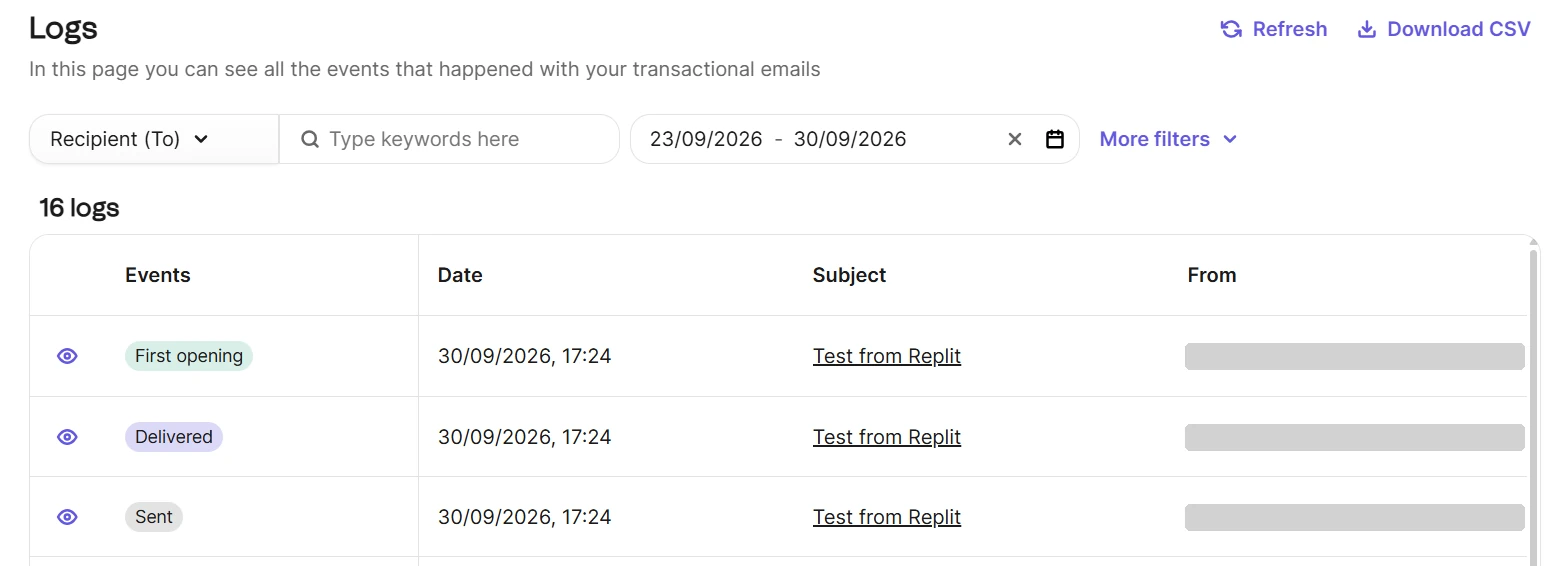
Then go further than the first email: a sequence of onboarding emails and well-written welcome emails turn signups into active users.
Our step-by-step guides
- Best email MCP servers: connect your AI coding tool to an email platform.
- Best transactional email APIs for AI-built apps: compare providers for Lovable, Bolt, Replit, and Cursor projects.
- How to send emails from Supabase Edge Functions with Brevo: app emails, database triggers, and auth emails.
- Supabase auth emails: magic links, OTP, and confirmations: sign-in flows that work on every device.
- How to send email in Replit with Brevo: enable the Brevo connector, let Replit Agent build the email flow, and add the MCP server for templates and contacts.
Ship faster, but ship it properly
Vibe coding removes most of the work between an idea and a working app. What it doesn't remove is the responsibility that comes with real users: protecting their data, keeping secrets secret, and making sure the emails they depend on arrive. A short checklist, a review of the risky parts, and the right building blocks close that gap. Once you launch, a simple landing page and regular updates to your users help the app grow.
Brevo handles the email side in one platform, from login emails and receipts to onboarding campaigns, with SDKs, SMTP, and an MCP server for AI coding tools. The free plan includes 300 emails per day, no credit card needed. Get started with Brevo's email API.