DEVELOPERS
Build email, SMS and AI agent workflows on Brevo
Use the REST API, the SDKs for Node.js, Python and PHP, the SMTP relay or the MCP server. Pick a capability, follow a framework guide, or copy a prompt for your AI assistant.
Join 600,000+ customers around the world who trust Brevo










Why developers build on Brevo

One API, many channels
Email, SMS, WhatsApp, push notifications, CRM and loyalty each have a documented API capability.
SDKs for your stack
Send your first message with the Brevo SDK for Node.js, Python or PHP, or call the REST API with cURL.
Keep your mail server
Point an app or mail server at smtp-relay.brevo.com and keep sending transactional email over SMTP.
Ready for AI agents
The Brevo MCP server lets assistants such as Claude, Cursor and VS Code read and act on your account.Send your first email
curl --request POST \
--url https://api.brevo.com/v3/smtp/email \
--header 'accept: application/json' \
--header 'api-key:YOUR_API_KEY' \
--header 'content-type: application/json' \
--data '{
"sender":{
"name":"Alex from Brevo",
"email":"[email protected]"
},
"to":[
{
  "email":"[email protected]",
  "name":"John Doe"
}
],
"subject":"Hello from Brevo!",
"htmlContent":"<html><head></head><body><p>Hello,</p><p>This is my first transactional email sent from Brevo.</p></body></html>"
}'
import { BrevoClient } from '@getbrevo/brevo';

const brevo = new BrevoClient({ apiKey: 'your-api-key' });

const result = await brevo.transactionalEmails.sendTransacEmail({
  subject: 'Hello from Brevo!',
  htmlContent: '<html><body><p>Hello,</p><p>This is my first transactional email.</p></body></html>',
  sender: { name: 'Alex from Brevo', email: '[email protected]' },
  to: [{ email: '[email protected]', name: 'John Doe' }],
});

console.log('Email sent. Message ID:', result.messageId);
from brevo import Brevo
from brevo.transactional_emails import (
    SendTransacEmailRequestSender,
    SendTransacEmailRequestToItem,
)

client = Brevo(api_key="your-api-key")

result = client.transactional_emails.send_transac_email(
    subject="Hello from Brevo!",
    html_content="<html><body><p>Hello,</p><p>This is my first transactional email.</p></body></html>",
    sender=SendTransacEmailRequestSender(
        name="Alex from Brevo",
        email="[email protected]",
    ),
    to=[
        SendTransacEmailRequestToItem(
            email="[email protected]",
            name="John Doe",
        )
    ],
)

print("Email sent. Message ID:", result.message_id)
<?php

require_once __DIR__ . '/vendor/autoload.php';

use Brevo\Brevo;
use Brevo\TransactionalEmails\Requests\SendTransacEmailRequest;
use Brevo\TransactionalEmails\Types\SendTransacEmailRequestSender;
use Brevo\TransactionalEmails\Types\SendTransacEmailRequestToItem;

$client = new Brevo(apiKey: 'your-api-key');

$result = $client->transactionalEmails->sendTransacEmail(
    new SendTransacEmailRequest([
        'subject' => 'Hello from Brevo!',
        'htmlContent' => '<html><body><p>Hello,</p><p>This is my first transactional email.</p></body></html>',
        'sender' => new SendTransacEmailRequestSender([
            'name' => 'Alex from Brevo',
            'email' => '[email protected]',
        ]),
        'to' => [
            new SendTransacEmailRequestToItem([
                'email' => '[email protected]',
                'name' => 'John Doe',
            ]),
        ],
    ])
);

echo 'Email sent. Message ID: ' . $result->messageId . PHP_EOL;
Send a transactional email from my verified sender to
me@example.com with the subject "Your order is confirmed", then
show me the message ID and its status in the logs.

Brevo MCP tools: transac_templates_send_transac_email,
transac_templates_get_transac_emails_list
Samples are taken from the Brevo developer docs and were not executed on this page. Replace the placeholder key and addresses with your own.
Find your starting point
Browse API capabilities, framework guides, AI agent resources and migration paths. Each page shows the request or config you need, with a link to the full docs.
Guides by framework
Node.js
Send email from Node.js with the Brevo SDK.Laravel
Send email from Laravel with the Brevo API.
Django
Send email from Django through the Brevo SMTP relay.Firebase
Send email from Firebase with the Brevo API.Python and SMS
Send SMS from a Python application with the Brevo API.
WordPress SMTP
Set up WordPress to send email through the Brevo relay.Brevo MCP Server
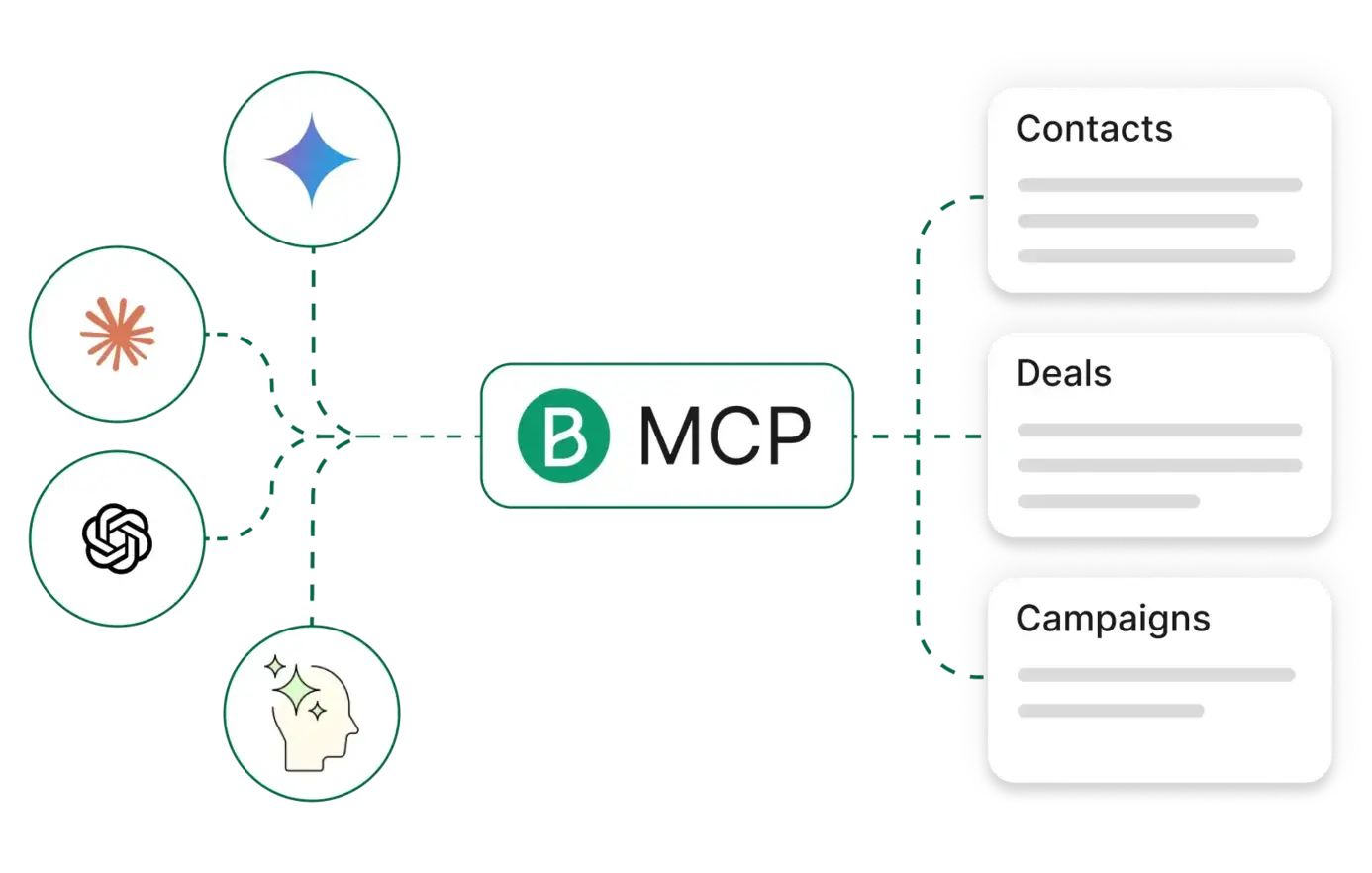
Connect your AI tools directly to Brevo
Brevo's MCP Server lets your existing AI assistants talk directly to Brevo. This gives them the context they need to answer questions, run reports, and manage campaigns—all right inside your favourite AI tool.Full Brevo functionality at your AI's fingertips
Contact and company management
Deals, pipelines, and tasks
Contact attributes and segmentation
Campaign creation and A/B testing
Cross-channel analytics
Prompts, comparisons and migration guides
Prompt library
Copy-ready prompts for your AI assistant, from campaign reports to CRM deals.Brevo for AI agents
See how AI agents connect to Brevo.Brevo vs SendGrid
Compare the Brevo API with SendGrid for developers.Resend alternatives
Weigh Brevo against Resend and its alternatives.Migrate from Mailchimp
Move from the Mailchimp API to Brevo.Migrate from Mailgun, Postmark or SES
Move from Mailgun, Postmark or Amazon SES to Brevo.Loved by users everywhere
 2500+ reviews
 3600+ reviews
 3400+ reviews