
The beauty of owned marketing channels is that you are not at the mercy of an algorithm. But with SMS marketing, the character count of each message can create unexpected costs if you do not understand how message segments work.
With email marketing, you can add endless contacts, and your copy can go into as much detail as you want, so the marginal cost is lower and, in most cases, predictable.
But with SMS, the compliance stakes are higher because you are taking up space in your subscriber’s text inbox, and getting them wrong can lead to a penalty higher than the revenue from your SMS campaigns.
Or when you didn’t realize you were sending twice the number of messages you had planned for because of one stray emoji, and the costs piled up.
With this e-commerce SMS marketing guide, you will know which campaigns to focus on through SMS channels (and which to skip) and how to calculate message costs and handle compliance, while also avoiding some key mistakes many brands end up committing while using SMS.
- What is e-commerce SMS marketing?
- SMS vs. email vs. push: how to choose marketing channels
- How to build an SMS list that converts
- How to comply with SMS marketing rules
- 8 SMS automations every e-commerce store should run
- What e-commerce SMS marketing actually costs
- How to set up an SMS marketing campaign in Brevo
- 4 SMS best practices to follow
- SMS marketing mistakes to avoid
- Get started with e-commerce SMS marketing using Brevo
What is e-commerce SMS marketing?
E-commerce SMS marketing is the practice of using text messages to communicate with customers and prospects throughout the buying journey.
E-commerce brands can use SMS to promote products, recover abandoned carts, announce flash sales, and more, either independently or as part of multi-channel marketing campaigns alongside email.
E-commerce SMS marketing, like emails, falls under two categories:
- SMS campaigns: One-off messages sent to a targeted group of subscribers as per a campaign schedule for product launches, flash sales, early-access alerts, holiday marketing promos, and so on.
- SMS automations: Messages triggered by customer actions or events, such as signing up for SMS alerts, abandoning a cart, transactional updates related to active orders, and back-in-stock alerts for products a customer has wishlisted.
The most effective e-commerce SMS strategies combine both.
With campaigns, brands send brand-relevant alerts and updates to everyone on their subscriber list, while automations trigger as customers move through stages of the buying journey.
SMS vs. email vs. push: how to choose marketing channels
SMS, email, and push notifications all drive e-commerce marketing engagement, but they have distinct strengths. There’s a reason why you have never received a founder’s letter from a brand in your text inbox or a bare 2-line replenishment reminder in an email.
The context, content, and timing determine which channel to choose for a specific alert.
| CHANNEL | BEST FOR | EXAMPLE |
|---|---|---|
| SMS | Time-sensitive/concise messages | “Your 20% off code expires tonight.” |
| Detailed content, product education, long-form storytelling | A tutorial with images and videos explaining how to use the product you ordered | |
| Web push | Timely reminders or short promos | “The item on your wishlist is back in stock.” |
SMS is ideal for shorter promos that don't require elaborate visuals or multiple links, as well as for time-based messages like order updates. Make the CTA clear right away, and you can break up the text with emojis.
Not every short promotion deserves an SMS.
Your SMS campaigns, like all marketing efforts, need to provide value to your subscribers. But the threshold is higher because your SMS alerts land in an inbox subscribers also use for personal communication.
Barbara Casey, CEO at Mobile High 5, points out:
The advice that brands should send more texts because "nearly everyone reads a text" is off base. Attention and interest are not the same.
To avoid sending only SMS alerts, use other channels in your workflow.
For example, you can send a welcome email with a discount, then an SMS a day later as a reminder. Or send an order confirmation with all the relevant details via email, and send subsequent shipping updates via text.
Using SMS, email, and other channels in coordination avoids spamming on one channel. Casey further elaborates:
If a business model has a product that is a one-time purchase or infrequent purchase, SMS isn't the right channel. Text is best for brands that have timely and useful communication to send. If a customer buys an area rug, they don't need a flow of follow-up text messages to "keep in touch." Use email.”
Choose your channels based on intent and the outcome you want.
How to build an SMS list that converts
An SMS list that converts is not necessarily the one that is long, but one that is highly engaged. Here’s how to collect contact details of subscribers in a way that encourages engagement:
Rule 1: Ask for consent
Start with a clear SMS opt-in that mentions what the customer is subscribing to.
If the customer consents to SMS alerts related to their orders, do not send them promotional campaigns.
You can collect consent through:
- An unchecked checkbox on a sign-up popup or on the checkout page.
- Text-to-join mechanisms that allow a customer to text a specific keyword to activate marketing alerts.
- QR codes in your physical store or on packaging so a customer can scan to opt in.
No matter how you collect consent, you should state why you're collecting the phone number and whether data rates will apply.
You can also send a follow-up to confirm their subscription. While double opt-in isn't required by law, it can help prevent accidental signups. Just because a customer has provided their phone number doesn't mean they consent to receiving marketing promotions.
Rule 2: Always include a clear way to unsubscribe
Make opt-out mechanisms as easy as opting in. Each SMS alert should include an easy, visible way to unsubscribe. Use simple opt-out keywords, such as UNSUBSCRIBE or CANCEL.
Other methods include an unsubscribe link or a simple unsubscribe button. When you include this unsubscribe option, unengaged customers will automatically leave, so you can clean your SMS lists with no extra effort.
Rule 3: Give shoppers a reason to subscribe
When asking for consent, give the shoppers some incentive. It does not have to be a discount code. It could be access to exclusive offers, early access, or a free resource relevant to your product in exchange for their contact details. You could send a link to a buying guide, a quiz, or a template as an incentive.
The SMS doesn't need to include the lead magnet itself, since email is a better medium for that, but a link to the resource over SMS should be enough to reel in the subscriber.
These incentives encourage customers to sign up.
Rule 4: Set subscriber expectations from the start
Tell subscribers what kind of messages they will receive and how often. A customer who expects occasional product alerts has different expectations from someone signing up for weekly flash sales.
When you set clear expectations, your subscribers will be more engaged.
Rule 5: Collect useful preferences
Related to setting expectations, if the signup experience allows it, narrow down a customer’s preferences to make future communication relevant.
For example, a fashion brand can let subscribers choose specific categories (men’s clothing, women’s clothing, for example) or shopping interests so that their SMS alerts are limited to those preferences.
A skincare brand can ask subscribers about their skin type so it can send product-launch campaigns that match it with early access.
When subscribers can narrow the scope of marketing communication, they are more likely to subscribe because they control the kind of messages they receive.
How to comply with SMS marketing rules
Beyond the consent requirements outlined earlier, brands must meet other compliance requirements when sending SMS campaigns, because consent is only the first step.
Brands need to keep in mind where subscribers are located, when they can send messages, how often they contact subscribers, and whether they document consent.
Region-wise legislation for SMS marketing
SMS regulations vary by country and sometimes by state or region, so even if some underlying principles overlap, avoid treating one compliance checklist as universal. Here are the governing legislations to look at for SMS marketing compliance:
- USA: The Telephone Consumer Protection Act (TCPA) and related FCC rules govern marketing texts, including automated/robotext messages. Violations can expose businesses to up to $500 per violation, with up to $1,500 for willful or knowing violations.
- Canada: Canada’s Anti-Spam Legislation (CASL) prohibits commercial electronic messages, including texts, in circumstances where the required consent and other conditions are not met. Penalties can reach up to CAD $1 million for individuals and CAD $10 million for businesses per violation.
- UK: The Privacy and Electronic Communications Regulations (PECR) govern direct marketing by text. The Information Commissioner’s Office (ICO) can issue monetary penalties of up to 500,000 pounds for serious breaches.
- EU: The General Data Protection Regulation (GDPR) and ePrivacy rules govern SMS marketing. GDPR infringements involving certain consent and data processing obligations can carry fines up to 20 million euros or 4% of worldwide annual turnover, whichever is higher.
These figures are maximum statutory penalties and not automatic fines. Actual consequences depend on the nature and severity of the breach.
To know which laws govern your campaigns, check where your subscribers are located and identify the applicable laws. Next, check whether the SMS provider or mobile carriers impose additional requirements.
SMS timing and quiet hours
SMS marketing laws also restrict the timing of when you can send messages to your subscribers. "Quiet hours" refer to a window, usually late at night and early in the morning, during which brands cannot send promotional text messages.
Even on weekends, certain hours are restricted.
Always check the relevant legislation for timing restrictions. Even if not for compliance, adhering to quiet hours is practical, since subscribers are likely to opt out if they receive promos at all hours of the day.
SMS frequency limits
Frequency limits refer to the cap on daily SMS sends per recipient. A customer’s consent does not mean you can send them an endless number of text alerts every day. Some jurisdictions, carriers, or messaging platforms may impose restrictions.
Even without a fixed legal maximum, brands should set a reasonable frequency to avoid overwhelming subscribers.
Data storage and consent records
Keep records of who consented, when they consented, what they agreed to receive, and their phone number. A record of the signup source can also help during disputes, so you can show how a subscriber opted in to your SMS campaigns.
Brands should also consider how subscriber information is stored, accessed, retained, and deleted. GDPR has strict requirements around data storage and processing, so you need appropriate security controls to protect the data you collect.
Identify the sender each time
Subscribers should be able to tell which brand is contacting them.
A recognizable sender identity makes messages easier to contextualize and can reduce confusion and spam complaints.
Sender requirements, like other rules, depend on region-specific legislation. A sender identity approved in one market may not automatically be used in another region.
Some destinations may require a registered sender ID, phone number, or other sender type before a business can send SMS alerts at scale.
8 SMS automations every e-commerce store should run
Like with every marketing automation, SMS workflows should focus on moments when a message can influence or recover a purchase or protect the customer experience.
Common e-commerce advice sometimes says SMS should be used only for flash sales and other promos.
According to Rafael Sarim Oezdemir, Head of Growth at EZContacts, that’s not necessarily true; based on his store’s performance, he believes the focus should be on value-added automations, such as post-purchase automation flows (shipping and order fulfillment updates), that build customer trust.
The workflows below are ordered based on purchase intent. The examples assume each message fits within one SMS segment. Actual SMS costs vary by destination country, message length, and character encoding.
Automation #1: Abandoned cart SMS automations
An abandoned cart is one of the strongest triggers for an e-commerce SMS campaign because the customer has already shown purchase intent.
Send the first message 30 to 60 minutes after abandonment, then a second message around 24 hours later. Two messages are usually enough; sending five or six can quickly become intrusive.
Casey identifies the following parameters for an abandoned cart SMS automation:
- Cart value
- Customer status
- Purchase history
- Whether a customer has already received a message
“The first message can serve as a useful reminder, but incentives should be reserved for where they are needed,” she notes.
Include the product name and a direct link back to the cart. For example:
“Still thinking about the Raspberry Glow Serum? Your cart is waiting: [shortened link0 Reply STOP to unsubscribe.”
This example uses one SMS segment per recipient. You can remove customers from the sequence when they complete their purchase.
Automation #2: Back-in-stock alerts
Back-in-stock SMS reaches customers who have already subscribed to inventory notifications for a specific product, thus making it one of the highest-intent messages in the channel.
Send the message as soon as inventory returns, rather than waiting for the next promotional window. Keep the message focused on availability and link directly to the product page. The audience is usually small and self-selected, so that the campaign can generate strong revenue without a large SMS spend.
Here is an example:
“It’s back! The “Stay Positive” Hoodie in Black, M, is available again. Shop now: [shortened URL]. Reply STOP to unsubscribe.”
This example uses one SMS segment per recipient. Measure the purchase conversion rate from the alert, and suppress contacts after they purchase or if the product sells out again.
Automation #3: Shipping and delivery updates
Shipping and delivery updates may not be revenue-generating campaigns, but they are essential to a good e-commerce SMS program.
Send updates when an order ships, goes out for delivery, or is delivered, depending on the information your store can provide. Customers get useful information without checking their order status, and proactive updates can reduce “Where is my order?” support tickets and associated service costs.
Here is an example:
“Good news, Aisha! Your Pear Cosmetics order is on the way. Track your delivery here: [shortened URL]. Reply STOP to unsubscribe.”
This example uses one SMS segment per recipient. Measure delivery-related support contacts per order and stop the order-status message once the delivery journey is complete.
Automation #4: Flash sale and limited-drop alerts
Flash sales and limited product drops are among the few cases where a broader SMS send can justify its cost. Send the alert when the promotion starts or shortly beforehand, and reserve “limited” messaging for genuine scarcity. If every promotion is a flash sale, customers will stop treating the messages as urgent.
Here is an example:
“24 hours only: 30% off sitewide at Misty Cosmetics. Sale ends at midnight. Shop now: [shortened URL]. Reply STOP to unsubscribe.”
For flash sales, limit sends to a few customer cohorts when a mass send isn't justified.
Automation #5: VIP and early-access offers
VIP SMS works best when you define the audience by actual customer value rather than a generic “VIP” label. Build the customer segment using factors such as purchase frequency, total spend, AOV, or customer lifetime value, then give those customers access to something the wider audience does not have.
Check out this VIP SMS alert:
“VIP early access: Shop from MiniSu’s new winter collection before everyone. Your early-access link: [shortened URL]. Reply STOP to unsubscribe.”
Send the message before a sale, product launch, or limited-stock event.
Automation #6: Post-purchase check-ins
A post-purchase SMS should not immediately try to sell another product. Send it 3 to 7 days after delivery and ask a simple question about the customer’s experience.
A two-way message can generate a review, flag a product issue, or give customer support a chance to resolve it before it becomes a negative review.
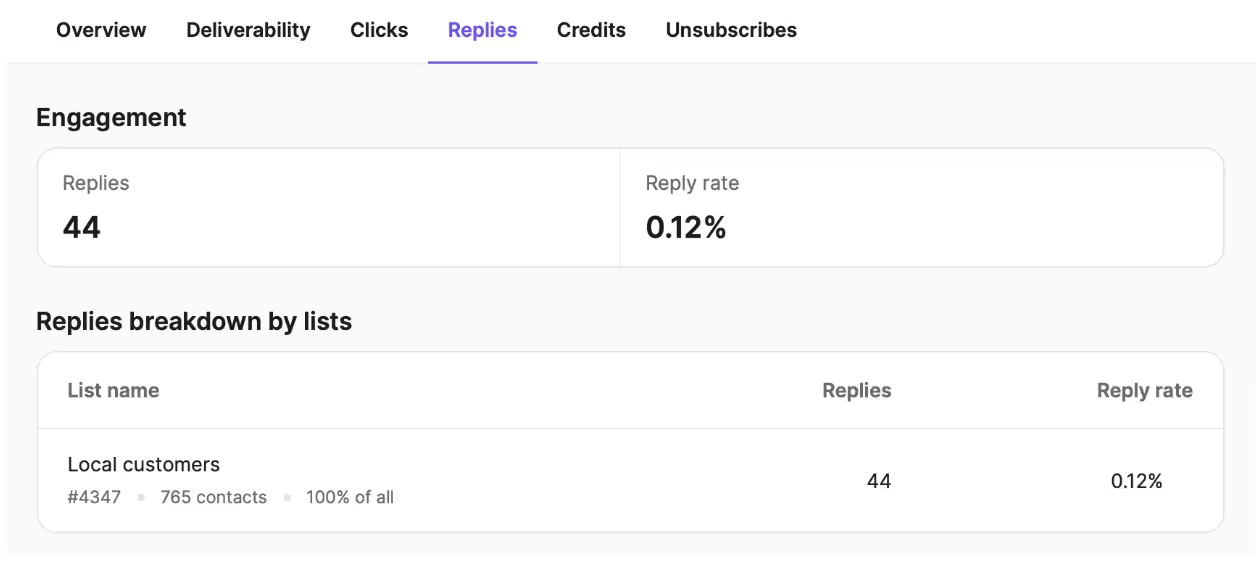
This is how you can frame it:
“Hi Nishi, how are you liking your Raspberry Glow Serum? Reply with your rating between 1 and 5 to tell us about your experience. Reply STOP to unsubscribe.”
You can also send customer support messages via SMS.
Automation #7: Win-back automations
Win-back campaigns target customers who haven't purchased for a specific period and are therefore identified as inactive customers. To win them back, first define who counts as a lapsed customer.
This depends on the store’s buying cycle and is often calculated as roughly twice the average repurchase interval.
Some stores simply define a lapsed customer as someone who hasn't bought from them in 60-90 days.
You can send the first win-back message when the customer crosses the identified threshold, then send a final reminder that you are removing them from your customer list. Here is an example:
“We have not seen you in a while, Tanya. Come back to Pear Cosmetics and unlock 15% off on your next order. Reply STOP to unsubscribe.”
A lapsed customer is more likely to unsubscribe than an active buyer, so repeated messages can do more harm than good.
Automation #8: Replenishment reminders
Replenishment SMS makes sense for products customers predictably use up, such as skincare, coffee and other beverages, supplements, and household consumables. Base the timing on the product’s actual consumption or reorder cycle, using previous purchases where possible.
A customer who usually reorders coffee every 30 days should not receive the same reminder as someone buying a product every 90 days, so send automations accordingly. An example of a replenishment reminder is:
“Running low on your daily cleanser? It may be time for a refill. Reorder here: [shortened URL]. Reply STOP to unsubscribe.”
Stores selling durable goods should skip this campaign.
What e-commerce SMS marketing actually costs
Text messages are billed per message segment.
With standard GSM-7 encoding, one message segment contains up to 160 characters. Longer GSM-7 messages are split into concatenated segments, with 153 characters available per SMS segment.
A single character can turn a one-segment message into a two-segment message, therefore costing you double.
| ENCODING | SINGLE MESSAGE | PER MESSAGE WHEN CONCATENATED |
|---|---|---|
| GSM-7 (standard characters) | 160 characters | 153 characters |
| Unicode (emoji, curly quotes, accented characters, etc.) | 70 characters | 67 characters |
The drop from 160 to 153 characters (or from 70 to 67 characters) happens when messages are concatenated (or split into individual SMS) and reassembled on the recipient’s phone to display as one continuous message.
For this reassembling, additional header data is needed, which takes up part of each SMS segment’s capacity as metadata.
Consider the following e-commerce SMS alert:
“20% off today only. Take our quiz to determine your skin type and create a routine in minutes. Products are selling out. Shop now: skincareparadise.com”
At 151 characters, this SMS fits in one GSM-7 segment.
Here’s a slightly longer version:
“Get 20% off on our entire exclusive collection for the next 24 hours. Confused about what to buy? Take our quiz to determine your skin type and create a routine in minutes. Lip oils, serums, moisturizers, sheet masks… You want it; we have it. Products are selling out ASAP, so don’t wait!! Shop now: skincareparadise.com”
At 320 characters, split this into two message segments of 160 characters each.
However, because metadata is added when messages are split, you need three message segments. Two message segments will have 153 characters, and the third one will have the rest.
Now let’s look at GSM-7 vs. Unicode messaging.
The skincare store sends a 75-character promotional SMS to 2,000 subscribers.
2,000 recipients X 1 message segment = 2000 billable message segments
Add one emoji to the same SMS copy, and it turns into Unicode. At 75 characters, it exceeds the Unicode message limit and gets split into two message segments. The same message, with a difference of one emoji, now leads to:
2,000 recipients X 2 message segments = 4000 billable message segments
Now imagine the store sends four campaigns a month.
The version without the emoji:
2,000 recipients X 1 message segment x 4 campaigns = 8,000 billable message segments
The version with the emoji will be:
2,000 recipients X 2 message segments x 4 campaigns = 16,000 billable message segments
So the same four campaigns now require 16,000 billable message segments, which is twice the amount.
Other factors that influence e-commerce SMS marketing costs include the destination country and additional carrier/sender fees. The same message can cost varying amounts in different regions. For example, 10DLC messaging in the US involves separate registration.
So there are four significant factors to consider:
- Number of messages sent
- Destination countries
- Additional carrier/sender fees
- SMS platform credits/per message cost
Assess your SMS costs against the above to understand which SMS platform makes sense. With Brevo, you purchase SMS credits separately from the marketing plan, so messaging spend scales with SMS volume rather than your SMS contact list.
How to set up an SMS marketing campaign in Brevo
You can set up your SMS marketing campaigns in Brevo in five steps: register the required Sender IDs, create an SMS campaign, write your message, select the appropriate sender, and choose your recipients.
Before sending, check whether recipients have opted in to receive SMS marketing and that the message meets the requirements of the countries you are targeting.
When you import your contact list, use the SMS list and not the email list, since contacts in the latter have not consented to receive text alerts.
Step 1: Create and register a sender ID for each country
Register a Sender ID for every country where you plan to send SMS messages:
Settings > Campaigns > SMS Sender ID
Select ‘Configure’ and request a Sender ID for the relevant country. Requirements vary by country, and some markets use numeric senders or require additional registration instead of an alphanumeric Sender ID.
Step 2: Create an SMS campaign
Go to Marketing > Campaigns > SMS and create a new SMS campaign.
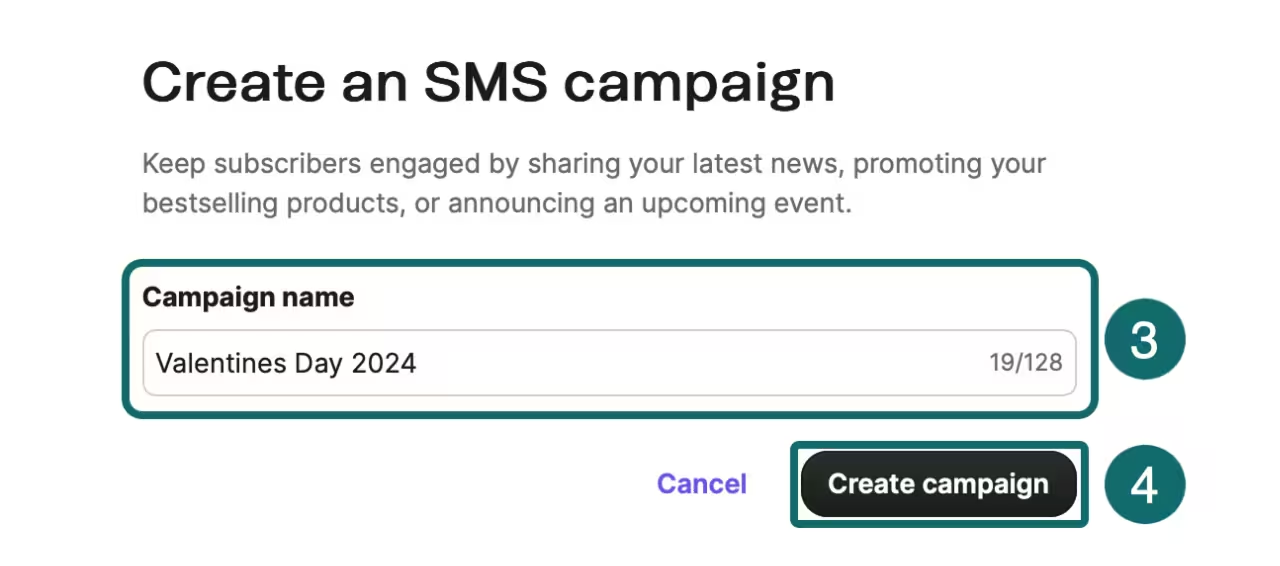
Name the campaign so it's easy to identify internally, then continue to campaign setup. If this is your first SMS campaign, make sure your account has enough SMS credits to send it.
Step 3: Create SMS content
Write a concise message with a clear purpose and call to action. Brevo supports personalization with contact attributes, such as a recipient’s first name, as well as store event data, to make the messages more relevant.
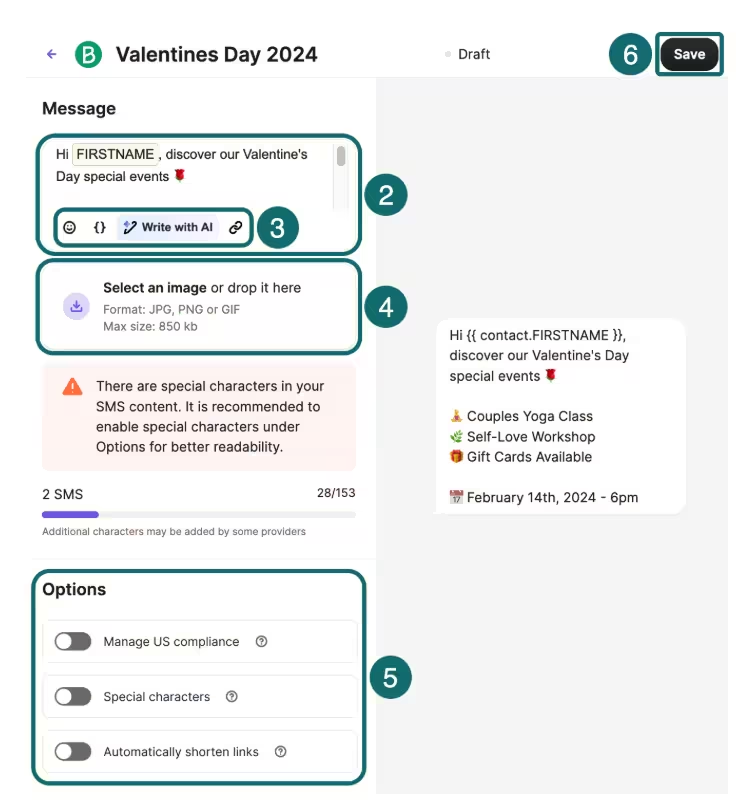
Keep character limits and encoding in mind; a standard GSM message can contain up to 160 characters, while Unicode messages have a lower 70-character limit.
You can also use the AI assistant to refine your text message. Layer it into your automation campaigns that include emails.
Step 4: Choose a sender name
In the Sender section, select the approved Sender ID for each country you are targeting.
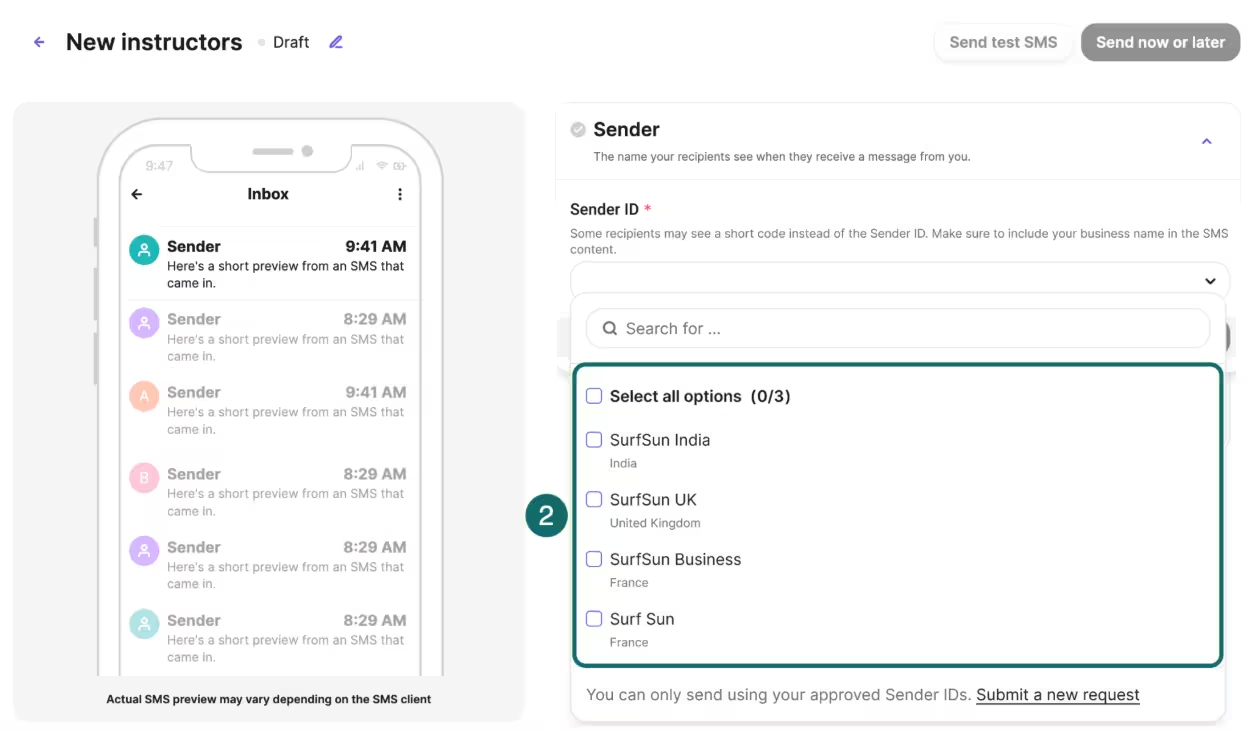
Brevo allows one Sender ID per country within the campaign. Sender formats and availability vary by market, so do not assume that the same sender name will appear for every recipient.
Step 5: Select recipients
In the Recipients section, choose the lists or segments that should receive the campaign. Only target contacts who have consented to receive SMS marketing and are expecting these messages.
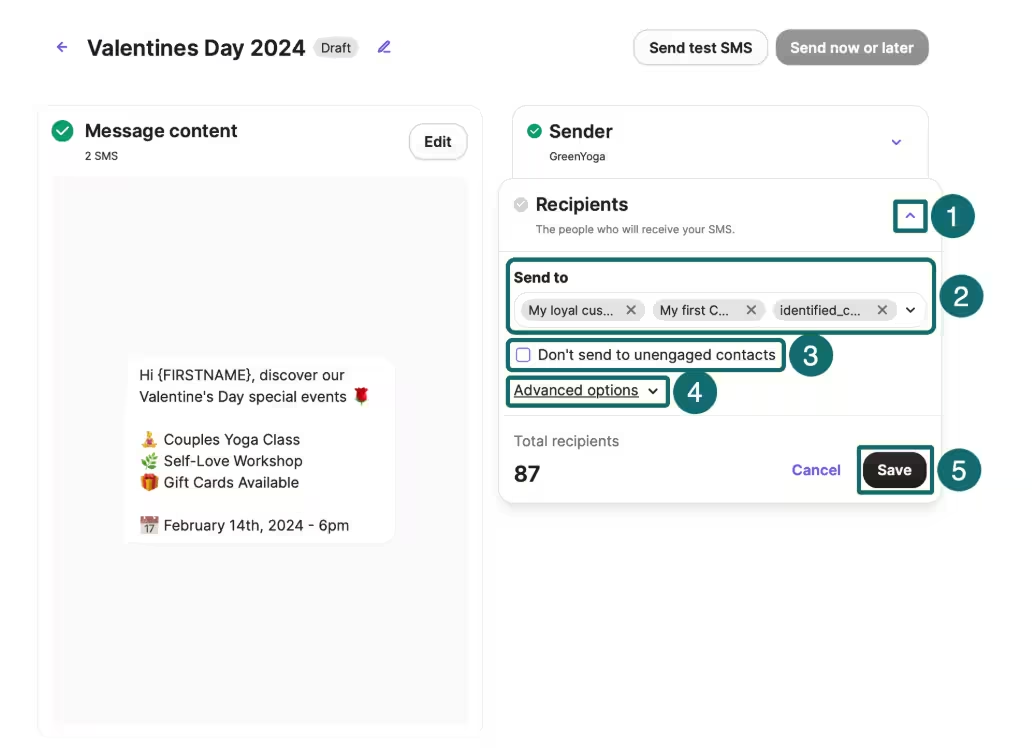
Review the recipients, sender, and message before sending or scheduling the campaign.
Optional (but recommended): Testing and batch sends
Before sending your campaign to your full audience, send a test SMS to a contact in your Brevo account. Testing helps catch spelling errors, broken or incorrect links, personalization issues, and unexpected character counts before the campaign reaches customers. Testing across iOS and Android also helps ensure no discrepancies between devices.
Test messages use SMS credits.
For large SMS campaigns, you can send texts in batches rather than all at once. When scheduling your campaigns, send them outside the quiet hours identified for that recipient’s local time.
How? Specify the number of messages per batch, the daily increase, and the time between batches.
This prevents sudden spikes in website traffic.
4 SMS best practices to follow
SMS best practices are not about elaborate copy. The goal is to keep SMS texts concise, recognizable, and high-value in as few words as possible.
Here are some SMS best practices to follow:
Identify yourself in the first five words
SMS doesn’t show a sender name the way email does. Identify the brand immediately so that shoppers know who is messaging them. A subscriber who doesn't recognize the sender may ignore the message or unsubscribe before reading it if they cannot instantly tell which brand is reaching out.
Write as per the message segment boundary
Draft the message, count characters, check the encoding before sending, and audit the copy to remove unnecessary words that push the message into another segment. Longer words, multiple CTAs, long links, and excessive emojis add no value; they only increase cost.
Watch unsubscribe rate above everything
For SMS, unsubscribe rate is one of the clearest indicators of list health.
A subscriber who replies STOP has actively removed themselves from the marketing channel, so there is no equivalent of an email re-engagement campaign for that person. Track opt-outs alongside conversions and revenue per message.
Execute omnichannel marketing
Another best practice for SMS campaigns is to layer them with other channels, both online and offline. Casey explains:
“A customer really should be able to earn a reward online, receive it by text, and walk into a store and it will be waiting for them there to easily redeem. This turns SMS into the connective tissue of the customer relationship rather than another promotional channel.”
The goal is not to include as many channels as possible. It’s to create a cohesive customer experience across all touchpoints.
SMS marketing mistakes to avoid
Many brands lose engaged subscribers and revenue by mixing up SMS campaigns, buying lists, using SMS for everything, and failing to tailor campaigns, among other common SMS marketing mistakes that affect SMS deliverability. Oezdemir clarifies:
“Any message that contains marketing information is commercial and must have an unsubscribe option.”
To avoid the confusion, Oezdemir’s team does the following: “We make sure our shipping and order confirmation SMS are purely transactional messages. That means no sales links inside them, which helps with compliance and lets us maintain our 96.6% SMS deliverability rate. Otherwise, the stakes are pretty high.”
If your transactional messages contain promo links, the recipient should have consented to both marketing and order-related messages.
Other than the above mistake, Casey identifies a few more:
- Burying the consent language
- Assuming that as long as their text says Reply STOP to opt out, they are safe.
- Buying lists
“Brands need to be aware that they have the ultimate responsibility for compliance, not their technology provider,” Casey cautions.
Here are some other things you should not do when sending SMS campaigns:
- Importing an email list into SMS: Consent to receiving email alerts does not automatically extend to consent for marketing texts. Each channel requires separate consent.
- Texting everyone the same offer: SMS is a high-attention channel, so irrelevant messages can make subscribers leave. Segment quickly based on purchase behavior, interests, or lifecycle stage.
- Using SMS for every promotion: Not every email campaign needs an SMS counterpart. Reserve texts for offers, reminders, launches, and updates where immediacy adds value.
Another mistake to avoid is sending daily campaigns. This is what Oezdemir’s research shows:
“In terms of frequency, our data shows that general e-commerce brands should limit themselves with 2-4 campaigns per month to not exhaust subscribers, although 6-10 texts are ok during peak seasons like BFCM.”
A sudden increase in opt-outs can indicate the brand is sending too often or that the messages are not relevant enough.
Casey illustrates what some of the messages can be:
“For promotional texts, it really depends on the type of business, but I find generally two messages per month is the sweet spot: one message that is more a branding message or maybe a new arrivals curation, and the other might have a sale alert. You increase frequency ONLY when you have something valuable to communicate. And the value has to be something the customer values, not the business.”
The monthly frequency you pick depends on your brand and your customers’ patterns and not generic benchmarks, so test accordingly.
Get started with e-commerce SMS marketing using Brevo
SMS marketing is more about discipline and precision, rather than complicated rules and requirements. The following guardrails will help you get started:
- Use SMS when immediacy earns its keep. If the message works just as well as an email, send an email. SMS is more expensive and more intrusive, so reserve it for moments where speed or visibility matters.
- Build three automations first. Start with abandoned cart, back-in-stock, and a time-sensitive promotion. Together, they cover high-intent recovery, demand-driven messaging, and immediate sales.
- Write for the billing unit. A message isn't just copy; it's a number of billable message segments. Check the character count and encoding before every send, and cut anything that pushes useful copy into another message segment.
- Meet the compliance floor first. Get the appropriate consent, keep consent records, make opting out easy, respect applicable sending restrictions, and complete required sender or campaign registrations before sending at scale.
- Skip vanity metrics. Revenue per message, conversion rate, and unsubscribe rate tell you whether SMS is earning its cost.
Then stop planning and test one thing.
Pick one automation, write it to fit within the required character count, and get your consent collection live before sending anything else. Trigger the automation with a test event, check the message and segment count, and confirm that the opt-out flow works.
Once that first workflow is working end-to-end, you are ready to scale. Ready to pick a plan?


