
An email MCP server lets an AI assistant like Claude, Cursor, or VS Code Copilot read, draft, or send email through a standard interface instead of custom API glue.
The catch: "email MCP server" covers three very different jobs. Some give the agent access to your marketing platform, contact lists, and CRM. Some expose a transactional sending API. Others connect an agent to your own Gmail or Outlook inbox.
Picking the wrong category is the most common mistake, so this guide is organized by job. For each server, we cover how it is hosted, how it authenticates, what it can actually do, and where it falls short. All details were checked against each vendor's own documentation in October 2026.
The information in this article was last updated on October 15, 2026.
Table of Contents
- Email MCP servers at a glance
- Best MCP servers for email marketing and CRM
- Best MCP servers for transactional email
- Best MCP servers for your own inbox
- How to set up an email MCP server
- Security: what you give an agent access to
- How we evaluated these email MCP servers
- Which email MCP server should you choose?
Email MCP servers at a glance
| Server | Category | Best for | Prices start at | Trustpilot rating |
|---|---|---|---|---|
| Brevo | Marketing & CRM | Marketing, SMS, and CRM in one server | Free plan; paid from $9/month | 3.9/5 |
| MailerLite | Marketing | Newsletters and creator businesses | Free plan; paid from $12/month | 4.1/5 |
| Klaviyo | Marketing | Ecommerce stores | Free plan; paid from $20/month | 1.6/5 |
| Mailtrap | Transactional | Testing in a sandbox before production | Free plan; paid from $15/month | 3.6/5 |
| Postmark | Transactional | Transactional-only senders | Free developer plan; paid from $15/month | 2.0/5 |
| Mailgun | Transactional | Routing, validation, and EU region | Free plan; paid from $15/month | 4.1/5 |
| Resend | Transactional | Developer-first send and receive | Free plan; paid from $20/month | 2.4/5 |
| Gmail MCP (Google) | Inbox | Google Workspace teams | Google Workspace from $7/user/month (annual) | 1.3/5 (Google Workspace) |
| Work IQ Mail (Microsoft) | Inbox | Microsoft 365 organizations | Microsoft 365 Copilot add-on from $18/user/month (annual) | N/A |
| mcp-email-server | Inbox | Any IMAP/SMTP mailbox | Free (open source) | N/A |
| AgentMail | Inbox | Agents that need their own inbox | Free plan; paid from $20/month | N/A |
Prices are for the platform each server connects to, billed monthly unless noted. Prices and Trustpilot ratings were checked in October 2026.
Here is how each server is hosted, authenticated, and whether it can send email:
| Server | Category | Official? | Hosting | Can send? |
|---|---|---|---|---|
| Brevo | Marketing & CRM | Yes | Remote, token | Yes (campaigns) |
| MailerLite | Marketing | Yes | Remote, OAuth | Yes (campaigns) |
| Klaviyo | Marketing | Yes | Remote or local | Yes (campaigns) |
| Mailtrap | Transactional | Yes | Local (npx) | Yes |
| Postmark | Transactional | Yes | Local (npx) | Yes |
| Mailgun | Transactional | Yes | Local (npx) | Yes |
| Resend | Transactional | Yes | Remote or local | Yes |
| Gmail MCP (Google) | Inbox | Yes (Developer Preview) | Remote, OAuth | Drafts only |
| Work IQ Mail (Microsoft) | Inbox | Yes (Preview) | Remote, M365 Copilot license | Yes |
| mcp-email-server | Inbox | Community | Local (uvx, pip, Docker) | Yes (SMTP) |
| AgentMail | Inbox | Yes | Remote, OAuth or API key | Yes |
Best MCP servers for email marketing and CRM
Marketing servers connect an assistant to campaigns, contacts, segments, and reporting. This is where you ask questions like "which campaign drove the most clicks last month?" or "add these leads to the webinar list", and get an answer without opening a dashboard.
1. Brevo MCP server
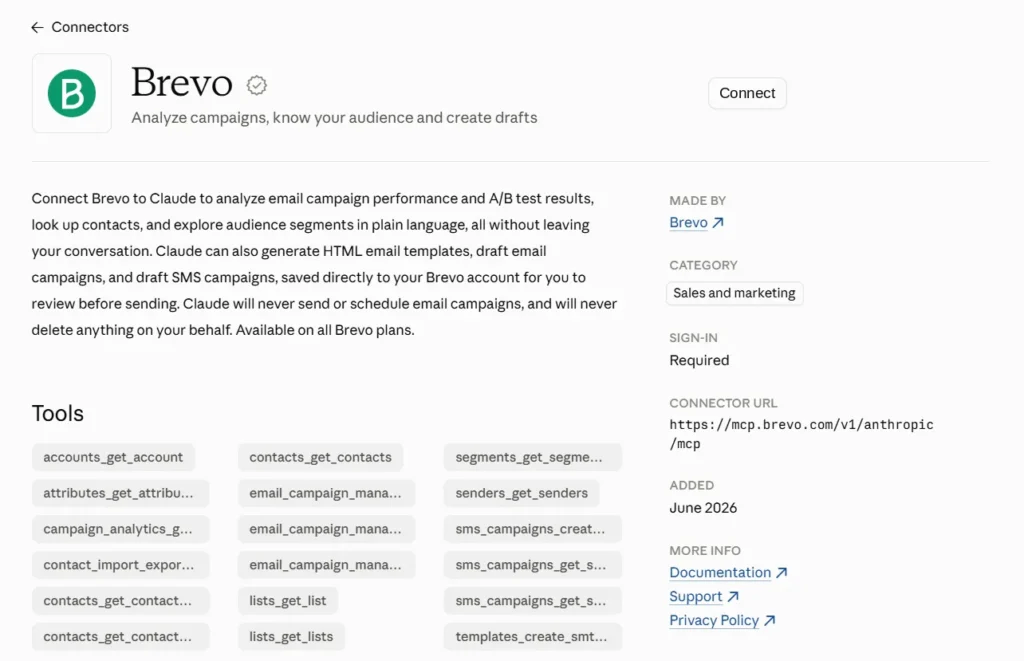
Brevo is a marketing and CRM platform that combines email, SMS, WhatsApp, and sales pipelines. Its official MCP server runs remotely at mcp.brevo.com/v1/brevo/mcp and authenticates with an MCP token passed in an Authorization: Bearer header. Since March 2026, its 193 tools are generated directly from the Brevo API specification, so the MCP server stays in sync with the API.
The main server groups those tools into 27 modules:
- Marketing: email campaigns, SMS campaigns, WhatsApp campaigns, templates, and campaign analytics
- Contacts: contacts, lists, segments, attributes, and import/export
- CRM: deals, companies, tasks, pipelines, and notes
- Account and infrastructure: senders, domains, dedicated IPs, users, and webhooks
What stands out: One connection covers marketing and sales data together. An agent can pull campaign results, find contacts who clicked, and create deals for them in Brevo's sales platform in the same conversation. You can also connect to a single module, such as /v1/brevo_contacts/mcp, so the assistant only sees the tools it needs.
Two ways to connect: Developers use the MCP server with Claude Desktop, Claude Code, Cursor, Windsurf, VS Code, or Cline. Marketers who don't want to handle tokens can use the Brevo connector in Claude instead, which is free on all Brevo plans and creates drafts only: sending and scheduling stay in your Brevo account.
- Pricing: The free plan includes 300 emails per day and up to 100,000 contacts, with no credit card. Paid plans start at $9/month (Starter) and $18/month (Standard).
- Limitations: The MCP token grants full read/write access to your account, with no per-token permission scopes. Use single-module endpoints to limit what the assistant can reach. The MCP modules also manage transactional templates but don't include one for sending transactional email: for that, call the API or SMTP relay directly.
- Testing: Brevo's transactional email API has a sandbox mode: adding the X-Sib-Sandbox: drop header validates a request without delivering the email or creating logs.
- Best for: Teams that run email marketing, SMS, and CRM from one platform and want one assistant connection for all of it.

Exceeding Expectations: A Five-Star Experience with Brevo
I recently had the pleasure of using Brevo's services, and I must say, my experience was nothing short of exceptional, meriting a full five stars. From the outset, the team at Brevo demonstrated unparalleled professionalism and dedication to customer satisfaction. Their attention to detail and commitment to providing tailored solutions truly set them apart in their field.
Bob,
Brevo user
Several Sales and Marketing Tools in One System
We stumbled upon Brevo by accident as we were using a system just for sending marketing emails. We discovered quickly that Brevo offered multiple different digital sales and marketing tools to enhance both our manual branded client engagement tasks, but also offered automation tools to aid our day to day sales efforts. Again, we never experienced any issues with the service itself. But it's great to know that Brevo's quick assistance is there if something goes wrong.
Stephen Day,
Brevo user
Brevo has most of the tools a small business needs
Brevo has most of the tools a small business needs for marketing and sales at a very reasonable price, without limiting your list growth. It has email marketing, CRM, transactional emails, SMS, live chat, Meta ad management, and WhatsApp messages. All this in a package that's easy to use and grows with your business.
Mor Mester,
Email Marketing Expert
Great range of features
We’ve been using Brevo ourselves for more than five years, and we’ve been really happy with it. It offers a great range of features (especially the automations) and makes creating beautiful emails very easy.
Robert Brandl,
Founder of EmailTooltester
2. MailerLite MCP server
MailerLite hosts its official server at mcp.mailerlite.com/mcp with OAuth, so there are no keys to paste. It covers subscribers, campaigns and campaign analytics, groups and segments, custom fields, forms, automations, templates, webhooks, and ecommerce data. It works with Claude, Claude Code, Cursor, VS Code, Gemini CLI, and ChatGPT (Plus and Pro accounts, on the web).
- What stands out: Campaigns are always created as drafts, and the assistant needs your explicit confirmation before it sends a campaign or takes a destructive action. The server also works on the free plan.
- Pricing: The free plan covers up to 250 subscribers and 2,500 emails per month. Paid plans start at $12/month.
- Best for: Newsletter publishers and small businesses focused on email-only marketing.
3. Klaviyo MCP server
Klaviyo offers a remote-hosted server at mcp.klaviyo.com/mcp (recommended), authenticated with OAuth, and a local version that runs with uvx and a private API key. Its 260+ tools span 23 categories, including campaigns, flows, profiles, reporting, catalogs, events, templates, coupons, and forms, so you can ask which flows convert best or how recent campaigns performed.
- What stands out: Query parameters trim what the assistant sees. For example, core-tools-only=true cuts the list to about 40 core tools, and a read-only mode blocks write actions.
- Limitations: Only users with an Owner, Admin, or Manager role can connect, and uploading an image from a file works on the local server only.
- Pricing: The free plan covers up to 250 active profiles and 500 email sends per month. Paid email plans start at $20/month.
- Best for: Ecommerce brands whose marketing runs on Klaviyo flows.
Best MCP servers for transactional email
Transactional servers wrap an email API so an assistant can send password resets, receipts, and notifications, check delivery logs, or manage templates and domains. They matter most to developers working inside an IDE. If you are still choosing a provider, our comparisons of the best email API services and the best transactional email services cover pricing and deliverability in more depth.
4. Mailtrap MCP server
Mailtrap's official server runs locally with npx -y mcp-mailtrap, with one-click installs for Cursor and VS Code and an .MCPB package for Claude Desktop. It needs an API token and, for most features, an account ID. Tools cover sending (including batch), email logs, sending stats, templates, sending domains, suppressions, and contacts.
- What stands out: Sandbox tools. The agent can send a test email to a Mailtrap sandbox, then read the message it just sent, all without touching real recipients. For other approaches, see our guide to testing transactional emails in staging.
- Best for: Development teams that want to test transactional flows from the IDE before going to production.
5. Postmark MCP server
Postmark's official server, published under ActiveCampaign, installs with npx -y @activecampaign/postmark-mcp. It exposes 24 tools: sending single and batch emails (with or without templates), template management, outbound message search, bounce and suppression management, delivery stats, webhooks, and a delivery diagnostics tool.
- What stands out: A tight focus on transactional delivery, including a tool that helps diagnose why a message was not delivered.
- Limitations: No marketing features such as campaigns, automation, or segmentation.
- Best for: Teams that send only transactional email and want deliverability tooling their agent can query.
6. Mailgun MCP server
Mailgun's server (npx -y @mailgun/mcp-server) covers a wide surface: sending and retrieving messages, domains and DNS, webhooks, routes, mailing lists, templates, analytics, suppressions, IP pools, email validation, and inbox placement testing.
- What stands out: A MAILGUN_MCP_TAGS setting limits which tool groups the agent sees, and MAILGUN_API_REGION switches to Mailgun's EU region.
- Best for: Backend teams that rely on inbound routing, validation, or EU data residency.
7. Resend MCP server
Resend offers both a hosted server at mcp.resend.com/mcp (OAuth, or an API key passed as a Bearer token) and a local version via npx -y resend-mcp. Beyond sending, it covers received emails, inboxes (in beta), templates, broadcasts, contacts, segments, automations, domains, and webhooks. Inboxes are only available on the hosted server, not the local package.
- What stands out: It handles both directions of email and supports more than 15 MCP clients.
- Best for: Developer teams building product email on a modern API who also want basic broadcasts.
Best MCP servers for your own inbox
These servers connect an AI assistant to a mailbox so it can search threads, summarize conversations, and prepare replies. They are the right choice if you want help with your own email, not if you need to send email from an application.
8. Gmail MCP server (Google)
Google hosts an official remote server at gmailmcp.googleapis.com, authenticated with OAuth 2.0. It exposes tools to search and read threads and single messages, list labels and drafts, create drafts and labels, and apply or remove labels.
- What stands out: It cannot send. Every draft the agent writes waits in Gmail for a human to review, which is a sensible default for a first deployment.
- Limitations: It is part of the Google Workspace Developer Preview Program. You need a Google Cloud project with the Gmail API and Gmail MCP API enabled, plus a configured OAuth consent screen. In Claude, it is available on Pro, Max, Team, and Enterprise plans.
- Best for: Google Workspace teams that want inbox triage and draft replies with a human in the loop.
9. Work IQ Mail (Microsoft Outlook)
Microsoft's official route to Outlook is the Work IQ Mail MCP server. It can create, send, update, and delete messages, reply and reply all, and run semantic search across the mailbox. Unlike Google's server, it can send email directly. It works with Copilot Studio, Microsoft Foundry, GitHub Copilot CLI, Claude Code, and VS Code.
- Limitations: It is still in preview, and Microsoft states it is not meant for production use. It also requires a Microsoft 365 Copilot license.
- Best for: Organizations already paying for Microsoft 365 Copilot that want official, admin-managed Outlook access.
10. mcp-email-server (open source, IMAP/SMTP)
If your mailbox is not on Gmail or Microsoft 365, or you want to avoid a vendor-specific setup, mcp-email-server is a popular open-source option. It connects over standard IMAP and SMTP, supports multiple accounts, and runs locally through uvx, pip, or Docker. A small web UI handles account configuration.
- Limitations: It is community-maintained, so security reviews and updates are your responsibility. Mailbox credentials live on the machine that runs it.
- Best for: Developers who want one server for several mailboxes from different providers.
11. AgentMail
AgentMail takes a different approach: instead of connecting the agent to your inbox, it gives the agent inboxes of its own. The hosted server at mcp.agentmail.to/mcp authenticates with OAuth or an API key and lets agents create inboxes, send and receive email, and manage threaded conversations.
- Pricing: The free tier includes 3 inboxes and 3,000 emails per month, capped at 100 emails per day.
- Limitations: Accounts must complete OTP verification before sending to external recipients. It is built for agent-to-human conversations, not marketing campaigns.
- Best for: Support, sales, or scheduling agents that need a two-way email address.
How to set up an email MCP server
Most servers follow the same pattern: create a credential, add the server to your client's configuration, and restart the client. Here is the Brevo setup for Claude Desktop as an example.
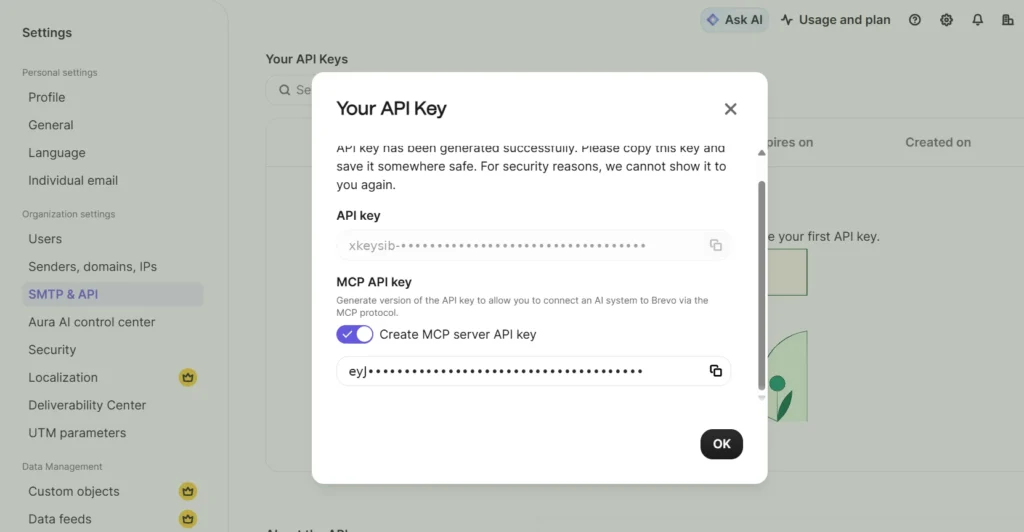
- Create an MCP key: In Brevo, go to Settings > SMTP & API, open the API keys & MCP tab, and generate a new key with a clear name, such as "Claude MCP", and an expiry date. In the confirmation window, turn on Create MCP server API key to get the MCP version of the key. Copy it right away: Brevo won't show it again.
- Add the server: Paste this into your claude_desktop_config.json (Node.js is required for npx):
{
"mcpServers": {
"brevo": {
"command": "npx",
"args": [
"mcp-remote",
"https://mcp.brevo.com/v1/brevo/mcp",
"--header",
"Authorization: Bearer ${BREVO_MCP_TOKEN}"
],
"env": {
"BREVO_MCP_TOKEN": "paste-your-mcp-token-here"
}
}
}
}
- Restart and test: Restart Claude Desktop and try a read-only prompt first, such as "List my last five email campaigns and their open rates."
Servers with remote OAuth, like Resend or MailerLite, skip the token step: you add the URL and sign in through the browser. Local servers like Mailtrap, Postmark, and Mailgun use the same npx pattern with an API key in an environment variable.
Security: what you give an agent access to
An email MCP server hands an AI assistant the ability to act on your behalf, so the setup deserves the same care as any other production credential.
- Start with drafts or read-only access. Gmail's server and Brevo's Claude connector only create drafts, and MailerLite's server asks for confirmation before it sends. Let a human approve sends until you trust the workflow.
- Narrow the tool surface. Use scoped endpoints (Brevo's single-module servers) or tool filters (Mailgun's tags) so the agent only sees what the task requires. Fewer tools also tends to improve the quality of the assistant's answers.
- Treat tokens as admin keys. Store them in environment variables, never in shared config files, and rotate them if a laptop or repository is exposed. Set an expiry date where the platform allows it: Brevo keys expire on the date you choose and after 90 days of inactivity.
- Watch for prompt injection. Google warns against asking an agent to process email from unverified sources: an incoming message can contain instructions aimed at the AI. Inbox servers carry the most risk here.
- Protect your sender reputation. An agent that can send campaigns can also send to the wrong list. Keep domain authentication in order and follow email deliverability best practices.
How we evaluated these email MCP servers
We reviewed each server's official documentation and repository in October 2026 and compared them on five points:
- Official status: maintained by the vendor, in preview, or community-built
- Hosting and authentication: remote with OAuth, remote with a token, or local with an API key
- Capabilities: read, draft, send, receive, and what else the tools cover (templates, contacts, CRM, analytics)
- Setup effort: what you need before the first prompt works, such as licenses, cloud projects, or verification
- Safety controls: draft-only modes, scoped endpoints, and tool filters
MCP servers change quickly, so check the vendor's documentation for the current tool list before you commit.
Which email MCP server should you choose?
- You run marketing and sales from one platform: Brevo, which covers campaigns, contacts, SMS, and CRM in a single server.
- You run an online store on Klaviyo or a newsletter on MailerLite: use your platform's official server.
- You test transactional email from your IDE: Mailtrap.
- You send only transactional email: Postmark, Mailgun, or Resend.
- You want help with your own inbox: the Gmail MCP server or Work IQ Mail, depending on your email provider, or mcp-email-server for any IMAP mailbox.
- Your agent needs its own email address: AgentMail.
If your workflows span marketing email, SMS, and your sales pipeline, Brevo's free plan lets you try the platform with 300 emails per day, no credit card needed, and connect it to your AI assistant in a few minutes. Compare Brevo's plans to get started.