
If you send newsletters or prospecting campaigns to contacts in France, you're almost certainly already using a tracking pixel. Inserted by default by most email marketing services, this invisible tracker shows who opened your messages, when, and on which device.
But the rules are changing for French recipients: following its recommendation of April 14, 2026, the CNIL(France's independent data protection authority) now treats these pixels the same way it treats cookies. To keep tracking opens on emails sent to contacts in France, you now need your recipients' prior consent.
The deadline to comply is July 14, 2026. But no need to panic — here's how to apply these rules step by step, using Brevo's built-in features.
Please note: This regulation comes from the CNIL, France's data protection authority, and applies specifically to contacts located in France — not your entire contact list or other markets. If you don't email contacts in France, this recommendation doesn't apply to you. If you run international campaigns that include French contacts, this affects that segment specifically — keep reading.
Table of Contents
At a glance
What is a tracking pixel?
A tracking pixel is an invisible, pixel-sized image embedded in an email. When the recipient opens the message, it loads and tells the sender that the email was opened, when, and on which device.
Who's responsible for the tracking pixel?
You are. The organization that decides to send the email carries the responsibility — even when the technical setup is handled by an email tool.
What's changing?
If you send to contacts in France, tracking pixels in emails now fall under the same rules as cookies (Article 82 of France's Data Protection Act, the loi Informatique et Libertés). For most marketing uses, you now need the recipient's consent before tracking whether they opened your message.
Who does this affect?
Any organization emailing contacts located in France — businesses, associations, public bodies, agencies, and freelancers — regardless of where the sender itself is based. B2B included, since pixel consent works independently from email consent.
The key date: July 14, 2026. Before this deadline, you must inform your existing French contacts about pixel use and let them opt out. After it, the CNIL has announced it will start enforcement checks.
What the CNIL recommendation changes
For years, open tracking operated in a gray area. Most senders switched the pixel on without asking, at best leaning on a legitimate-interest argument that was never fully settled. The recommendation adopted by the CNIL on March 12, 2026, and published on April 14, puts an end to that ambiguity — for contacts based in France.
Pixels are now treated like cookies
The CNIL's reasoning comes down to one idea: inserting a tracking pixel means asking the recipient's device to send back information about them. That counts as a read operation on their device. And any operation of that kind falls under Article 82 of the loi Informatique et Libertés, the same French law that already governs cookies.
The direct consequence: tracking pixels now follow the same consent logic as trackers placed on websites — for recipients in France. This recommendation extends the CNIL's existing rules on cookies and other trackers to email specifically.
Timeline and July 14, 2026 deadline
The recommendation took effect the moment it was published, on April 14, 2026. For any new French addresses you collect from that date, the rules apply immediately.
For contacts you already have on file, the CNIL set a phased approach. You have three months to clearly inform these people that you use a pixel and give them a way to opt out. That window runs until July 14, 2026. One piece of good news: the CNIL isn't requiring you to re-obtain consent from your entire base all at once. After that date, the authority has said it will check compliance as part of its regular audits.
| Contact subscribed | What to do |
|---|---|
| Before April 14, 2026 | Send a consent-collection campaign before July 14, 2026, with a simple way to opt out of tracking. |
| Between April 14 and July 14, 2026 | Collect their consent (via a preferences-update form), or turn off tracking for these contacts. |
| After July 14, 2026 | Collect consent right at signup and add a tracking revocation link to your emails' footer. |
Note: A CNIL recommendation isn't a binding regulation in itself — it's neither mandatory nor exhaustive, and it's meant to help organizations comply. But it's grounded in Article 82 of the loi Informatique et Libertés, which is binding on everyone. In practice, ignoring it means exposing yourself to real legal risk.
Managing pixel consent for French contacts with Brevo
Now let's get practical. By default, Brevo inserts a tracking pixel in your emails to measure opens and track engagement per contact. This applies to all your contacts located in France, whatever channel you use — campaigns, automations, or transactional emails sent via SMTP or API. As the recommendation makes clear, what matters is the purpose of the pixel, not the channel: a marketing message dropped into a transactional template is still subject to consent.
The compliant path comes down to one simple idea: only track contacts who said yes. Here's how to set that up in four steps.
Step 1: Turn on pixel-tracking consent, contact by contact
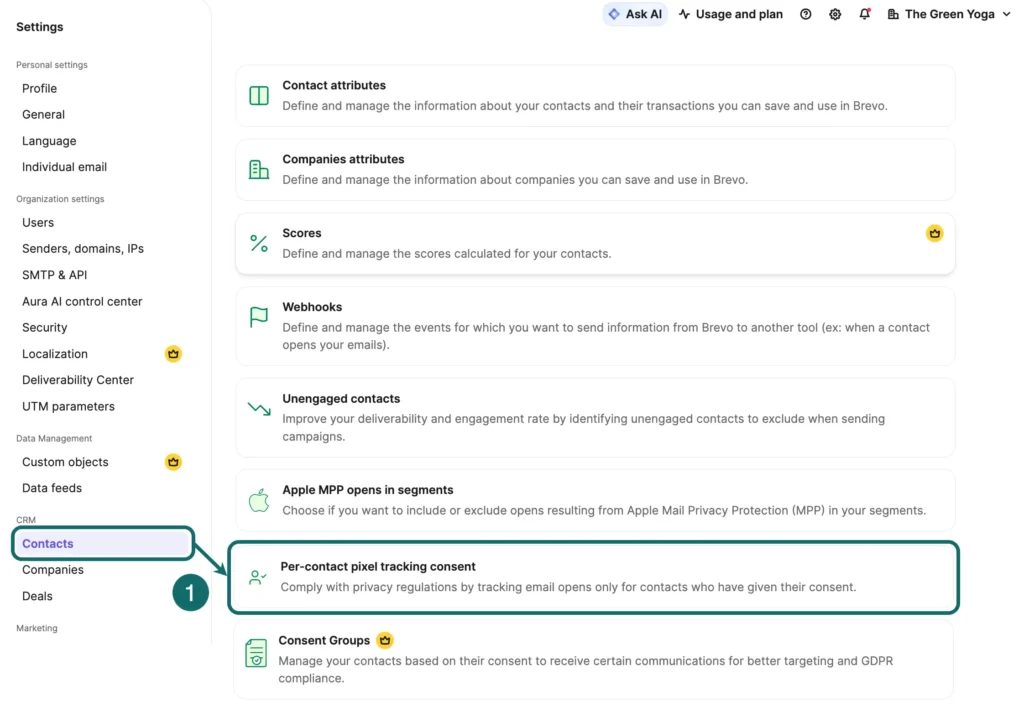
- Go to Settings > Contacts > Per-contact pixel tracking consent.
- Select Yes to activate per-contact consent management for every channel you send emails from.
- Choose how to handle contacts whose consent status is still unknown: Yes for a smooth transition (they stay tracked while you collect their choice), or No for a stricter approach (no tracking until they've consented).
- Save. All your existing contacts switch automatically to "unknown" status.
Once this is turned on, Brevo creates four attributes on your contact records: tracking consent (yes, no, or blank), its date, its source, and the date of last open. Only contacts marked "yes" are tracked. Good news: the last-open date can still be kept for a contact who declined, since it's used for cleaning up inactive contacts — a purpose the CNIL accepts.
Note for international teams: this setting applies account-wide, not just to your French contacts. If you only need to comply for France, you'll still need a France-specific segment (see Step 3) to manage consent collection and reporting separately — turning the toggle on doesn't scope itself to one country automatically.
Step 2: Add a consent checkbox to your forms
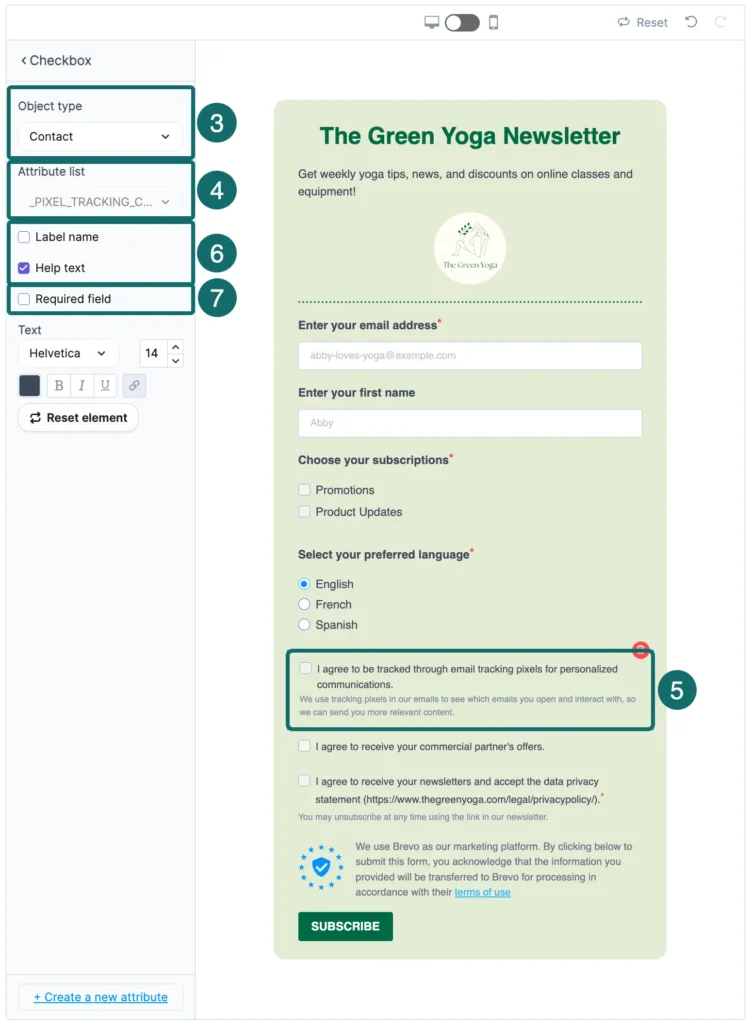
- Create or edit a signup form.
- From the Build tab, drag a checkbox field into the form.
- Under Object type, choose Contact, then select the PIXEL_TRACKING_CONSENT attribute from the list.
- Write a clear statement next to the checkbox, for example: "I agree to be tracked via pixels to receive personalized communications."
- Add a label and helper text so the intent is unambiguous, and turn on Required field if you want to make the choice mandatory before the form can be submitted.
- Publish.
Step 3: Inform your existing French contacts before July 14, 2026
This step targets contacts you collected before April 14, 2026, who never gave explicit consent.
- From CRM > Contacts, build a segment of your French contacts who signed up before that date and whose tracking consent is blank: Add a filter > Contact attributes > Pixel tracking consent > Not filled in.
- From Marketing > Campaigns, create an email campaign. In the content, reassure recipients about data protection and explain simply what the pixel is and what it's for.
- Add an opt-out link that's just as visible as the rest of the message. With the drag-and-drop editor: add a Button block, open its Link settings, and set the Link type to "Revoke pixel tracking consent link." Give it a clear label, like "I'd rather not be tracked." (In the HTML editor, insert the
{{ revoke_open_pixel_tracking }}merge field inside a link tag.) - At the Recipients step, select the segment you just created, then send.
Step 4: Add a revoke consent link to your email footer
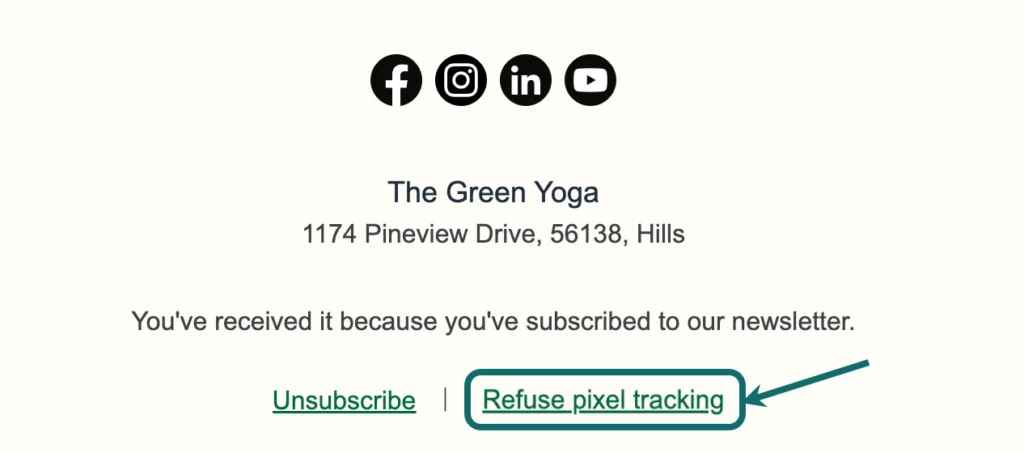
Finally, give your contacts an easy way to change their mind at any time, by adding a tracking opt-out link to your email footer.
Good to know: Starting July 14, 2026, two links become mandatory in the footer of emails sent to French contacts with tracking enabled: the usual unsubscribe link, and the pixel-tracking consent revocation link. Worth building into your templates now.
A note on B2B: same logic as the rest of the recommendation. A prospecting email can often be sent without consent, but the pixel itself still requires it. For your prospecting sequences to French contacts, collect explicit consent before turning on individual-level tracking.
⚠️ Reminder: This information doesn't constitute legal advice. To apply the recommendation to your specific situation, check with your DPO or legal counsel.
Consent becomes the standard
This is the heart of the recommendation. For most marketing uses of a pixel, you need the recipient's consent before tracking whether they open your emails — for recipients in France. Like cookie consent, it must be freely given, specific, informed, and unambiguous. In plain terms: the person knows exactly what they're agreeing to, and can say no just as easily.
Which purposes require consent
It depends on what you do with the data the pixel collects. As soon as tracking serves a marketing purpose, consent is required — whether you're measuring opens at the individual level, targeting or segmenting based on that behavior, or feeding an engagement score that triggers automated follow-ups.
The rule to remember: it's never the type of email that decides, it's the purpose of the pixel. A marketing-purpose pixel dropped into an otherwise transactional message still requires consent.
Accepting an email isn't the same as accepting to be tracked
This nuance trips up a lot of senders. Someone agreeing to receive your emails doesn't mean they're agreeing to be tracked. The CNIL treats these as two separate, independent permissions.
In practice, someone can want your newsletter without wanting you to know when or where they open it. Tracking consent needs to be collected separately from the signup itself.
What about B2B?
This is the point that surprises people most. In B2B prospecting, you can often send an email without prior consent. But that flexibility stops at the pixel. For the CNIL, commercial prospecting gets no exemption. If you're tracking opens on your prospecting emails to contacts in France, the same rule applies to you, no exceptions.
How to collect consent in practice
The CNIL gives clear guidance. The best moment is when you collect the email address: at the point someone shares their email with you, tell them pixels may be used and get their agreement. You can also ask later, through a pixel-free email inviting them to confirm their choice.
For this consent to be valid, keep three things in mind:
- The checkbox must never be pre-ticked — silence or inaction don't count as consent.
- Ask for consent by purpose, so people understand exactly what they're agreeing to.
- Present the information in clear language, at the right moment, and keep it accessible.
Exemptions: what's still possible without consent
The recommendation doesn't ban tracking pixels. It reserves consent for marketing uses and leaves room for a few purposes considered legitimate. These exemptions are real, but the CNIL keeps them tightly scoped — you can't use them to keep measuring everything as before.
Deliverability and inactive-contact management
You can use a pixel without consent for needs related to message delivery — for example, confirming that emails reach their destination, or identifying addresses that have gone inactive. Cleaning a list of subscribers who no longer open anything is still possible.
With one important condition: data minimalism. To spot an inactive contact, the CNIL considers one piece of information enough — the date of the last open, to the day. There's no need to keep the exact time, device, or location; that data falls outside the exemption.
Security and authentication
A pixel can also serve security purposes, like detecting unusual activity or protecting against fraud. These strictly technical uses don't require consent, as long as they stay limited to that purpose.
The right instinct: less data, less risk
One principle runs through the whole recommendation: only collect what you genuinely need. Even where an exemption applies, that's not a green light to gather more data than necessary. That simple instinct is often what makes the difference during an audit.
To make it clearer, here's how the most common uses stack up.
| Pixel purpose | Consent required? |
|---|---|
| Measuring opens at the individual recipient level | Yes |
| Targeting, segmenting, or scoring based on behavior | Yes |
| Feeding automated marketing follow-ups | Yes |
| Identifying inactive addresses (date only, to the day) | No, conditions apply |
| Verifying proper message delivery | No, conditions apply |
| Detecting fraud or securing the send | No, conditions apply |
Responsibility sits with you, not your email tool
This is probably the most misunderstood — and riskiest — point. Many senders assume that if the pixel is switched on automatically by their software, compliance is the software provider's job. The CNIL sees it the other way around.
In the authority's view, the data controller is whoever decides to send the email and defines its purpose — that's you. Your email provider acts as a processor: it supplies the tool, but you're the one who chooses to turn tracking on and decides how it's used. Outsourcing the technical side doesn't transfer your responsibility.
In practice, two habits matter. First, put this relationship in a data processing agreement compliant with Article 28 of the GDPR, setting out exactly what your provider is allowed to do with the data. Second, check your tool's tracking settings: default settings aren't necessarily compliant, and that's often where the gap with the CNIL's expectations hides.
Good to know: This logic isn't new. It's the same principle already applied to cookies: the organization that benefits from the tracker and decides how it's used carries the responsibility, even when a provider implements it technically. The tracking pixel simply extends that principle to email.
Other recent changes from the CNIL
The pixel recommendation didn't come out of nowhere. It's part of a broader trend: the CNIL is progressively tightening its oversight of online tracking, on the web and in messaging alike. Here are three recent developments worth knowing if you manage contacts and campaigns in France.
Multi-device consent (January 2026)
In January 2026, the CNIL published its final recommendations on multi-device consent, updating its cookie guidelines. The idea: when someone is logged into an account, the choice they make on one device can apply across all devices linked to that account, without repeating it everywhere.
The trade-off is strict. Refusal and withdrawal must stay just as simple as giving consent, and must also apply across all devices in a single action. In other words, you can't make "yes" easy and "no" complicated.
Tighter enforcement on trackers
Trackers remain one of the CNIL's most closely watched topics, and violations regularly lead to sanctions. The underlying message stays constant: refusing must be as easy as accepting. A cookie banner that offers a one-click "Accept all" alongside a convoluted refusal path stays firmly on the authority's radar.
That same standard shows up, almost word for word, in the pixel recommendation. The symmetry between accepting and refusing isn't a cosmetic detail — it's become a central compliance criterion, whatever the tracker.
The thread running through all these initiatives is the same: make consent clearer for people and tracking more transparent. Getting ahead of these changes will save you from scrambling after every new rule.
Turning compliance into cleaner campaigns
This recommendation might feel like a constraint, but it's mostly an opportunity. Tracking people who never really wanted to read you has never made a campaign perform better — it just inflates a few numbers and weighs down your list.
By collecting real consent, you're reaching contacts who actually want to hear from you. Your stats become more reliable, your list gets lighter, and your deliverability is better protected. Here, compliance and performance work toward the same goal.
The July 14, 2026 deadline mostly concerns your existing French contact base. Nothing insurmountable, though: audit your sends, clarify your purposes, ask for consent where it matters, and make opting out easy.